If you have been shopping for a curved monitor, you have probably run into two numbers over and over again, 1500R and 1800R. Both describe how tightly the screen bends, and the difference between them shapes everything from how immersive a game feels to whether straight lines look right in a spreadsheet. This guide breaks down what each number actually means, how the two curves compare across gaming, work, and everyday use, and which one makes more sense for your desk.
What Does 1500R and 1800R Mean?
The R in a curvature spec stands for radius, and the number in front of it tells you the radius of the circle the screen would form if it wrapped all the way around. A 1500R monitor forms part of a circle with a 1500mm, or 1.5 meter, radius. An 1800R monitor forms part of a circle with an 1800mm, or 1.8 meter, radius. The smaller the number, the tighter the circle, and the tighter the circle, the more pronounced the bend in the screen.
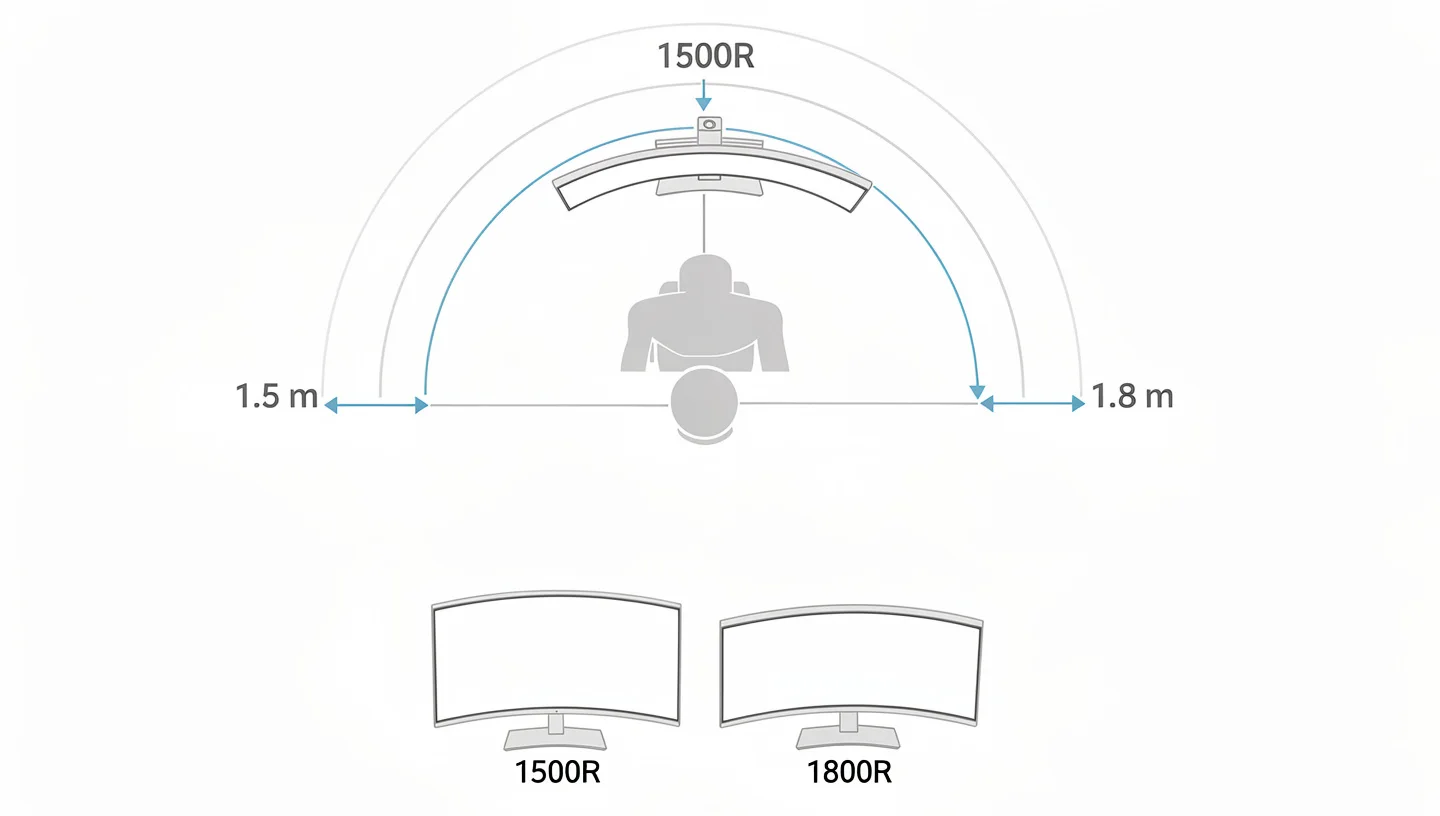
That makes 1500R the deeper curve of the two, while 1800R sits closer to flat. If you want to see where the two numbers sit next to a third common option, our guide on whether curved monitors are good for gaming covers the full range of curvature ratings and what they mean for play.
1500R vs 1800R: The Core Differences
Each radius number also lines up with a rough ideal viewing distance, since the curve is meant to keep every part of the screen at roughly the same distance from your eyes when you sit at that spot.
| Spec | 1500R | 1800R |
|---|---|---|
| Radius | 1500mm (1.5m) | 1800mm (1.8m) |
| Ideal viewing distance | About 1.5 meters | About 1.8 meters |
| Curve intensity | Noticeably tighter | Gentler, closer to flat |
| Best screen size | 32 to 34 inch ultrawide | 27 to 32 inch standard |
| Common panel type | VA, some IPS | VA, some IPS |
1500R advantages
- Stronger immersion and a wider sense of peripheral vision
- Best suited to 32 inch and larger ultrawide screens
- Pairs well with gaming and media heavy use
1800R advantages
- Gentler curve that feels closer to a flat screen
- Easier to adjust to for first time curved monitor buyers
- Lines up more naturally in a multi-monitor setup
Why Your Eyes Prefer a Curve
There is an actual reason curved screens feel more comfortable and not just a marketing line. Your eyes naturally focus on a slightly curved plane, roughly matching the arc your head would trace if you swept your gaze side to side. On a flat screen, the edges sit farther from your eyes than the center, which forces small, constant adjustments in focus as your gaze moves across the display. A curved screen, whether 1500R or 1800R, keeps that distance far more even from edge to edge, which is why both curves tend to feel less tiring over a long session than a flat panel of the same size.
1500R vs 1800R vs 1000R: How They Compare
It is worth knowing where a third common number, 1000R, fits into the picture, since it shows up constantly in curved monitor marketing. A 1000R screen forms a circle with a 1 meter radius, making it noticeably more curved than either 1500R or 1800R.
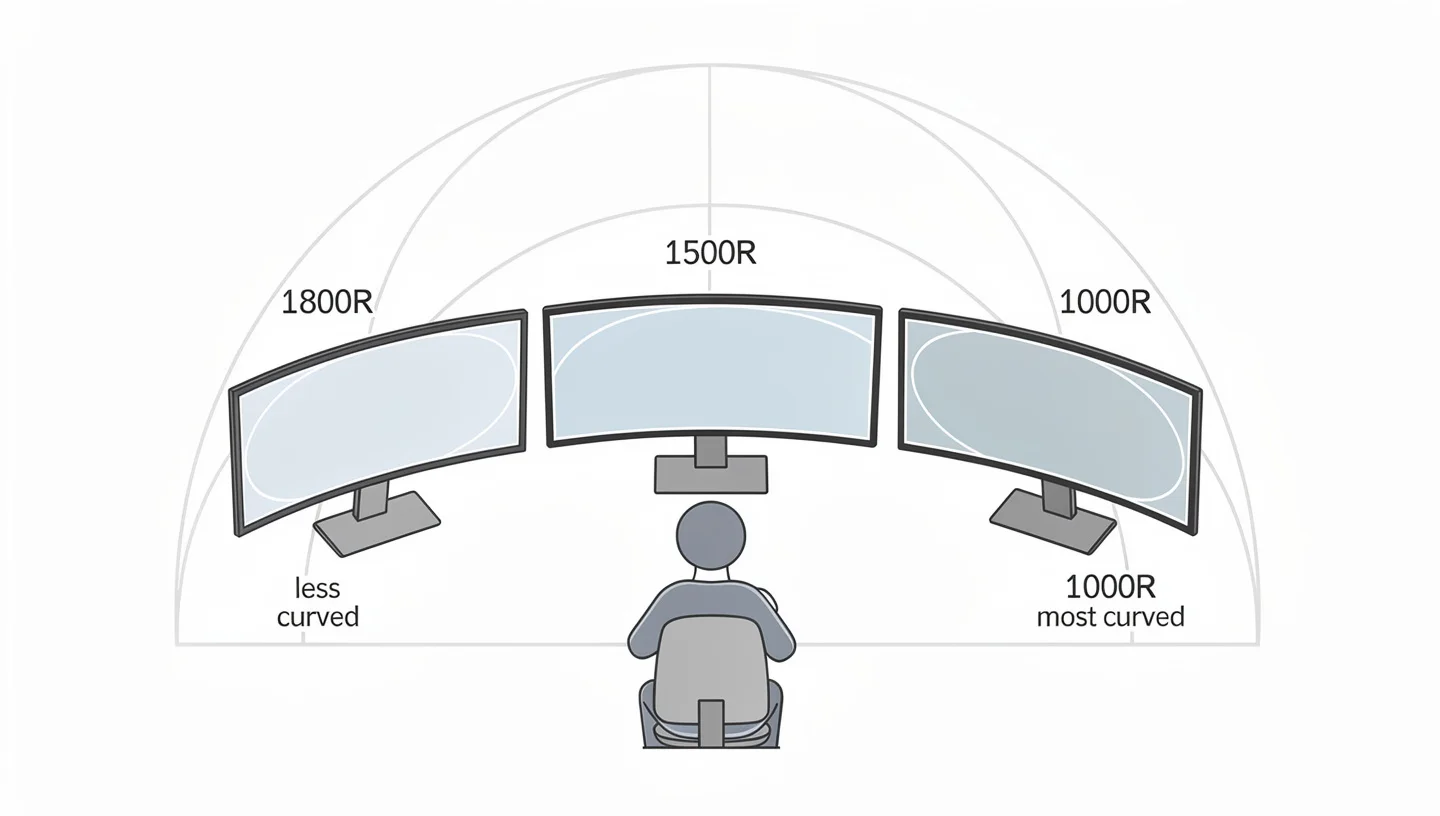
Manufacturers generally agree that 1000R gives the strongest wraparound effect and the closest match to how your eyes naturally scan a scene, while 1500R and 1800R were the standard curvature options before tighter curves became possible to manufacture at scale. In short, going from 1800R to 1500R to 1000R is a steady climb in how dramatic the bend feels on your desk.
Which Curve Offers Better Immersion and Field of View?
On immersion, 1500R has the clear edge. The tighter radius pulls more of the screen into your peripheral vision, which matters most on larger panels like 32 inch and 34 inch ultrawides where the edges would otherwise sit far outside your natural line of sight. An 1800R screen still offers some of that same benefit over a completely flat panel, just in a milder, less noticeable form. Players who want the game world to feel like it wraps around them tend to prefer 1500R, while those who want a subtler effect, or who are easing into curved screens for the first time, often find 1800R feels more familiar.
Does 1500R or 1800R Cause More Distortion?
Distortion worries come up a lot with curved monitors, and the honest answer is that neither 1500R nor 1800R causes meaningful distortion for most everyday use. Straight lines in documents, browsers, or spreadsheets hold up fine on both curves at normal viewing distances, and any sense that lines look slightly bowed tends to fade within a few days as your eyes adjust. The deeper 1500R curve is more likely to produce a hint of warping if you sit unusually close or work with precise geometry, such as CAD drawings or architectural plans, where even a 1800R curve or a flat IPS panel may be the safer choice.
Eye Strain and Comfort: 1500R vs 1800R
Both curves help reduce eye strain compared to a flat screen of the same size, since they keep the distance from your eyes to the edges closer to the distance from your eyes to the center, which means less constant refocusing as your gaze moves across the display. 1500R does this slightly more effectively on larger screens simply because it pulls the edges in further, while 1800R offers a smaller but still real improvement over flat. For long gaming or work sessions, either curve beats a flat panel on comfort, and the choice between them comes down to how much curve you personally want to feel.
A published study comparing curved and flat displays found that appropriately curved screens can lower visual fatigue and improve performance on visual search tasks compared to flat equivalents, which lines up with what curved monitor owners tend to report after switching.
Best Screen Size for 1500R vs 1800R (27, 32, 34 Inch)
Screen size changes how much either curve actually matters. On a 27 inch monitor, the difference between 1500R, 1800R, and even flat is fairly small, since the edges simply are not far enough away for the curve to change much. Once you move up to 32 inch screens, 1500R starts to show a clear advantage in immersion and edge consistency over 1800R. At 34 inch ultrawide sizes, where many buyers are also deciding between 2K resolution and higher pixel counts, the gap between the two curves becomes the most obvious, with 1500R giving a noticeably stronger wraparound feel than the more conservative 1800R bend.
| Screen size | 1500R | 1800R |
|---|---|---|
| 27 inch | Subtle, barely noticeable | Nearly flat |
| 32 inch | Clearly noticeable | Mild |
| 34 inch ultrawide | Strong immersion | Comfortable middle ground |
1500R vs 1800R for Gaming: Which Should You Choose?
For gaming, 1500R is generally the stronger pick, especially in fast paced shooters, racing games, and open world titles where a wider sense of peripheral vision adds to the experience. The deeper curve keeps more of the action in view without forcing you to turn your head, and it tends to pair well with the VA panel technology found on most curved gaming monitors, since VA already leans into strong contrast that benefits from the extra wraparound.
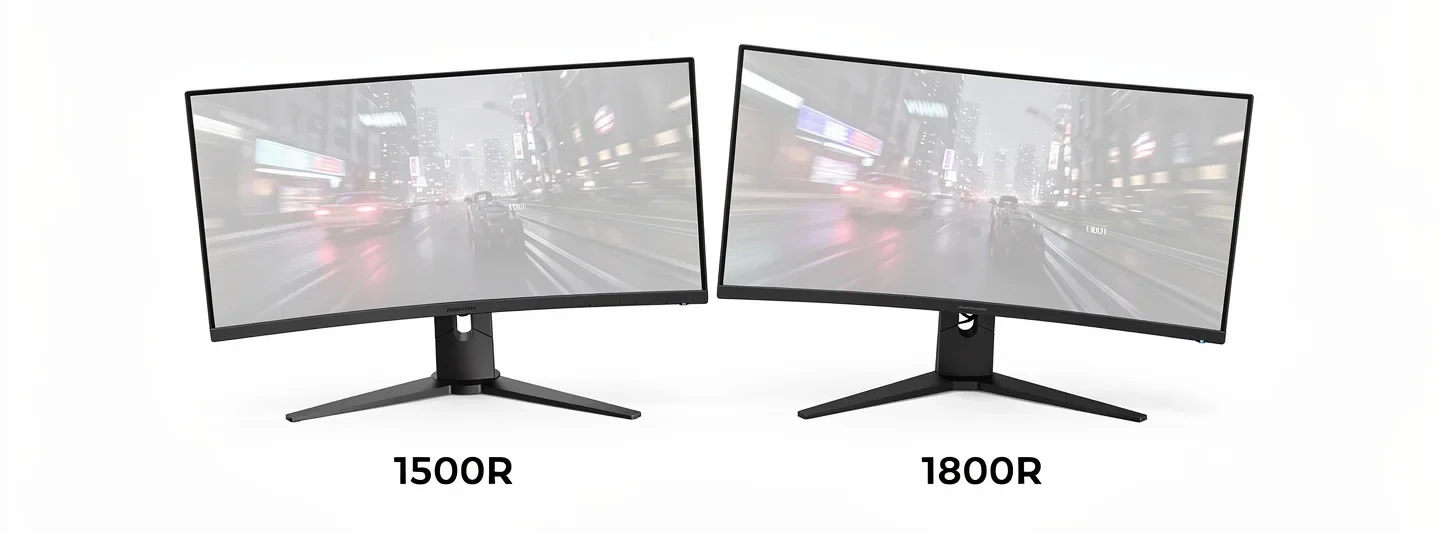
That said, 1800R is far from a bad choice for gaming. It still beats a flat screen on immersion and comfort, and some players genuinely prefer the gentler bend, particularly on 27 inch screens where the difference between the two curves barely registers during actual play.
1500R vs 1800R for Productivity and Office Work
For everyday productivity, most people land somewhere in the middle and barely notice a difference between the two curves. Developers, writers, and anyone doing general office work tend to be fine with either option, since both keep straight lines looking normal at typical desk distances. Where the two start to diverge is with heavy spreadsheet work or anything involving a lot of fine grid alignment, where the gentler 1800R curve, or a flat screen entirely, tends to feel more natural. If precise straight line judgment matters for your work, such as detailed design or drafting, it is worth leaning toward 1800R or staying flat rather than reaching for the deeper 1500R bend.
Curved Monitor vs Dual Monitor Setup
A single curved ultrawide, at either 1500R or 1800R, is often compared against running two separate flat monitors side by side, and the right answer depends on what you actually do with your screen space. A curved ultrawide gives you one continuous workspace with no bezel breaking up the middle, which feels cleaner for gaming and media. Two flat monitors, on the other hand, usually add up to more total pixels and tend to snap windows into place more predictably, which some people prefer for heavy multitasking. Neither setup is strictly better, it really comes down to whether you value a seamless single screen or the flexibility of two separate displays.
Do Curved Monitors Work With Consoles?
Yes, both 1500R and 1800R curved monitors work fine with consoles, since the curve is purely a physical property of the screen and has nothing to do with the signal coming in from your PS5, Xbox, or Switch. The curve does not add or remove any compatibility issues, and console games display normally on either curvature. The one thing worth checking is resolution and refresh rate support on the specific model, since those specs vary by monitor regardless of how curved the screen is.
Price Difference: Curved vs Flat Monitors
Curved panels generally cost more than a flat monitor with otherwise similar specs, since bending the panel evenly without visible seams adds a step to manufacturing. This holds true whether you are looking at 1500R or 1800R, and the price gap tends to be similar between the two curvatures themselves, with the bigger cost jump showing up when you compare either curved option against a flat screen of the same size and resolution. If you are weighing a curved monitor purely on value, it is worth checking whether the flat equivalent offers a better panel, since some flat competitors use IPS panels at the same price point where curved options stick with VA.
Multi-Monitor Setups: Is 1500R or 1800R Better?
If you plan to run your curved monitor alongside another screen, 1800R is the easier fit. Its gentler bend lines up more naturally against a flat monitor or a second curved screen, keeping the edges closer to aligned. A 1500R curve, with its deeper bend, makes that alignment noticeably harder, which is worth considering if a multi-monitor desk is part of your plan. Plenty of people still choose 1500R anyway for the stronger single-screen experience and simply accept that a second monitor will not line up perfectly.
Who Should Buy 1500R vs Who Should Buy 1800R
Choose 1500R if you want the strongest immersion a mainstream curve can offer, you are buying a 32 inch or larger screen, and you mostly use the monitor for gaming or media rather than precise multi-window work. Models like the Crua curved gaming monitors lean into this deeper curve on their larger screen sizes for exactly this reason.
Choose 1800R if this is your first curved monitor, you want a gentler effect that still beats flat, or you regularly do work involving straight lines and fine detail. It is also the safer pick if a multi-monitor setup is part of your plans. Brands such as Koorui offer several 1800R options that suit this more cautious, all purpose approach well. Either way, if you are still comparing curved options against the rest of the market, our guide to choosing a gaming monitor covers the rest of the specs worth checking before you buy.
Final Verdict: 1500R or 1800R?
There is no universally correct answer between 1500R and 1800R, since the right choice depends on screen size, what you use the monitor for, and how strong a curve you personally want. Pick 1500R for the deepest immersion on a 32 inch or larger screen, especially for gaming. Pick 1800R for a gentler, more forgiving curve that suits mixed use, precise work, or a desk that might grow into a multi-monitor setup down the line. Both are a genuine step up from flat, and neither is a wrong choice as long as it matches how you actually plan to use your screen.
Frequently Asked Questions
Can you tell the difference between 1500R and 1800R?
On larger screens, 32 inch and up, most people can tell the difference fairly easily, with 1500R feeling noticeably more wrapped around their vision. On 27 inch screens, the difference is much more subtle and some people barely notice it at all.
Is 1500R or 1800R better for a 27 inch monitor?
At 27 inches, either curve works fine, since the screen is not wide enough for the curve to make a dramatic difference either way. 1800R is a slightly safer pick if you want the curve to feel barely there, while 1500R adds a touch more depth.
Does 1500R or 1800R cause eye strain?
Neither curve causes eye strain on its own, and both actually reduce it compared to a flat screen by keeping viewing distance more consistent across the display. Eye strain is far more affected by brightness, screen distance, and break habits than by the small difference between these two curves.
How long does it take to adapt to a curved monitor?
Most people adjust within a few days of regular use. Any initial sense that lines look slightly bowed tends to fade quickly as your eyes and brain get used to the new geometry.
Is 1500R suitable for multi-monitor setups?
It can work, but it is more challenging than 1800R, since the deeper curve makes lining up the edges with a second flat or differently curved monitor less seamless. Many people still prefer it for the stronger single-screen experience despite that tradeoff.