Gawfolk has quietly become one of the more common names on Amazon and Walmart monitor listings, offering everything from budget 1080p screens to curved 4K panels at prices that make you double check the listing. This is an independent look at the full Gawfolk gaming monitor lineup, ranked from the strongest option down to the weakest, with full specs, pros, and cons for the top five picks so you know exactly what you are getting before you buy.
Gawfolk Monitors Ranked: Top 10 List
Here is where every current Gawfolk model lands, based on published specs, verified owner ratings, and how each one holds up against its price tag.
- Gawfolk 27 Inch 4K Gaming Monitor – 3840×2160, 144Hz, IPS, the clear top pick
- Gawfolk 24 Inch 1080p 200Hz Gaming Monitor – fastest refresh rate for the smallest price
- Gawfolk 34 Inch Ultrawide Gaming Monitor (UWQHD) – best screen real estate for the money
- Gawfolk 32 Inch Curved Gaming Monitor – biggest flat-out screen size on a budget
- Gawfolk 27 Inch Curved Gaming Monitor – solid all rounder with FreeSync
- Gawfolk 34 Inch Ultrawide Curved Gaming Monitor – same panel as #3 with better build quality
- Gawfolk 32 Inch 4K Curved Gaming Monitor – sharp resolution held back by a shaky stand
- Gawfolk 34 Inch Ultrawide Gaming Monitor (FHD stretched) – cheapest ultrawide entry, soft image
- Gawfolk 24.5 Inch Curved Gaming Monitor – fine as a second screen, nothing special
- Gawfolk 49 Inch DQHD Curved Monitor – huge but rare and hard to recommend blind
Quick Picks: Best Gawfolk Monitor for Every Need
- Best overall: Gawfolk 27 Inch 4K Gaming Monitor
- Best budget pick: Gawfolk 24 Inch 1080p 200Hz Gaming Monitor
- Best for beginners: Gawfolk 24 Inch 1080p 200Hz Gaming Monitor
- Best ultrawide: Gawfolk 34 Inch Ultrawide Gaming Monitor (UWQHD)
- Best for biggest screen on a budget: Gawfolk 32 Inch Curved Gaming Monitor
- Best build quality: Gawfolk 34 Inch Ultrawide Curved Gaming Monitor
1. Gawfolk 27 Inch 4K Gaming Monitor Review
A 4K IPS panel with 144Hz and HDMI 2.1 at this price should not exist, and yet here it is. This is the standout in the whole Gawfolk range and one of the more surprising budget monitor stories on the market right now. The panel delivers proper color accuracy with wide viewing angles that hold up whether you are gaming, editing photos, or just staring at a spreadsheet all day. At 3840×2160 on a 27 inch screen, text looks genuinely crisp, sharper than you would get from a 1440p panel at the same size.
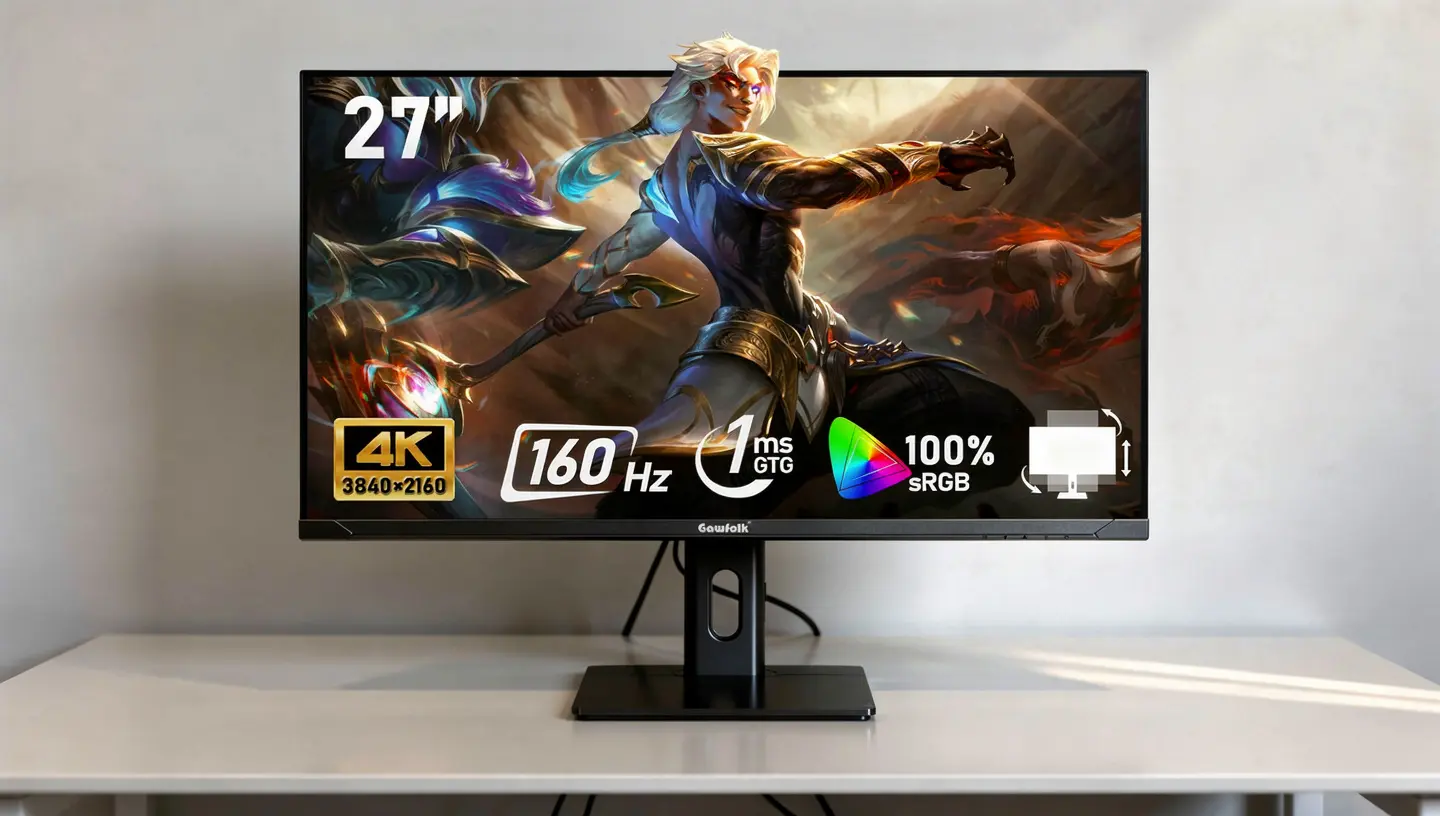
The 144Hz refresh rate is where things get interesting for gaming. You will need a fairly strong graphics card to push full 4K at that speed in demanding titles, but for esports, older games, or anything less intensive, it is very achievable. HDMI 2.1 also means console owners can connect at 4K without the usual bottleneck older ports run into.
| Spec | Detail |
|---|---|
| Resolution | 3840 x 2160 (4K UHD) |
| Panel type | IPS |
| Refresh rate | 144Hz |
| Ports | HDMI 2.1, DisplayPort 1.4 |
| Stand | Tilt only, no height adjustment |
Pros
- Genuine 4K IPS panel at a remarkable price
- 144Hz refresh rate for smooth gaming
- HDMI 2.1 for full-speed console gaming
- Wide viewing angles suit both gaming and office work
Cons
- Basic stand with tilt only, no height adjustment
- HDR performance is limited and not worth relying on
- Needs a strong graphics card to hit 144Hz in demanding games
2. Gawfolk 24 Inch 1080p 200Hz Gaming Monitor Review
This is the most straightforward monitor in the whole lineup, and one of the highest rated Gawfolk products on Amazon with well over a thousand owner ratings behind it. It is compact, fast, and genuinely simple to set up, which makes it a sensible pick for anyone buying a first proper gaming monitor or coming off an old 60Hz screen. The panel runs at Full HD resolution, and 200Hz is genuinely fast for this price bracket. At 24 inches that resolution still looks sharp for both gaming and everyday desktop tasks, and the frameless design keeps the footprint small on a compact desk.

Setup takes only a few minutes out of the box, and the single joystick control on the back handles all the on-screen menu navigation without a cluster of separate buttons to hunt through during a late night gaming session. Combined with a VA panel that produces deep blacks and strong contrast, this screen punches well above its size for dark scene gaming.
The VA panel can occasionally struggle with motion blur during very fast scenes, but the high refresh rate helps compensate. Color coverage sits at 100% sRGB, which makes this a decent option for casual photo viewing and everyday content as well as gaming. Eye care features round out the package for long sessions.
| Spec | Detail |
|---|---|
| Resolution | 1920 x 1080 (Full HD) |
| Panel type | VA |
| Refresh rate | 200Hz |
| Color coverage | 100% sRGB |
| VESA mount | 75x75mm |
Pros
- 200Hz refresh rate is fast for the price
- VA panel with deep blacks and strong contrast
- 100% sRGB for accurate color
- Compact size, easy to set up
Cons
- 75x75mm VESA is less common than the standard 100x100mm size
- VA panels can show motion blur in very fast scenes
- Smaller 24 inch size will not suit everyone
3. Gawfolk 34 Inch Ultrawide Gaming Monitor (UWQHD) Review
If you want an ultrawide that actually does the job properly, this is the one to go for. Running at 3440×1440 on an IPS panel, it sits at the top of the Gawfolk ultrawide range and the specs justify the higher price compared to the cheaper stretched FHD version. This resolution is the real sweet spot for ultrawide gaming and productivity, giving you a lot more horizontal space than a standard 16:9 screen, which is great for multitasking, editing timelines, and any game that supports 21:9.
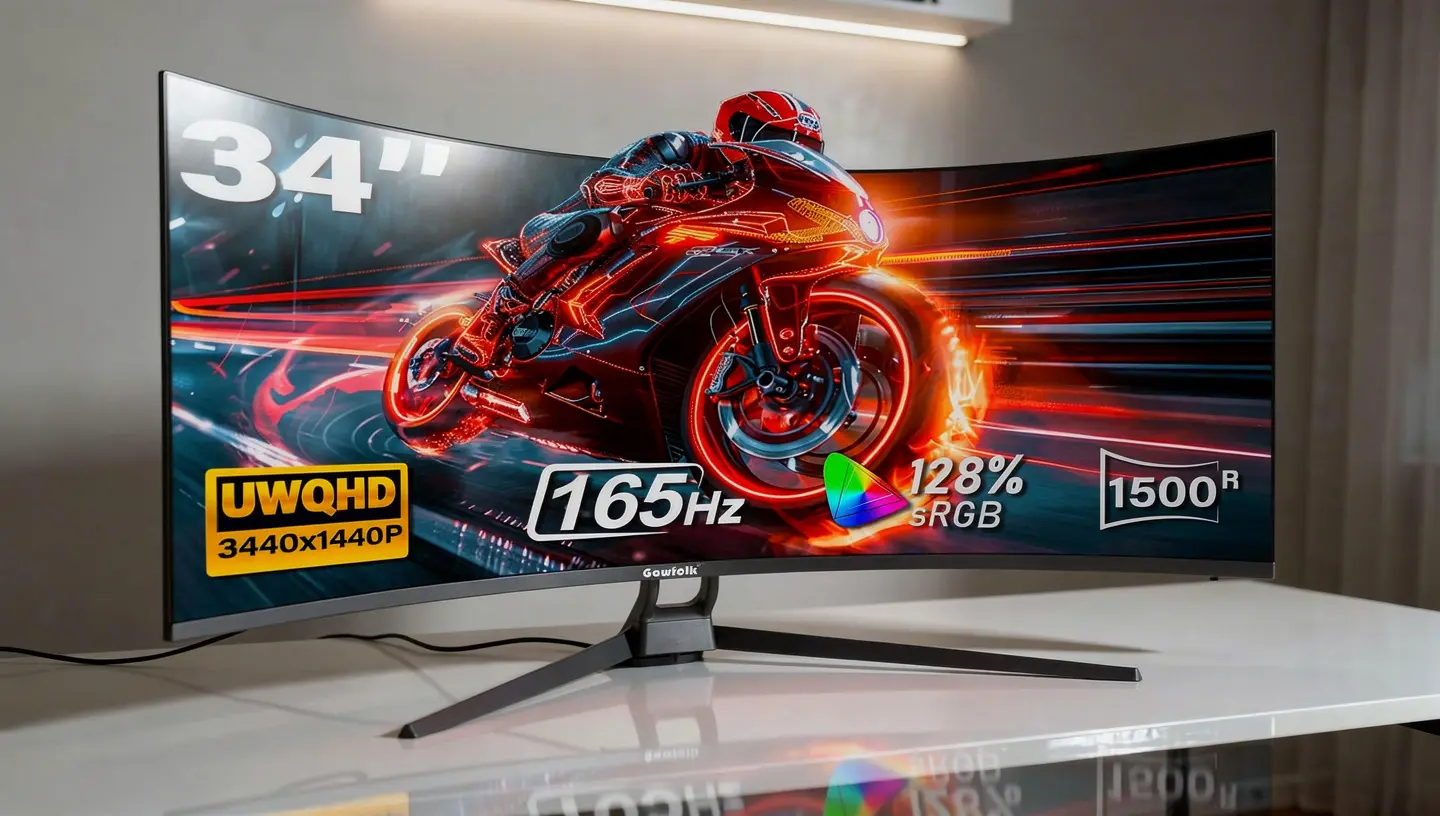
Color accuracy is a highlight here, with 128% sRGB coverage that is noticeably better than the budget stretched ultrawide further down this list. The 165Hz refresh rate with adaptive sync keeps gameplay smooth without tearing, and built-in speakers are a nice bonus if you do not want extra cables on your desk. The main catch is GPU demand. Running 3440×1440 at 165Hz needs a mid-range to high-end graphics card to really shine.
| Spec | Detail |
|---|---|
| Resolution | 3440 x 1440 (UWQHD) |
| Panel type | IPS |
| Refresh rate | 165Hz |
| Color coverage | 128% sRGB |
| Extras | Built-in speakers, adaptive sync |
Pros
- UWQHD resolution is excellent for gaming and productivity
- IPS panel with accurate, vivid color
- 165Hz with adaptive sync for smooth gameplay
- Built-in speakers included
Cons
- Needs a capable graphics card to run at full resolution and refresh rate
- Speakers are functional rather than impressive
- Costs more than the other options in the lineup
4. Gawfolk 32 Inch Curved Gaming Monitor Review
Want the biggest flat-out screen in the range without spending a fortune? This is the one. The 32 inch curved panel at 180Hz offers a genuinely large gaming experience at a price that will not hurt. At 1080p on a 32 inch panel, pixel density is lower than you would get on a 27 inch screen at the same resolution, so text looks a bit softer and fine detail in games is not razor sharp. For gaming at a normal sitting distance though, it works fine, and the curve helps pull your eyes toward the center of the screen.

The 180Hz refresh rate and 1ms response time make this a proper gaming monitor rather than just a big office display. Fast shooters and racing games feel responsive, and because it runs at 1080p rather than something heavier, you do not need a powerful graphics card to hit high frame rates.
| Spec | Detail |
|---|---|
| Resolution | 1920 x 1080 (Full HD) |
| Curve | 1800R |
| Refresh rate | 180Hz |
| Response time | 1ms |
| Color coverage | 98% sRGB |
Pros
- Large 32 inch screen at a budget price
- 180Hz and 1ms response time for responsive gaming
- 1080p is easy for budget graphics cards to drive at high frame rates
- Bezel-free design looks clean on a desk
Cons
- 1080p on 32 inches means lower pixel density than a smaller screen
- No built-in speakers
- Color coverage is decent but not exceptional
5. Gawfolk 27 Inch Curved Gaming Monitor Review
This is the solid all rounder in the range. The 27 inch curved panel at up to 200Hz and 1ms hits a comfortable middle ground between size and sharpness, since 1080p at 27 inches looks noticeably crisper than the same resolution stretched over 32 inches. FreeSync support keeps things smooth with compatible graphics cards, and the 178 degree viewing angle means the image holds up well even from the side, which matters if you share your desk or your monitor is not perfectly centered.

Built-in speakers are included and handle system sounds fine, though they will not replace a proper speaker setup. The main limitation is the same one that follows every 1080p model on this list. If sharp text and fine detail matter more to you than price, the 4K model further up is worth the stretch.
| Spec | Detail |
|---|---|
| Resolution | 1920 x 1080 (Full HD) |
| Curve | 1800R |
| Refresh rate | Up to 200Hz |
| Response time | 1ms |
| Sync | FreeSync |
Pros
- Fast 200Hz and 1ms response time for competitive gaming
- FreeSync keeps gameplay tear-free
- 178 degree viewing angle holds up from the side
- Built-in speakers included
Cons
- 1080p on 27 inches is fine but not as sharp as the 4K option
- Speakers are basic
- Color coverage is good but not class leading
Other Gawfolk Models Worth a Mention
The remaining five models in the lineup do not make the top five cut, but each one still has a place depending on what you are after. The Gawfolk 34 Inch Ultrawide Curved Gaming Monitor uses the same 3440×1440 panel as the flat UWQHD model above, but wraps it in a 1500R curve and a noticeably sturdier chassis. The build quality here is the best in the whole range, with slimmer bezels and a more stable stand, though it drops the built-in speakers found on the flat version and costs a bit more.
The Gawfolk 32 Inch 4K Curved Gaming Monitor packs the same UHD resolution as the top pick into a curved VA panel at 165Hz, giving you 137 PPI pixel density across a bigger screen. The catch is HDR that looks aggressive and poorly calibrated, crushing shadow detail rather than adding to it, so it is best left in standard dynamic range mode. The stand is also on the flimsy side for a panel this size.
The Gawfolk 34 Inch Ultrawide Gaming Monitor that runs Full HD stretched across a 34 inch panel is the cheapest way into ultrawide gaming, but the tradeoff is obvious as soon as you see text on screen. Pixel density drops noticeably at this width, so fine detail and small fonts look soft. It is fine as an entry point or a secondary screen, but the UWQHD version further up this list is worth the extra spend if image quality matters to you.
The Gawfolk 24.5 Inch Curved Gaming Monitor covers the same ground as the 24 inch model in position two, just with a gentler curve and a lower ceiling on refresh rate depending on the exact configuration you land on, since Gawfolk sells several near identical variants of this size under slightly different names. It works fine as a second monitor or a budget main screen, but it does not bring anything the higher ranked picks do not already do better.
Finally, the Gawfolk 49 Inch DQHD Curved Monitor is the outlier of the range at 5120×1440 and 120Hz. It is genuinely massive and effectively replaces a dual monitor setup on its own, but it is far less common than the rest of the lineup, has thinner owner feedback to draw on, and needs a serious desk and a strong graphics card to make sense. Recommend it with caution unless you have already used something similar.
Gawfolk Monitors by Budget
Splitting the lineup by price makes the decision easier if you already know roughly what you want to spend. Under $100, the 24 inch 1080p 200Hz model is the standout, along with the cheaper stretched FHD ultrawide if you want maximum screen width for the least money. Between $100 and $200, the 27 inch curved model and the 32 inch curved model both land here, and the choice between them comes down to whether you want a sharper 27 inch image or a bigger 32 inch screen at slightly lower pixel density.
Above $200, the 27 inch 4K model and the UWQHD ultrawide options take over, and both are worth the jump if your graphics card can actually take advantage of the extra resolution. Spending more than that on a Gawfolk monitor rarely makes sense, since the brand’s strength is clearly at the budget end rather than competing with premium display makers on build quality or color calibration.
Is Gawfolk a Good Monitor Brand?
This is worth answering honestly rather than glossing over. Gawfolk is not a household name, and a thread on the AMD community forum sums up the general reaction well, with one user noting they had never heard of the brand before spotting a deal, and another guessing the monitors are made overseas and rebadged under the Gawfolk name with a marketing focused team behind the label rather than a technical one.
Trustpilot paints a mixed picture too. The brand sits around a 2.5 out of 5 rating, and the recurring complaints are worth knowing before you buy: colors fading or turning dull after a few months of use, and customer support that is slow to respond or hard to reach when something does go wrong. You can read the raw feedback yourself on Trustpilot’s Gawfolk page, and the brand discussion is also visible on the AMD community forum thread where the question first came up.
On the other side, the Amazon and Walmart review counts tell a different story. Several Gawfolk models sit above a thousand ratings at 4.2 or higher, and most day to day complaints in those reviews are shipping related rather than about the screen itself. The honest summary is that Gawfolk delivers real value on paper, the specs are usually accurate, but you are trading brand reputation and long-term support for the price, so budget for the possibility that the warranty process will be a hassle if you ever need it.
Gawfolk Gaming Monitor Specs Compared
A quick side-by-side helps put the full lineup in context before you pick one.
| Model | Resolution | Refresh Rate | Panel |
|---|---|---|---|
| 27 inch 4K | 3840×2160 | 144Hz | IPS |
| 24 inch 1080p | 1920×1080 | 200Hz | VA |
| 34 inch Ultrawide UWQHD | 3440×1440 | 165Hz | IPS |
| 32 inch Curved | 1920×1080 | 180Hz | VA |
| 27 inch Curved | 1920×1080 | 200Hz | VA |
| 32 inch 4K Curved | 3840×2160 | 165Hz | VA |
What to Know Before Buying a Gawfolk Gaming Monitor
Resolution versus screen size is the biggest decision you will make. A 27 inch 1080p panel looks noticeably sharper than the same resolution stretched across 32 or 34 inches, so if pixel density matters to you, match the resolution to the size rather than just chasing the biggest screen available. As a rough guide, 1080p holds up well up to 27 inches, while anything larger benefits from stepping up to 1440p or 4K.
Panel type shapes the whole experience too. IPS panels give you better color accuracy and wider viewing angles, which matters for shared use or color sensitive work, while VA panels deliver deeper blacks and stronger contrast at the cost of some motion blur in fast scenes. The Gawfolk range uses both, so check which panel type a specific model uses before assuming.
Refresh rate is where these monitors genuinely compete with pricier brands. For competitive gaming, 144Hz and above makes a real difference over a standard 60Hz screen, and every model on this list clears that bar comfortably. Just remember that a high refresh rate only helps if your graphics card can actually produce enough frames to use it, otherwise you are paying for headroom you cannot use yet. This matters even more on the 200Hz and 4K models, since those numbers only translate into a real advantage once the rest of your system can keep pace with them, and it is worth checking your own graphics card’s typical frame rate in the games you actually play before paying extra for a higher number on the box.
Check response time and connectivity too. Most Gawfolk monitors run HDMI 2.0 and DisplayPort 1.4, which covers the vast majority of setups, though the 4K model’s HDMI 2.1 support is a genuine extra worth having if you game on console. VESA mount sizes vary between 75x75mm and 100x100mm across the range, so double check compatibility before buying a monitor arm separately, since the wrong size can leave an otherwise good monitor stuck on a flimsy stock stand for longer than you would like. It is a small detail that is easy to miss during a quick checkout but annoying to fix after the box is already open. For a full walkthrough of the buying process from start to finish, our guide on how to choose a gaming monitor covers everything discussed here in more depth.
Gawfolk vs Other Budget Monitor Brands
Gawfolk sits in the same crowded budget lane as brands like KTC, KOORUI, Z-Edge, and AOC’s entry-level lineup. Against KTC and KOORUI specifically, Gawfolk tends to match or slightly undercut on price while offering similar specs on paper, though both of those competing brands generally have a longer track record and steadier owner feedback over time. AOC, being a more established name with a longer history in monitors, usually edges ahead on build quality and color accuracy out of the box, though you will typically pay a bit more for that consistency.
Where Gawfolk tends to win outright is raw spec for the price, especially with the 27 inch 4K model, which undercuts most established brands offering the same resolution and refresh rate combination. Where it tends to lose is everything around the panel itself: stand quality, long-term color stability, and how easy it is to get help if something breaks after the return window closes.
Who Should Buy a Gawfolk Gaming Monitor
Gawfolk makes the most sense for anyone building a budget gaming setup who wants strong specs on paper and is comfortable accepting some risk around long-term support. Students, casual gamers, and anyone setting up a second or third monitor rather than their main daily driver get the most value here, since the price to performance ratio is hard to match at this end of the market. If you need rock solid color accuracy for professional work, or you want the peace of mind of a brand with a long track record and responsive support, it is worth paying more for an established name instead.
How We Ranked These Gawfolk Monitors
Every model on this list was weighed against the same set of criteria: published specifications, verified owner ratings pulled from Amazon and Walmart listings, real-world price at the time of writing, and how each panel’s stand, port selection, and build quality compare once you look past the marketing copy on the product page. Resolution and refresh rate mattered, but so did practical things like VESA compatibility, whether the color coverage numbers held up against similar models, and how consistent owner feedback was across a large enough sample size to trust. Models with thin review counts or unresolved spec contradictions in their own listings were marked down accordingly, which is why a couple of the ultrawide options land lower despite decent headline numbers.
Final Verdict: Best Gawfolk Gaming Monitor
Across the full lineup, the Gawfolk 27 Inch 4K Gaming Monitor is the clear standout. Getting a real 4K IPS panel with 144Hz and HDMI 2.1 at this price is the kind of value that makes you check the listing twice. For a tighter budget, the 24 inch 1080p 200Hz model is the smart entry point, and if ultrawide screen space is the priority, the 34 inch UWQHD model earns its higher price. Whatever you pick, go in with realistic expectations about the stand quality and long-term support, and you will get a genuinely capable gaming monitor for the money.
Frequently Asked Questions
Is Gawfolk a good gaming monitor brand?
Gawfolk delivers strong specs for the price, and owner ratings on Amazon and Walmart are generally solid at 4.2 or higher across most models. The trade-off is brand reputation and customer support, which have drawn mixed reviews, so it is a good pick if you are comfortable with that risk in exchange for the price.
Where are Gawfolk monitors made?
Gawfolk does not publish detailed manufacturing information, and industry discussion suggests the monitors are produced overseas and sold under the Gawfolk name, which is a common approach among budget monitor brands rather than something unique to this company.
Do Gawfolk monitors have a warranty?
Yes, Gawfolk monitors typically come with a 12 month warranty. Some owner reviews mention that reaching customer support during a claim can be slow, so it is worth keeping your order confirmation and documenting any issue early.
Is the Gawfolk 4K monitor good for gaming?
Yes, the 27 inch 4K model with 144Hz and IPS is the strongest gaming option in the range. You will want a fairly powerful graphics card to hit that refresh rate consistently at full 4K in demanding titles, but for esports and less intensive games it performs well.
What panel type do Gawfolk monitors use?
Gawfolk uses a mix of VA and IPS panels depending on the model. VA panels appear on most of the 1080p and curved options for stronger contrast, while IPS shows up on the 4K and ultrawide models for better color accuracy and viewing angles.
Are Gawfolk monitors better than other budget brands?
On raw specifications for the price, Gawfolk often beats similarly priced options from KTC, KOORUI, and AOC’s entry-level range. Those competing brands generally have a longer track record and more consistent long-term feedback, so the choice comes down to whether you prioritize spec sheet value or brand consistency.