Shop for a gaming monitor and you will run into two labels fast, LED and LCD. Boxes, product pages and spec sheets throw both around, and it looks like you have to pick a side. You don’t. Every LED monitor is an LCD monitor. The two words describe different parts of the same LCD screen, and that mix-up is behind most of the confusion.
The LCD is the panel that forms the picture. The LED is the backlight sitting behind it. So the real question in any LED vs LCD debate is what lights the panel, and whether that light is good enough for your games. This guide covers how both work, how the backlight types differ, what changes for gaming and eye comfort, and what to check on a spec sheet before you pay.
LED vs LCD for Gaming: The Short Answer
For LED vs LCD monitor for gaming, pick an LED monitor. Almost every gaming monitor sold today is an LED-backlit LCD, so most of the time you don’t even get a choice. Older LCD monitors with CCFL fluorescent tubes have nearly disappeared from stores, and nobody builds a fast gaming screen on them anymore.
What matters more than the label is everything else on the spec sheet. Panel type (IPS, TN or VA), refresh rate, response time and the type of LED backlight will change how your games look and feel far more than the word LED or LCD on the box. The rest of this guide sorts out which of those details deserve your money.
- Every LED monitor is an LCD with an LED backlight, so you are rarely choosing between two different screens.
- Older CCFL LCD monitors are nearly gone, and an LED-backlit LCD is the standard for gaming.
- Panel type, refresh rate and response time change your games more than the LED or LCD label.
- Full-array and Mini-LED backlights matter for HDR and dark scenes, while edge-lit LED is enough for most budgets.
What Is an LCD Monitor?
LCD stands for liquid crystal display, and it describes how the screen forms an image. Behind the glass of every LCD sits a layer of liquid crystals wedged between two polarizing filters. These crystals can’t make light on their own. They twist when electric current passes through them, which lets more or less light travel through the filters. Each pixel is built from red, green and blue subpixels, so the LCD crystals control how much of each color reaches your eyes.

How an LCD Panel Produces an Image
Think of an LCD panel as a very fine shutter system. An LED or CCFL backlight shines from behind, the polarizing filters block most of that light, and the crystals decide what gets through. Color filters then tint the light red, green or blue. The pixels are switched by individual electrodes, so the control is precise, but the LCD panel still depends on an outside light source. Without a backlight an LCD shows almost nothing. That single fact is why the LED vs LCD argument is really an argument about lighting.
CCFL Backlighting in Older LCD Monitors
Early LCD monitors used CCFL backlights, short for cold cathode fluorescent lamps. Long tubes ran behind the LCD screen and stayed lit the whole time the monitor was on. That made the LCD screen thicker and heavier, and it burned more power. The tubes also lit the LCD panel unevenly, and you couldn’t switch off one area to get a darker patch. Dark scenes looked washed out, and some LCD monitors showed backlight bleed along the edges. Fluorescent tubes contain mercury too, which makes recycling harder. A few cheap fluorescent LCD models still turn up on the used market, but for gaming they are a poor deal.
What Is an LED Monitor?
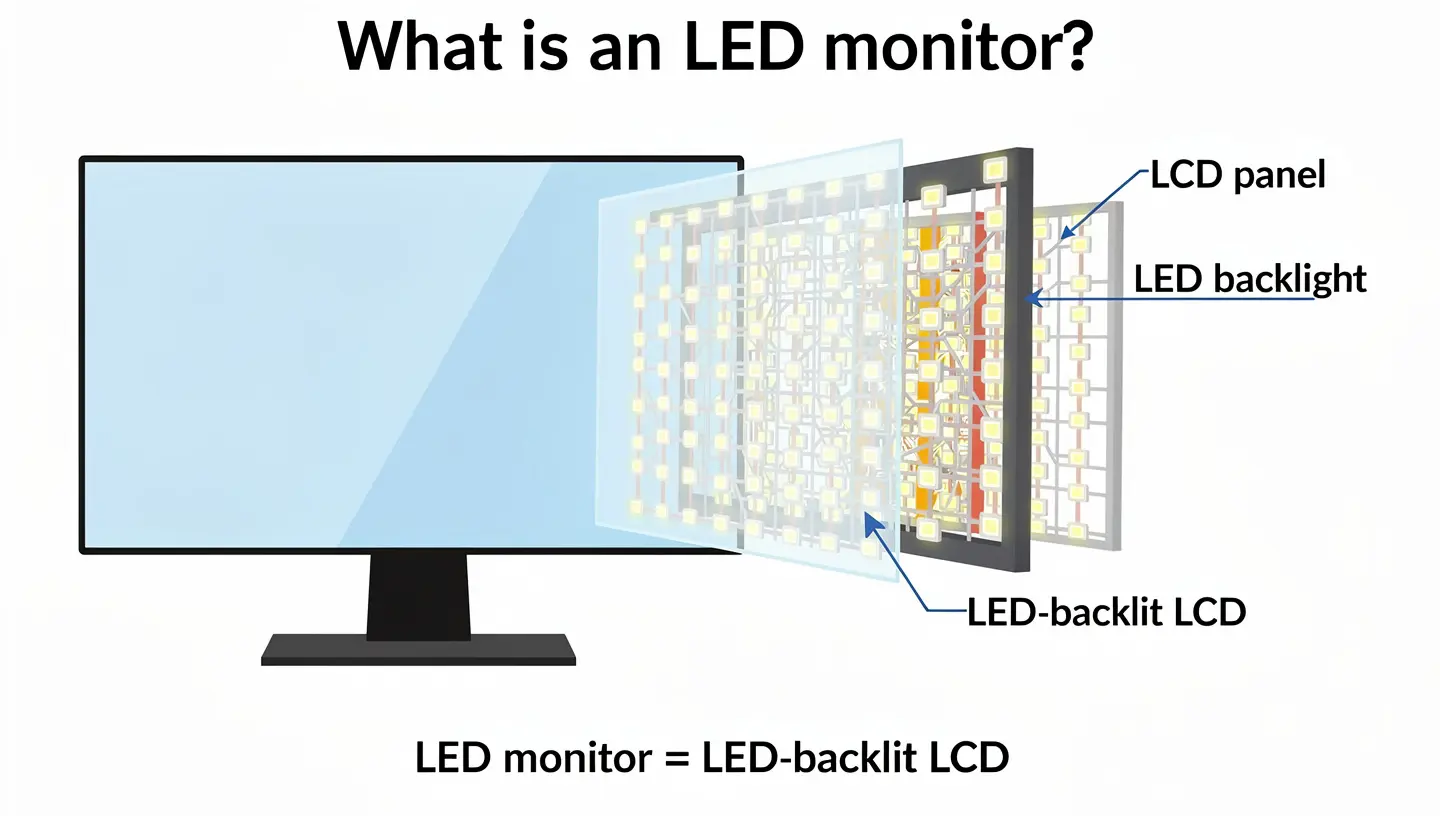
An LED monitor is an LCD monitor that swaps the fluorescent tubes for light-emitting diodes. The LCD panel doesn’t change. The crystals, filters and subpixels all work the same way. Only the LED light behind them is different. That is why the correct name is LED-backlit LCD, and why the shorter label is really marketing shorthand.
Are LED Monitors Actually LCD Monitors?
Yes, hands down. LED describes the backlight, LCD describes the display technology. If a box says LED, you are looking at an LCD with LED lighting. If it says LCD and nothing else, it is almost always the same thing, because makers stopped using fluorescent lamps in new LCD monitors years ago. The exception is OLED, which lights each pixel on its own and has no backlight at all. We’ll get to those further down.
Why Manufacturers Replaced CCFL With LED
LEDs are small, cheap to build now and run cooler. That let makers build slimmer LCD panels and thinner bezels, and it cut power use. LED backlights also reach full brightness the moment the monitor turns on, which fluorescent tubes did slowly. Lifespan ratings differ by brand, but LED backlights are commonly rated between 50,000 and 100,000 hours, while CCFL tubes tend to land lower, in the tens of thousands. LED backlighting also became the standard on monitors with high refresh rates and fast response times, which is why the gaming market moved this way.
Is LED Just a Marketing Label?
Partly. The label is shorthand, and it hides the fact that you are buying an LCD. But the change behind it is real. Swapping fluorescent tubes for LEDs made LCD monitors slimmer, cooler and cheaper to run, and it opened the door to local dimming. Some early cheap LED monitors drew complaints about a blue tint, which is where the hype talk started. Today a monitor sold as LED is simply the normal LCD, so the label tells you very little by itself. What counts is the type of LED backlight, so look for edge-lit, full-array or Mini-LED.
Types of LED Backlighting in Monitors
Not every LED backlight is built the same way. The layout of the diodes decides how even the picture looks, how deep blacks get and how much the LED monitor costs. Spec sheets rarely spell it out, so it helps to know the main types.

Edge-Lit LED
On an edge-lit LED monitor the diodes sit along the edges of the screen, and a plastic light guide spreads that light across the LCD panel. This keeps the monitor thin and the sticker price low, which is why most budget LED gaming monitors are edge-lit. The downside is uneven lighting. Corners and edges can look brighter than the center, and some edge-lit LED screens get hard to read from steep angles. Edge-lit models can offer local dimming too, but with only a few zones the control stays coarse.
Full-Array LED and Local Dimming
Full-array LED monitors place the diodes in a grid behind the whole LCD panel. That gives even brightness, and when the LED monitor supports full-array local dimming (FALD), the LCD screen can dim or brighten separate zones. A dark sky stays dark while a bright moon stays bright. The result is a higher contrast ratio and deeper blacks. These LED monitors run thicker and cost more, and they are the ones that deliver a convincing HDR picture in games.
Mini-LED Backlights and Dimming Zones
Mini-LED is not a new kind of screen. It is still an LCD, lit by thousands of much smaller diodes packed into hundreds, or even over a thousand, dimming zones. More zones mean tighter control, so bright highlights bleed less into dark areas. Mini-LED also reaches higher peak brightness than OLED, and it has no burn-in risk. It costs more than a regular full-array LED monitor, though the price gap keeps shrinking.
Blooming, Haloing and Banding
Every local dimming system on an LED backlight has a weak spot. When a bright object sits on a dark background, nearby zones light up too, and you get a glow around it. That is blooming, sometimes called haloing. Fewer zones make it worse. Edge-lit LED screens can also show banding, visible stripes where the light steps between zones. Crosshairs, white text on black menus and star fields are the classic places to spot it. More dimming zones cut the problem down, but no LCD removes it completely.
LED vs LCD Monitor: Key Differences
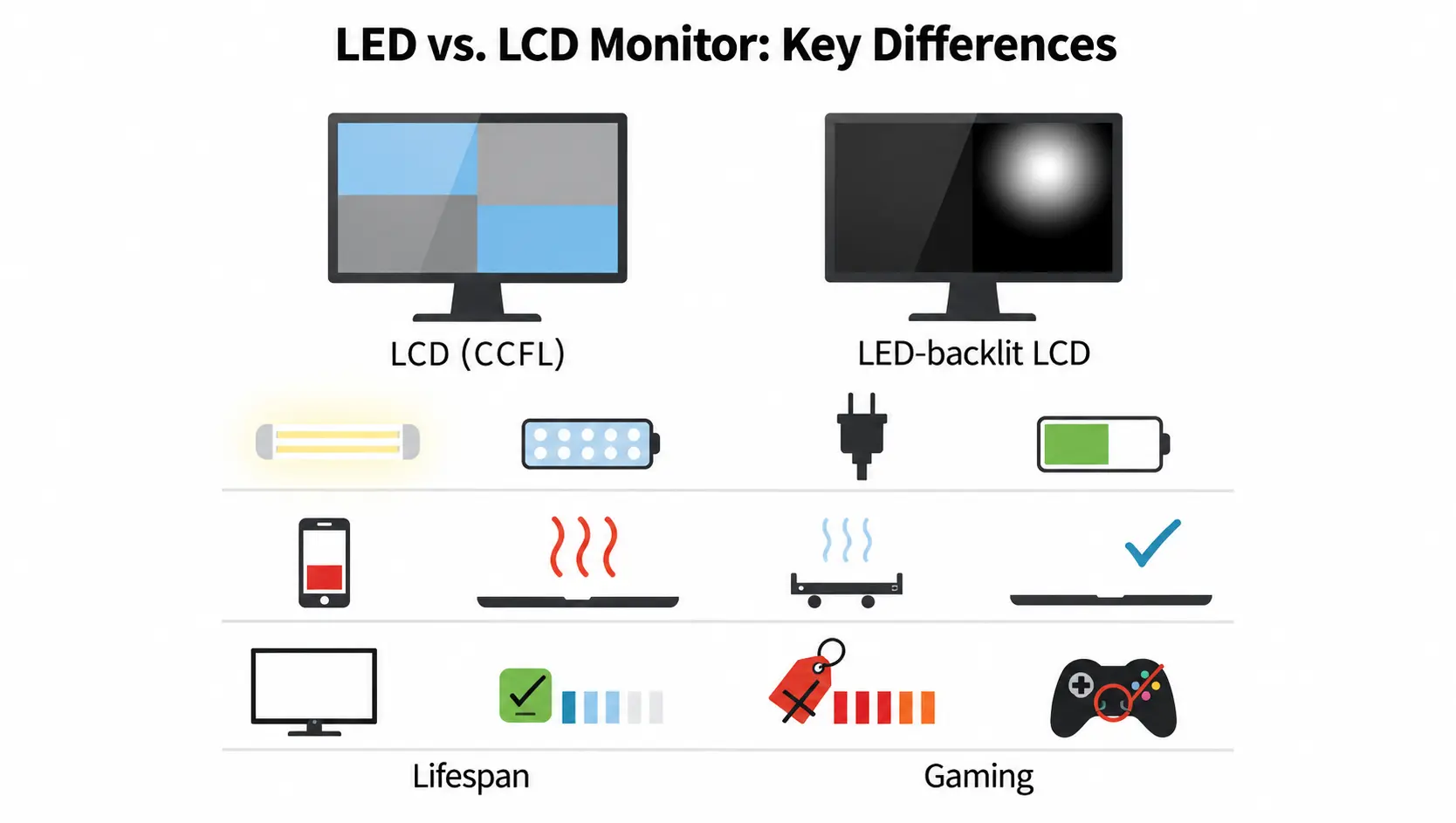
Here is how an older LCD monitor with CCFL tubes stacks up against a modern LED-backlit LCD, so the LED vs LCD comparison is easy to scan.
| Feature | Older LCD (CCFL) | LED-backlit LCD |
|---|---|---|
| Backlight | Fluorescent tubes | Light-emitting diodes |
| Contrast and blacks | Lower, no zone dimming | Higher, zones possible on FALD and Mini-LED |
| Energy use | Higher | Lower |
| Heat | Warmer | Cooler |
| Lifespan | Shorter | Longer |
| Thickness | Thicker | Thinner |
| Price | Cheaper, when you can find one | Slightly higher, gap is small |
| Availability | Rare | Standard |
| Gaming use | Poor fit | Standard choice |
Picture Quality and Contrast
LED backlighting gives brighter colors and sharper contrast than fluorescent tubes. The biggest gain shows up with local dimming. A CCFL LCD can’t dim one area, so a black screen looks dark gray and light leaks along the edges. A full-array or Mini-LED monitor can switch whole zones down and get much closer to real black. A higher contrast ratio means darker blacks next to bright whites, and that gap is what makes explosions and neon lights pop in games. A standard IPS monitor sits around 1000:1, while VA panels and full-array LED monitors go well beyond that. Color accuracy depends more on the panel itself than on the backlight, so an LED monitor with a weak panel will still look flat next to a good one.
Color Accuracy and Color Gamut
The backlight touches color too. A standard white LED backlight covers most of the sRGB range, but wide gamut monitors need a better light source, like RGB LED backlights or a layer of quantum dots on a QLED screen. That is how some LED monitors reach most of DCI-P3 and look richer in games with bright, saturated art. For photo and video work you still want an IPS panel and a factory calibration report, because the LCD panel decides color accuracy more than the LED does. For gaming, close is good enough, and refresh rate and response time matter more.
Energy Efficiency and Heat
LEDs are more energy efficient, drawing less power than fluorescent tubes and giving off less heat. On a single LED screen you will barely notice it on the power bill. On a desk with two or three LCD monitors next to a hot gaming PC, the cooler running adds up, and the room stays more comfortable during long sessions.
Lifespan and Reliability
Manufacturers publish different ratings, so treat any single number with caution. The pattern is consistent though. LED backlights last longer than CCFL tubes, and the tubes and the power inverter feeding them are the parts that tend to fail first on older monitors. Modern LED monitors have fewer parts that wear out in that way.
Price
Older CCFL LCD monitors were cheaper, but you will almost never find a new one. Today the price gap between a budget LCD and an edge-lit LED monitor has closed, and a basic LED gaming monitor costs about what you would expect to pay for any entry level screen. The real price jump comes with full-array and Mini-LED backlights, not with the LED label itself.
LED Monitor vs LCD Monitor: Pros and Cons
Here are the LED vs LCD tradeoffs in one place. The LCD list covers older CCFL models, since nearly every current LCD monitor already uses an LED backlight.
LED Monitor Pros and Cons
Pros
- Brighter colors and sharper contrast than fluorescent tubes
- Thinner and lighter LCD screens
- Lower power use and less heat
- Longer rated lifespan
- Local dimming on full-array and Mini-LED models
- No mercury, so recycling is easier
Cons
- Edge-lit LED monitors can show uneven lighting and blooming
- Full-array and Mini-LED monitors cost more
- Some LED backlights use PWM, which flickers at low brightness
- The backlight type is hard to find on many product pages
Older LCD Monitor Pros and Cons
Pros
- Cheaper, when you can still find one
Cons
- More power use and more heat than an LED monitor
- Thicker and heavier because of the CCFL tubes
- No zone dimming, so blacks look gray
- Uneven lighting, easy to spot in dark rooms
- Shorter life, and harder to repair
- Contains mercury
Is LED or LCD Better for Gaming?
On backlight alone, LED wins, and it isn’t close. But most of what shapes a gaming session comes from other specs, so LED vs LCD for gaming is a smaller question than it looks.
Response Time and Input Lag
A common claim says LED monitors have faster pixels. That isn’t quite right. Response time is how long a pixel takes to change color, and it comes from the LCD panel type and its overdrive tuning, not from the LED backlight. Our guide on response time explains how to read the number on a spec sheet. A TN panel can hit 1ms, a fast IPS panel lands between 1ms and 4ms, and a VA panel is usually slower. Input lag is the delay between your click and the picture on screen, and it is a separate spec that makers rarely list. Both LED and LCD labels hide that number, so independent reviews are the only place to check it.
Refresh Rate
Both LED and LCD gaming monitors can carry high refresh rates like 144Hz, 165Hz or 240Hz, because the backlight doesn’t cap the number. If you want the full picture on how Hz changes motion, the refresh rate guide breaks it down. A higher refresh rate gives smoother motion and less blur, which helps most in shooters. Your graphics card still has to push enough frames to use it.
HDR and Local Dimming in Games
This is where the backlight starts to matter for real. HDR needs bright highlights and dark blacks on screen at the same time, and that only works when the LED backlight can dim by zone. Many LCD monitors carry an HDR400 label while using an edge-lit LED backlight with no local dimming, and the picture looks barely different from standard. Full-array and Mini-LED monitors do far better, thanks to a much higher contrast ratio. Our HDR guide covers what the labels promise and what they deliver.
Panel Type Matters More Than LED vs LCD
Two LED monitors can feel completely different in games because of the panel underneath. All three common panel types are LCD, and all three use LED backlights today. That is why two LED monitors with the same backlight can feel very different in a match. The LCD panel decides how fast pixels switch, how wide the viewing angles are and how rich the color looks, while the LED backlight only decides how bright and how even the picture gets. Pick the LCD panel first, then the LED backlight.
TN Panels for Competitive FPS
A TN panel is the fastest of the three, with response times around 1ms. That speed made it the favorite of competitive shooter players for years. The trade is weaker color and narrow viewing angles, so the picture washes out when you sit off center. TN suits fast first person shooters and tight budgets, and it is a poor choice for story games where color matters. Most budget LED monitors with a TN panel are edge-lit, so you also give up contrast and even lighting. Keep that in mind if you play in a dark room, because an LCD like that looks gray where a VA panel looks black.
VA Panels for Deep Blacks
A VA panel gives the highest static contrast ratio among LCD types, with inky blacks that look great in dark single player games and movies. The weakness is pixel speed. Dark transitions can smear during fast motion, which some players notice in shooters and racing games. VA sits between TN and IPS on color and viewing angles, and it makes a strong pick if your room is dim and your games are slower paced. Many VA monitors pair the panel with full-array local dimming, which pushes the LED backlight further and makes dark scenes look even better. The same setup can add blooming around bright objects, so check reviews before you buy.
IPS Panels for Color and Viewing Angles
An IPS panel offers the best color accuracy and the widest viewing angles, close to 178 degrees. Modern gaming IPS monitors with LED backlights also hit response times fast enough for most players, so the old speed penalty is mostly gone. The tradeoffs are lower contrast ratio than VA and a faint glow in the corners on dark scenes. For anyone who plays a mix of genres and wants one LED monitor that does everything well, IPS is the safe pick.
Is LED or LCD Better for Your Eyes?
Eye comfort is where people argue the most, and where bad advice spreads. No LED or LCD monitor is gentle for everyone. Both LED and LCD screens can tire your eyes after long gaming sessions, and the cause is rarely the label on the box.
PWM Flicker and Flicker-Free Monitors
Most LED backlights lower brightness using PWM, short for pulse width modulation. The diodes switch on and off many times per second. At full brightness you can’t see it. At low brightness the off periods get longer, and some people pick up flicker as headaches, tired eyes or general eye strain. Monitors sold as flicker-free dim by adjusting the current instead, and some LCD reviews list the PWM frequency, where a higher number is easier on sensitive eyes. If you game at night with the brightness turned down, this spec matters more than any LED or LCD label.
Low Blue Light and Eye Comfort Settings
Low blue light modes shift the picture toward warmer tones. Many LED monitors carry a certificate from TUV Rheinland for this, and brands call the setting names like Eye Saver or Reader mode. Windows Night Light does a similar job in software. Auto brightness helps too, because it dims the screen when the room gets dark. Cutting blue light also helps you wind down, since late night gaming on a bright LED screen can keep you awake. Whatever LED or LCD monitor you own, the 20-20-20 rule works: every 20 minutes, look at something 20 feet away for 20 seconds. That break does more for eye strain than switching between LED and LCD.
Matte vs Glossy Screens and Glare
Glare is a big cause of strain. A matte coating cuts reflections in bright rooms. A glossy LCD screen looks punchier and has richer color, but it mirrors lamps and windows. Place your gaming monitor so light doesn’t hit it head on, and keep the screen brightness close to the room brightness. A bright LCD in a dark room tires your eyes quickly, no matter which LED backlight it uses. Monitor height matters too. Keep the top edge near eye level and sit about an arm’s length away, and use a height adjustable stand or an arm mount if your LCD doesn’t tilt enough.
LED vs Mini-LED vs OLED vs QLED
The LED vs LCD question usually leads to a bigger one, which is whether to pay for a newer screen type.
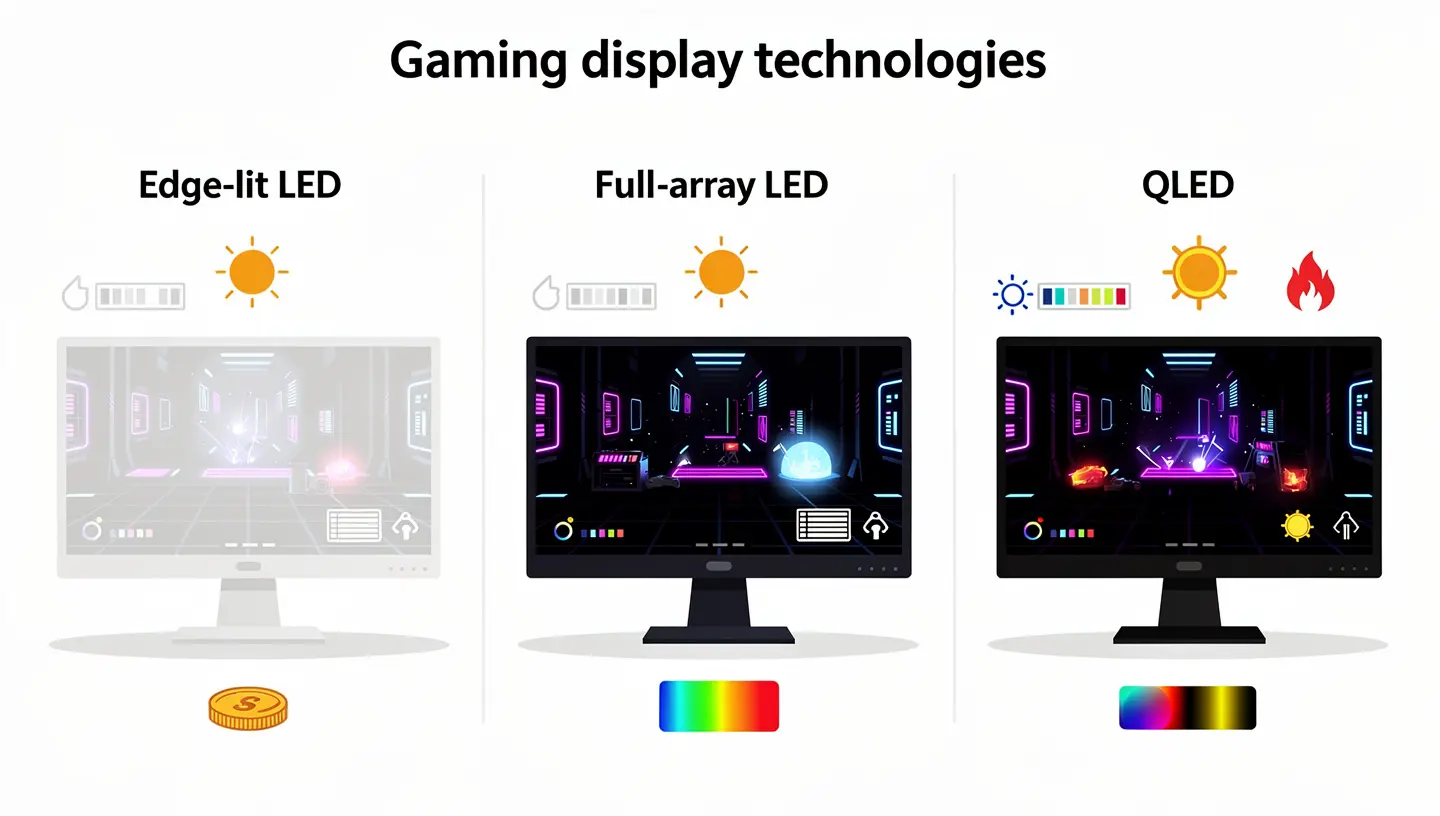
Here is how they compare for gaming.
| Type | How it lights the picture | Black levels | Peak brightness | Burn-in | Price tier |
|---|---|---|---|---|---|
| Edge-lit LED | Diodes along the edges | Gray in dark rooms | Moderate | None | Lowest |
| Full-array LED | Diode grid with zones | Good | High | None | Mid to high |
| Mini-LED | Thousands of tiny diodes | Very good | Very high | None | High |
| QLED | LED backlight plus quantum dots | Depends on backlight | High | None | Mid to high |
| OLED | Each pixel lights itself | Perfect | Lower than Mini-LED | Possible | High |
Mini-LED vs Standard LED
Mini-LED is the natural step up if you like your gaming LCD but want better contrast and brightness. It keeps the LCD panel and shrinks the backlight diodes so the monitor can fit far more dimming zones. Independent mini-LED vs OLED testing shows that Mini-LED gets brighter and sharper on text, while OLED still wins on deep black detail. For bright rooms and long HUD sessions, Mini-LED is a safe bet.
OLED vs LED and LCD
OLED screens skip the backlight and let every pixel make its own light. Pixels turn fully off, which gives perfect blacks, and response times are near instant. The costs are a higher price and a small risk of burn-in from static images like health bars and taskbars. A closer look at mini-LED vs OLED for gaming lays out which scenarios favor each one. If you play in a dark room and chase the best motion clarity, OLED is the pick. If your desk faces a window, LED-backlit LCD stays the safer long-term buy.
QLED vs LED
The name sounds close to OLED, but QLED is a different thing. It is an LED-backlit LCD with a layer of quantum dots that improves color and brightness. It still needs a backlight, so it can show the same blooming and the same dark gray blacks as any other LED screen unless the backlight is full-array or Mini-LED. Think of QLED as an upgrade to color, not a break from LCD.
When a Standard LCD Monitor Still Makes Sense
An older CCFL LCD only makes sense for office work on a very tight budget, like spreadsheets and email, where speed and contrast don’t matter. For anything that involves games, skip it. If your budget is small, a basic edge-lit LED gaming monitor is the sensible low-cost pick. It gives you the refresh rate and response time you need without the bulk, the heat and the power draw of fluorescent tubes. Some older LCD screens come with matte coatings, but that comes from the screen coating and not the backlight, so many LED monitors have it too.
How to Read a Monitor Spec Sheet in a Store
LED backlight details are hard to find on most gaming monitor product pages, so a quick checklist saves you from buying the wrong screen.
- A monitor labeled LED is an LED-backlit LCD. A label like WLED just means white LEDs.
- If the page doesn’t mention full-array, FALD or Mini-LED, assume the LED backlight is edge-lit.
- Look for the number of dimming zones. A few dozen zones is basic. Hundreds or more is where real HDR starts.
- An HDR400 label doesn’t guarantee local dimming. Check the DisplayHDR level and read independent reviews.
- Check the LCD panel type, refresh rate, response time and whether the LED monitor is listed as flicker-free.
- Search reviews for blooming complaints before you buy an LED monitor with local dimming.
Manufacturers tend to share LED backlight details only when the feature is a selling point. If a page stays quiet about it, that usually means a plain edge-lit LED panel. An honest review from a testing site will tell you more than the box ever will.
LED vs LCD for PS5 and Xbox Series X
Consoles don’t care about the LED or LCD label either. A PS5 or Xbox Series X talks to the screen through HDMI, so you need a monitor that matches what the console can send. Look for an HDMI 2.1 input if you want 4K at 120Hz, since older ports cap out lower. Variable refresh rate (VRR) keeps the picture smooth when frame rates dip, and an LED-backlit LCD gaming monitor with an IPS or VA panel covers most players. For HDR on console, full-array local dimming makes a visible difference, while a plain edge-lit LED screen with an HDR400 label usually doesn’t. Mini-LED handles bright games well, and OLED gives the darkest blacks if you play at night.
Backlight Settings Worth Changing for Gaming
Once the monitor is on your desk, a few LED backlight settings change how games look. Our guide on how to set up a gaming monitor covers the full setup, and these are the backlight parts worth knowing. Brightness comes first. Turn it down until a white page doesn’t hurt in your room, which also cuts eye strain and PWM flicker. Dynamic contrast is next. It lets the LCD raise and lower the backlight based on the scene, and in games the picture can pump between bright and dark, so many players switch it off. Local dimming is worth testing both ways. Some games look better with it on, while others show blooming around crosshairs and menus. Finally, turn HDR on in the game and in Windows only when the monitor has a real local dimming backlight.
What to Look for in a Gaming Monitor
Once the LED vs LCD for gaming question is settled, the choice comes down to a few specs that decide how every game plays.
Refresh Rate and Response Time
For shooters, aim for 144Hz as the floor and 240Hz if your graphics card can keep up. Look for a response time between 1ms and 4ms gray to gray, and read reviews rather than trusting the number on the box. Overdrive settings can speed pixels up, but pushed too far they leave trails behind moving objects.
Resolution and Screen Size
A 24 inch LED monitor looks sharp at 1080p, and a 27 inch LCD screen is the sweet spot for 1440p. 4K looks great but needs a strong graphics card to hold high frame rates. Match the resolution to your hardware before you chase the sharpest picture.
Adaptive Sync
Adaptive sync keeps your gaming monitor in step with your graphics card and stops screen tearing. FreeSync is common on budget monitors and works with AMD cards, and most of those screens run fine with Nvidia too. Adaptive sync works the same on an LED or LCD label, since it lives in the display controller and has nothing to do with the backlight. It matters most when your frame rate drops below the refresh rate, because the LCD adjusts on the fly instead of showing a torn frame. Budget LED monitors with FreeSync cost very little extra.
Premium LED monitors often carry a certified badge from Nvidia as well, which tells you the screen passed their tests for tearing and flicker. That badge costs extra, and on a tight budget it is usually safe to skip. Our G-Sync guide explains how that certification differs from basic adaptive sync and when it is worth paying extra.
Which Monitor Should You Buy?
For LED vs LCD monitor for gaming, the winner is an LED-backlit LCD, and the real choice is which kind. Here is the simple version.
- Casual gamer on a budget: an edge-lit LED monitor with an IPS panel and 144Hz.
- Competitive shooter player: a high refresh rate LED monitor, TN or fast IPS, with a low response time.
- Dark room and cinematic games: a VA LCD with full-array LED local dimming, or an OLED if the budget allows.
- Bright room or long HUD sessions: a Mini-LED monitor, since it has no burn-in.
If you still feel stuck between models, our guide on how to choose a gaming monitor walks you through the rest of the spec sheet, one step at a time.
Frequently Asked Questions
Is LED or LCD better for gaming?
In LED vs LCD for gaming, LED wins. Nearly every current gaming monitor is an LED-backlit LCD, so you rarely have to choose. The LED backlight gives you better contrast, lower power use and a thinner LCD screen, while panel type, refresh rate and response time decide how fast the game feels.
Are LED monitors LCD monitors?
Yes. An LED monitor is an LCD with LED backlighting instead of fluorescent tubes. The LCD forms the picture and the LED lights it from behind.
Is LED or LCD better for your eyes?
Neither wins on its own. Look for a flicker-free LED monitor with low blue light settings and a matte coating if you play in a bright room. Breaks matter as much as the screen, so follow the 20-20-20 rule.
Which lasts longer, LED or LCD?
LED backlights usually last longer than CCFL tubes. Ratings vary by manufacturer, with LED often listed between 50,000 and 100,000 hours and CCFL lower than that.
Is LED or LCD more energy efficient?
LED. It needs less power for the same brightness and runs cooler, which helps on desks with several LED gaming monitors.
Is Mini-LED better than regular LED?
For contrast and HDR, yes. Mini-LED packs far more dimming zones into the backlight, so blacks look deeper and blooming drops. It costs more than a standard LED monitor.
Does the backlight affect response time?
No. Response time comes from the LCD panel type and overdrive tuning, not from the LED backlight. A TN or fast IPS panel is quick whether it carries an LED label or not.
Does color accuracy matter for gaming?
A little, not much. Ballpark color is enough for games, and refresh rate, response time and dimming matter more. Color accuracy only becomes a priority if you also edit photos or video on the same LED or LCD monitor.
Is LED or LCD better for PS5 and Xbox?
You will find LED-backlit LCD screens in both cases, so look at the HDMI 2.1 input, 120Hz support and VRR instead of the label. For HDR on console, pick a full-array or Mini-LED monitor.
Is LED just a marketing term?
It is shorthand for LED-backlit LCD. The label is loose, but the backlight change is real, so check whether the LED monitor is edge-lit, full-array or Mini-LED.