Curved monitors have gone from a niche office upgrade to one of the most common choices on a gaming desk. If you are shopping for a new display, you have probably wondered whether the curve is worth the extra money or if a flat panel still does the job just as well. The answer depends on what you play, how far you sit from your screen, and how much desk space you have to work with. This guide walks through what a curved monitor actually is, where it helps during gameplay, where it comes up short, and how to decide if one belongs on your setup.
What Is a Curved Monitor?
A curved monitor is a display with a screen that bends slightly inward instead of staying flat across its whole width. The idea borrows from movie theaters, where screens are curved so people sitting off to the side still get a clear picture without the edges stretching or warping. Applied to a computer screen, that same bend keeps the distance from your eyes to every part of the display roughly equal, whether you are looking at the center or the far edge.
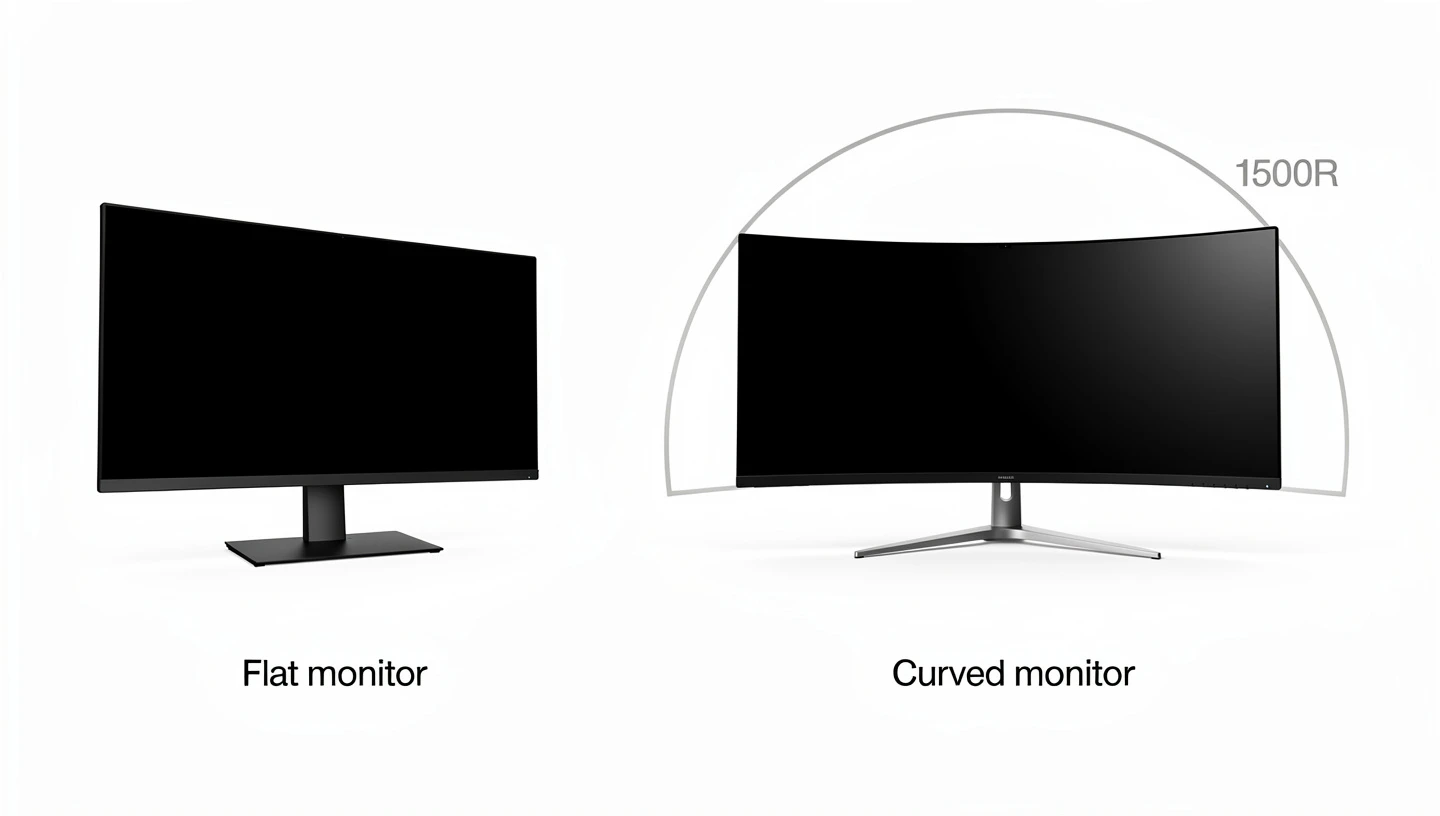
The amount of curvature on a monitor is described using a number followed by the letter R, such as 1500R or 1800R. That number represents the radius of the circle the screen would form if it wrapped all the way around. A smaller number means a tighter, more noticeable curve, while a larger number means a gentler one. Most gaming monitors on the market today sit somewhere between 1000R and 1800R, with wider ultrawide models often using a tighter curve to match their extra width.
Curved computer displays are not a brand new idea either. Samsung released one of the first widely available curved monitors back in 2015, and the format was met with plenty of skepticism at launch. It took a few years of refinement in panel manufacturing and a drop in price before curved screens became a normal sight on gaming desks rather than a novelty item.
Curved vs Flat Monitors: The Core Differences
Flat monitors keep a single straight plane from edge to edge, which is why they have been the default for decades and still make up most budget and office displays. Curved monitors trade that simplicity for a shape that follows your natural field of vision more closely, especially on larger screens where a flat panel would force you to turn your head to see the corners.

Size plays a big role here too. On a 24 or 27 inch screen, the difference between curved and flat is fairly small, since the edges are not far enough away to cause real distortion either way. Once you move into 32 inch and ultrawide territory, the curve starts to matter a lot more, which is part of why nearly every large ultrawide monitor on the market ships curved rather than flat. If you are still deciding what size and specs actually matter for your setup, our guide to choosing a gaming monitor covers the full list of factors beyond just the shape of the screen.
Are Curved Monitors Good for Gaming? The Short Answer
Yes, for most types of gaming a curved monitor is a genuine upgrade, particularly if you play story driven games, open world titles, racing games, or anything where a wide field of view adds to the experience. The curve pulls the edges of the screen into your peripheral vision and can make long sessions feel less tiring on the eyes. Where it matters less is competitive, fast paced gaming, where refresh rate and pixel response do more for your actual performance than the shape of the panel. A fast flat monitor can still outperform a curved one in a competitive match, so the right choice really comes down to what kind of games you spend most of your time in.

The Benefits of Curved Monitors for Gaming
Once you get past the basic shape, the appeal of a curved screen comes down to a handful of real, noticeable benefits during actual play. Here is what changes when you switch from flat to curved.
Immersion and Field of View
The single biggest reason gamers choose curved monitors is immersion. When the edges of the screen wrap slightly around your peripheral vision, the game world feels less like something you are looking at and more like something you are sitting inside. This effect is strongest in first person games, racing titles, and anything built around a wide, detailed environment. It is the same principle that made curved screens popular in movie theaters long before they showed up on a desk.
Reduced Eye Strain During Long Sessions
Long gaming sessions can leave your eyes feeling tired, dry, or strained, and a curved screen can genuinely help with that. Because every part of the display sits at roughly the same distance from your eyes, you do not have to refocus as much as your gaze shifts from the center of the screen to the edge. A study hosted on the National Institutes of Health website found that people using a curved monitor reported noticeably less eye strain over extended use compared to a flat panel of the same size, which lines up with what most curved monitor owners describe on their own. The full study on curved display eye fatigue goes into the numbers behind that finding.
Less Distortion and More Accurate Visuals
On a flat monitor, the distance from your eyes to the center of the screen is shorter than the distance to the far edges. That gap is what causes straight lines and shapes near the edge of a flat display to look slightly stretched. A curved screen closes that gap by bringing the edges physically closer to you, which keeps images looking consistent no matter where on the screen the action is happening. This matters most on larger displays, where the difference between center and edge distance is big enough to actually notice.
Wider Aspect Ratios and Ultrawide Screen Space
Most curved gaming monitors are built around wider aspect ratios than the standard 16:9, commonly 21:9 and sometimes 32:9 on the largest ultrawide models. That extra width gives you more horizontal space to work with, whether that means seeing further to the sides in a racing game or fitting more windows on screen while multitasking. Driving that many extra pixels does ask more of your graphics card, so if you are eyeing an ultrawide curved panel it is worth checking our breakdown of 2K resolution to see what kind of hardware keeps frame rates smooth at that pixel count. That same width also comes in handy outside of gaming, since a large ultrawide curved screen can replace a two monitor desktop setup for chat apps, browsers, and streaming tools running alongside whatever you are playing.
Better Color Consistency and Viewing Angles
Flat panels often show a slight dip in color accuracy near the edges, especially on cheaper panels where the viewing angle is already a weak point. Because a curved screen keeps you looking at every part of the display at close to the same angle, colors and contrast tend to stay more even from center to edge. This is a smaller benefit than immersion or reduced eye strain, but it adds up over time, especially if you also use your monitor for watching movies or editing photos and video. There is also a simple look factor at play, since a large curved panel has a more dramatic presence on a desk than a flat slab of the same size, which is part of why plenty of gamers pick one on looks alone.
How the Curve Affects Different Game Genres
The benefit of a curved screen is not the same across every type of game. First person shooters and racing games benefit the most, since field of view and peripheral awareness genuinely matter to gameplay, not just visuals. Open world and story driven RPGs benefit almost as much, since the extra sense of depth suits large, detailed environments. Horror games also gain something from the format, since the wraparound effect makes tight spaces feel more claustrophobic in a way that adds to the atmosphere. If you lean toward fast paced shooters, it is worth pairing a curved panel with a strong frame rate setup, since the two work together rather than one replacing the other.
What Are the Downsides of Curved Monitors?
None of this means a curved monitor is the right choice for everyone. There are real trade offs worth knowing before you spend the extra money.
Higher Price
Curved panels cost more to manufacture than flat ones, since the internal layers have to be built to bend evenly without weak spots or visible seams. That extra manufacturing complexity gets passed on to the price tag, so a curved monitor will usually cost more than a flat monitor with otherwise identical specs.
More Desk Space Needed
Because the sides of a curved monitor angle outward, the whole unit takes up more physical depth on your desk than a flat panel of the same screen size. On a small or shallow desk, that extra footprint can be a real problem, especially once you get into 34 inch and larger ultrawide territory.
Not Ideal for Wall Mounting or Multiple Monitors
A curved screen will not sit flush against a wall the way a flat one does, which makes wall mounting awkward at best. The same problem shows up if you want to run a multi monitor setup, since lining up a curved screen next to a flat one, or even next to another curved screen, rarely looks aligned or clean.
Narrow Sweet Spot for Viewing
Curved monitors are designed to be viewed from directly in front, and that sweet spot is noticeably smaller than what you get with a flat screen. Sit off to the side, or have a second person watching from an angle, and the image can start to look distorted or washed out near the edges. Independent testing from RTINGS on curved versus flat viewing angles backs this up, showing measurable color and contrast shifts once you move away from center. If you regularly share your screen with someone else in the room, this is worth thinking about before you buy.
Fewer Panel Type Options
The majority of curved monitors use VA panel technology, since VA panels are easier and cheaper to manufacture with a curve built in. That leaves fewer curved options for buyers who specifically want better color accuracy or the fastest possible pixel response, since those two priorities usually point toward panel types that are much less common in a curved shape.
Understanding Curve Ratings: 1000R, 1500R, 1800R and More
The R number attached to a curved monitor tells you exactly how aggressive the bend is, and it is worth understanding before you buy rather than after. Here is a rough breakdown of what the common ratings feel like in practice.
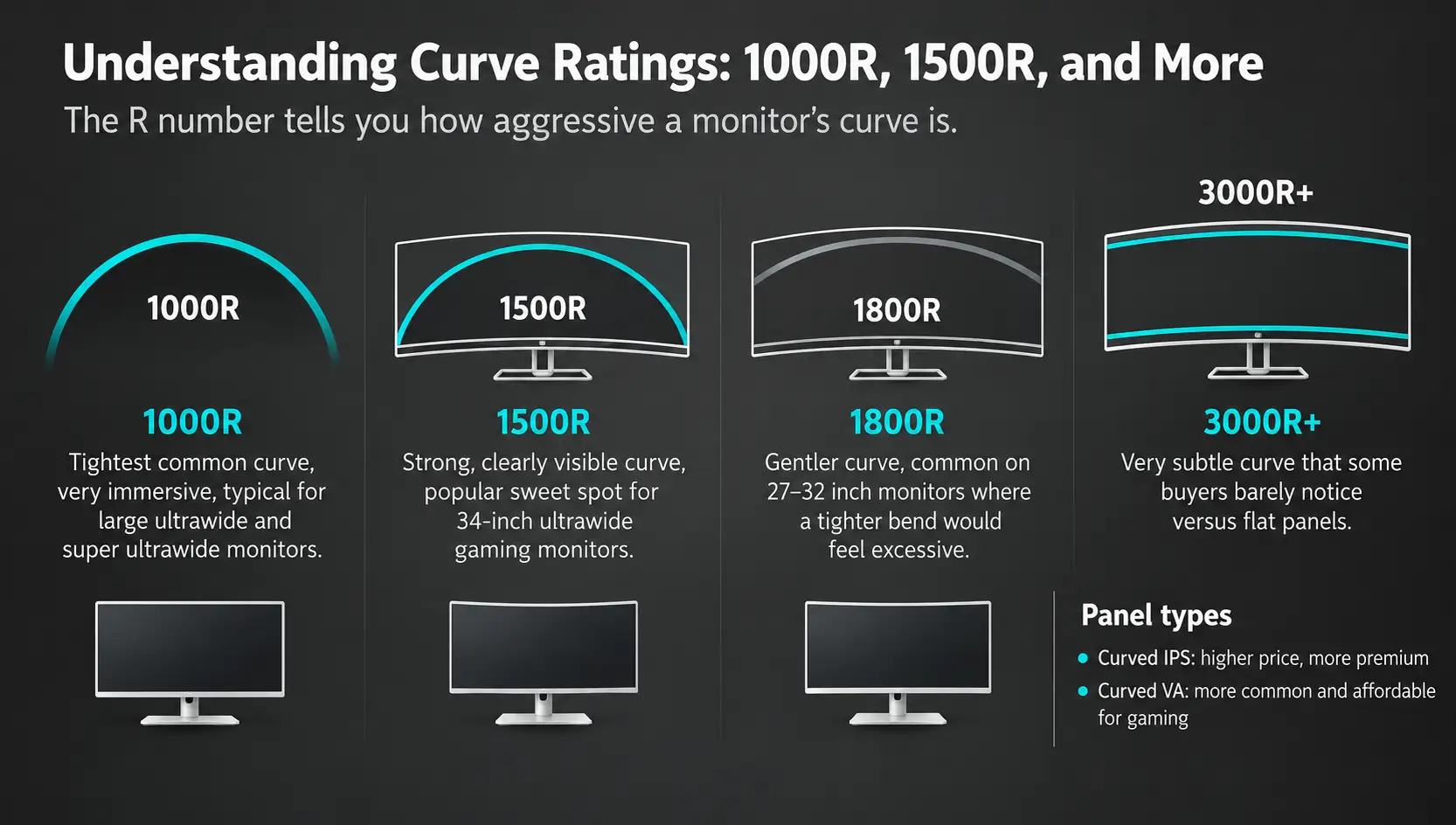
- 1000R: the tightest curve you will typically find, most common on large ultrawide and super ultrawide monitors, very noticeable immersion
- 1500R: a strong, clearly visible curve, a common sweet spot for 34 inch ultrawide gaming monitors
- 1800R: a gentler curve, often used on 27 to 32 inch monitors where a tighter bend would feel excessive
- 3000R and up: a subtle curve that some buyers barely notice compared to a flat panel
Panel type and curve rating tend to travel together as well. Curved IPS panel monitors do exist, but they sit at the higher end of the price range compared to curved VA options, which is part of why VA remains the default choice for most curved gaming displays on shelves today.
Why Are Ultrawide Monitors Usually Curved?
Once a monitor gets past 34 inches wide, viewing it as a flat panel starts to cause real problems. The far left and right edges sit noticeably farther from your eyes than the center, which is exactly the kind of distortion a curve is built to fix. That is a big part of why almost every ultrawide and super ultrawide monitor on the market ships curved rather than flat, since a flat panel at that width would need you to constantly turn your head just to read text near the edges.
It is also worth mentioning why curved TVs never caught on the same way curved monitors did. The difference comes down to viewing distance. You sit only a couple of feet from a monitor, close enough for the curve to genuinely wrap into your peripheral vision, while most people watch television from across a room, where a curved screen does very little for immersion and can actually create distortion for anyone sitting off to the side. That gap in viewing distance is the main reason curved TVs mostly disappeared from stores while curved gaming monitors kept growing in popularity.
What Is the Best Size for a Curved Gaming Monitor?
Curvature makes the biggest difference on larger screens, so most manufacturers and reviewers agree that a curved monitor starts earning its price around the 32 inch mark. Below that size, the edges of the screen simply are not far enough from your eyes for the curve to change much. Once you get into 34 inch ultrawide and 49 inch super ultrawide territory, the benefits of immersion, reduced eye strain, and screen real estate all become much more obvious.
Bigger screens also mean more pixels to render, so if you are considering a 49 inch super ultrawide it is worth reading up on 4K resolution requirements before you commit, since a screen that large paired with a weak graphics card can end up looking soft rather than sharp.
What to Look for When Buying a Curved Gaming Monitor
Beyond the curve itself, a handful of other specs will decide how good the monitor actually feels to play on. Refresh rate and response time still matter more than curvature for how smooth the action looks, so do not let the curve distract from those numbers on the spec sheet. Support for variable refresh rate technology, whether that means G-Sync, FreeSync, or both, is also worth checking for, since it keeps motion smooth and prevents screen tearing no matter whether the panel in front of you is curved or flat. Once you have picked a monitor, taking the time to set it up correctly, from cable choice to on screen menu settings, makes a real difference in how it actually performs day to day.
Curved or Flat Monitor: Which Should You Choose for Gaming?
If you play mostly single player, story driven, or open world games, a curved monitor is very likely worth the extra cost, especially at 32 inches or larger. The added immersion and reduced eye strain add up over long sessions, and the wider aspect ratio gives you a genuine gameplay advantage in racing games and simulators.
If you play competitively, especially in fast paced shooters where every millisecond counts, a flat monitor built around a TN panel or a fast flat IPS panel often makes more sense. Competitive players tend to prioritize the lowest possible response time over immersion, and most of those specialized panels still ship flat rather than curved. There is no wrong answer here, just a different set of priorities depending on how you actually play.
Frequently Asked Questions
Are curved monitors better than flat monitors for gaming?
For most casual and single player gaming, yes, a curved monitor offers a more immersive and comfortable experience, especially at larger sizes. For competitive gaming where reaction time matters most, a flat monitor with a faster panel is often the better pick.
Do curved monitors affect gaming performance?
The curve itself does not change your frame rate or input lag. Performance still comes down to refresh rate, response time, and your graphics card. A curved monitor mainly changes how the game feels to look at, not how fast it runs.
What curve rating is best for gaming?
There is no single best rating, since it depends on screen size and personal preference. A 1500R curve is a common and well liked middle ground on 34 inch ultrawide monitors, while 1800R suits smaller 27 to 32 inch screens better.
Are curved monitors good for first person shooters?
They can be, since the wider field of view helps with peripheral awareness. That said, many competitive shooter players still prefer flat monitors for the faster panel types and lower response times those displays tend to offer.
Is a curved monitor worth it for gaming?
If you are buying a 32 inch or larger screen and mostly play single player or open world games, yes, it is generally worth the extra cost. If you are buying a smaller screen or play mostly competitive titles, a flat monitor may serve you just as well for less money.