2K resolution on a gaming monitor means 2560×1440 pixels, also called 1440p or QHD. It sits between a Full HD monitor and a 4K monitor, delivering a noticeably sharper image than 1080p while staying far easier to run than 4K. In the film industry 2K means something different, exactly 2048×1080 pixels, but when someone buys a gaming monitor and sees the 2K label, it almost always points to 2560×1440.
Below we will cover where the name actually comes from, how it compares to 1080p and 4K, which devices actually use it, how strong a graphics card you need to run it, which refresh rate makes sense, which panel type to pick, and which type of gaming gets the most out of a 2K setup. Skip ahead to whichever section answers what you came here for, or read through in order if you are picking your first monitor.
- 2K on a monitor means 2560×1440 pixels, also called 1440p or QHD
- Cinema 2K is a separate standard at 2048×1080 pixels, used only in film production
- 2K carries about 78 percent more pixels than 1080p and roughly 44 percent of the pixels in 4K
- 27 inches is the most common and best balanced screen size for this resolution
- A mid-range graphics card like the RTX 4060 or RX 7700 XT is enough for basic 2K gaming
What Is 2K Resolution
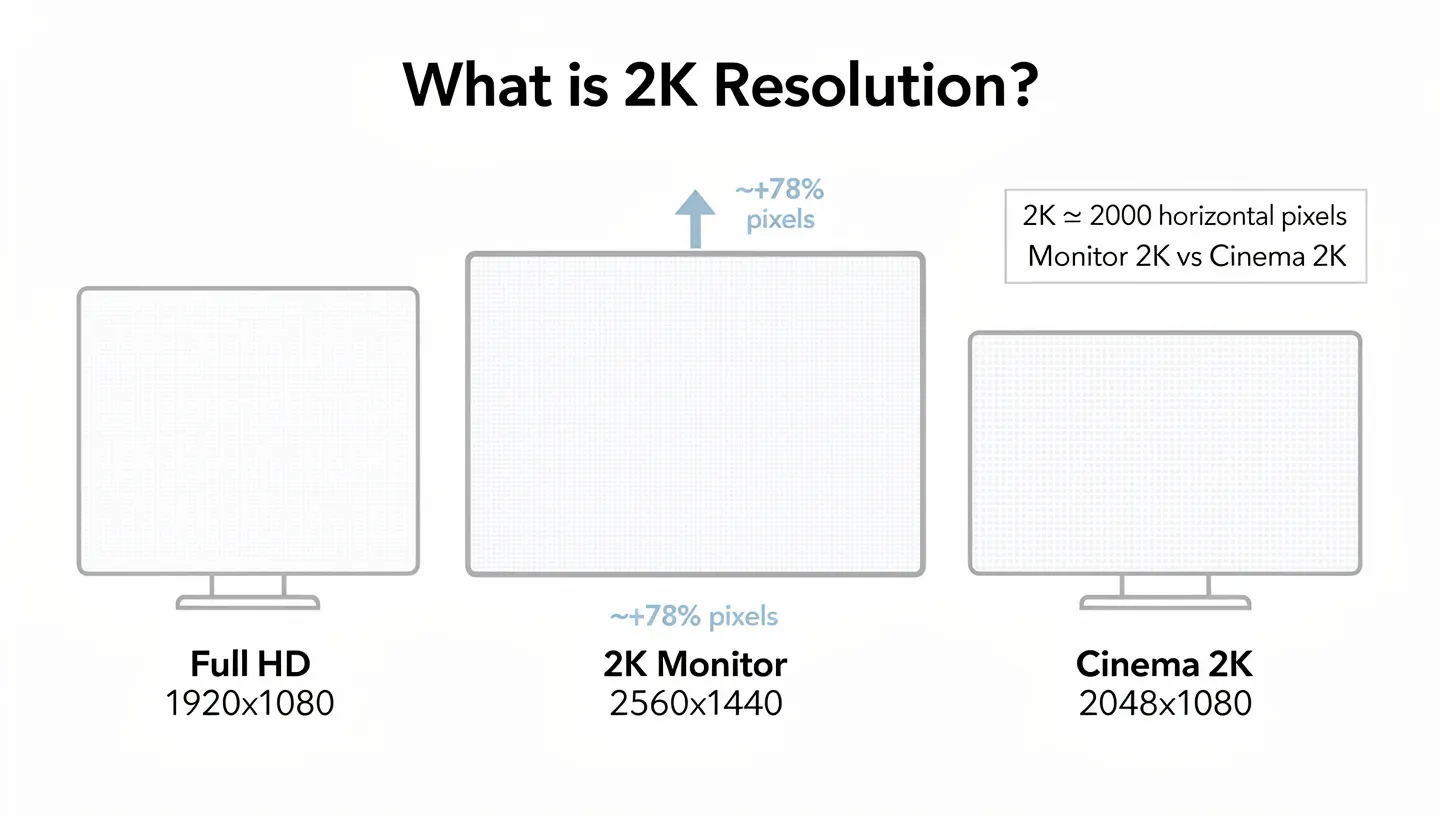
The 2K label comes from the horizontal pixel count, roughly landing near 2,000 pixels wide. On a monitor that works out to 2560 pixels wide by 1440 pixels tall, adding up to about 3.7 million pixels on screen. A Full HD screen carries around 2.1 million pixels, so 2K packs roughly 78 percent more pixels than 1080p.
Why 2560×1440 Is Called 2K, Not 2.5K or 3K
Fair question, since 2560 sits closer to 2500 than to 2000. The naming comes down to rounding, the “K” counts thousands of horizontal pixels in a loose way, not an exact one. Cinema uses a stricter breakdown, but once monitor makers started building panels 2560 pixels wide, marketing simply rounded to the nearest familiar term, and 2K was already sitting there next to 4K as the obvious step below it. The label stuck even though it is not technically precise, and today the entire industry uses it without a second thought.
Cinema 2K vs Monitor 2K
Two completely different definitions share the same name. In film production, the DCI standard (Digital Cinema Initiatives) defines 2K as 2048×1080 pixels, the resolution used for theater projection. On monitors, laptops and gaming gear, 2K means 2560×1440 pixels, which actually holds almost 67 percent more pixels than the cinema version. When someone says they own a 2K monitor, they mean the monitor version, since cinema 2K rarely shows up outside film production and editing workflows.
Why 1080p, 2K, 4K and 8K Are Named Differently
The naming across resolutions is not consistent, and that is exactly why it trips people up. Older labels like 720p, 1080p and 1440p count vertical pixels, the “p” stands for progressive scan and the number tells you how many rows of pixels stack top to bottom. 2K, 4K and 8K flip that around and count horizontal pixels instead, rounded to the nearest thousand.
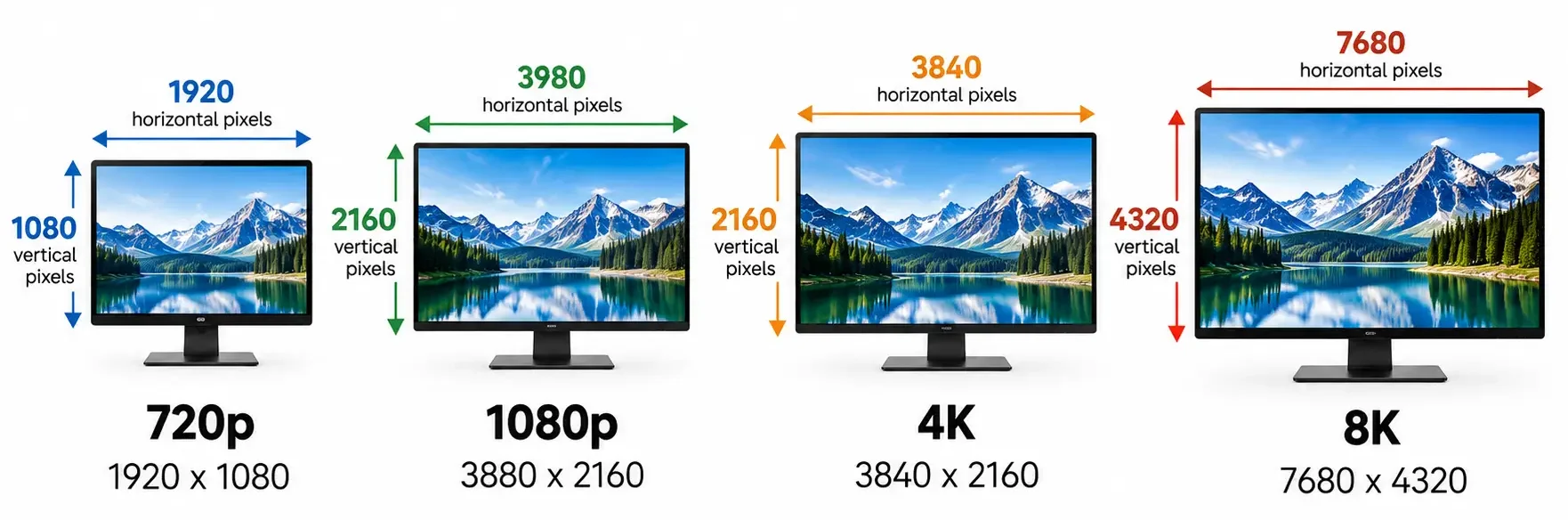
That is why 1080p sounds like a small jump from 720p while 4K sounds like a massive jump from 2K, the two naming systems are simply measuring the screen from different directions.
| Resolution | What it counts | Approximate width |
|---|---|---|
| 1080p | Vertical pixels | 1920 pixels wide |
| 2K | Horizontal pixels | 2048 to 2560 pixels wide |
| 4K | Horizontal pixels | 3840 to 4096 pixels wide |
| 8K | Horizontal pixels | 7680 pixels wide |
Once you know which system a label belongs to, the confusion mostly disappears. Anything ending in “p” is counting rows top to bottom, anything ending in “K” is counting columns left to right, and mixing the two up is where most of the online arguments about resolution naming actually come from.
Is 2K the Same as 1440p and QHD
Yes, on monitors, 2K, 1440p and QHD are three different names for the exact same resolution, 2560×1440 pixels. QHD stands for Quad High Definition, since it holds four times the pixels of a standard HD screen at 1280×720. You will also run into the label WQHD, which refers to the widescreen version of the same resolution. Whichever of these three labels shows up in a spec sheet, all three point to the same 2560×1440 panel.
| Name | What it means |
|---|---|
| 2K | Marketing term based on a rounded horizontal pixel count |
| 1440p | Named after the vertical pixel count, 1440 rows |
| QHD | Quad High Definition, four times the pixels of HD |
| WQHD | Widescreen version of the QHD resolution |
2K vs Other Resolutions
To see where 2K actually sits, it helps to put it next to its neighbors on both sides, 1080p below it and 4K above it.

2K vs 1080p (Full HD)
1080p, also called Full HD, runs at 1920×1080 pixels, roughly 2.1 million pixels total. 2K at 2560×1440 pixels, about 3.7 million total, produces a visibly sharper image, especially noticeable on screens 27 inches and up. Text renders cleaner, edges on in-game objects look smoother, and small details like foliage, wall textures or distant objects become easier to pick out. That sharpness comes at a cost, your graphics card has to push nearly twice as many pixels every second. If you are running an older or budget card, the frame rate gap between 1080p and 2K can be noticeable, so it is worth checking our guide on what Full HD resolution actually means before deciding whether an upgrade makes sense.
| Resolution | Horizontal pixels | Vertical pixels | Total pixels |
|---|---|---|---|
| 1080p (Full HD) | 1920 | 1080 | ~2.1 million |
| 2K (1440p, QHD) | 2560 | 1440 | ~3.7 million |
| 4K (UHD) | 3840 | 2160 | ~8.3 million |
2K vs 4K
4K takes it a step further, running at 3840×2160 pixels, more than double the pixel count of 2K. The image on a 4K monitor looks extremely sharp, especially on large screens over 32 inches, but that sharpness demands a much stronger graphics card to keep games running smoothly. For a closer look at this comparison and when it actually pays off to jump straight to 4K, check our guide on how 4K resolution works and what hardware it really takes. On smaller screens, up to 27 inches, the difference between 2K and 4K becomes much harder to spot with the naked eye, which is why many players would rather run a 2K monitor at a high refresh rate than a 4K panel that barely holds 60 frames per second.
What Devices Use 2K Resolution
2K is most common on 27 inch gaming and productivity monitors, where it has become the dominant resolution in that size class. It also shows up on plenty of laptops as a QHD screen option, on some flagship phones where it gets marketed as “2K” or “QHD Plus”, and on gaming consoles that output a 1440p signal in performance modes. Television sets are the one place 2K mostly skips over entirely, since TVs tend to jump straight from 1080p to 4K rather than stopping at a resolution in between. That makes 2K, at its core, a PC and monitor resolution, one that grew out of the desktop world needing a real step between Full HD and Ultra HD rather than a jump straight from one extreme to the other.
Is 2K Good for Gaming
For most players, a 2K gaming monitor offers the best balance between image sharpness and the frame rate a graphics card can actually deliver. It is not as demanding as 4K, while still looking clearly better than 1080p, especially in open world games where environmental detail really stands out.
Advantages of a 2K Gaming Monitor
- Noticeably sharper image than 1080p without a massive hit to frame rate
- Easier to run than 4K, stays smooth even with a mid-range graphics card
- More on-screen space for a minimap, stats and other in-game UI elements
- Strong value for money, both 2K monitors and the cards needed to run them cost less than 4K gear
- Wide selection of high refresh rate monitors built specifically around this resolution
Drawbacks and Limitations of 2K Resolution
- Still needs a stronger graphics card than 1080p, older cards can struggle
- Pixel density starts dropping on screens over 32 inches, the image looks softer
- Not true 4K sharpness, professionals doing detailed photo or video work still lean toward 4K
- Newer AAA titles with ray tracing enabled can still push even strong cards hard at 2K
Is 2K Good for Work and Productivity
Outside of gaming, 2K covers everyday work and most creative tasks well. The extra vertical space compared to 1080p means more of a spreadsheet, more lines of code, or more of a document fits on screen at once, and text still renders cleanly at 27 inches without needing scaling tricks that can make some apps look blurry.
For photo and video editing, 2K offers a sharp, roomy canvas without putting the same strain on a graphics card that 4K editing work would. It also makes multitasking noticeably easier, splitting the screen between a browser, a chat app and a document feels far less cramped than it does on a 1080p panel of the same size. If your work involves detail critical tasks at large sizes, high end photo retouching on a 32 inch screen for example, 4K or 5K will pull ahead, but for the large majority of office and creative setups, 2K hits a practical sweet spot between clarity, screen space and cost.
What GPU Do You Need for 2K Gaming
The graphics card is the single biggest factor deciding whether a 2K gaming setup runs smoothly or stutters. For basic gaming at 2K with medium settings, a card like the RTX 4060 or RTX 4060 Ti is enough, while high settings and a stable 100 or more frames per second call for something like the RTX 4070 or RTX 4070 Ti.
Anyone chasing a high frame rate in demanding titles should look toward the RTX 4080 or stronger. On the AMD side, the RX 7700 XT and RX 7800 XT deliver similar 2K performance at a somewhat lower price point. It is also worth checking the monitor’s ports, since hitting a high refresh rate at 2K resolution usually requires DisplayPort 1.4 or newer, while HDMI 2.1 also supports these higher combinations of resolution and refresh.
Refresh Rate and Response Time on a 2K Monitor
Beyond the resolution itself, a monitor’s refresh rate plays a big part in how smooth a game actually feels. This number tells you how many times per second the screen redraws the image, measured in Hertz. For a full breakdown of what that number means and how it affects the feel of gameplay, check our guide on what refresh rate is and why it matters.
Which Refresh Rate to Pick by Game Type
If you mostly play competitive titles like shooters or arena games, where every millisecond of reaction time counts, 144Hz is a reasonable floor, and 180Hz or 240Hz give an extra edge to players who can actually make use of that frame rate. For story driven, open world or cinematic games, where visual impact matters more than reflexes, 60 to 100Hz is plenty, especially if that gap in refresh lets you crank up detail settings or HDR instead.
Response Time and Ghosting on 2K Monitors
Response time measures how fast a pixel can switch color, usually in milliseconds. A lower number means less motion blur and less of what is called ghosting, a faint trailing shadow left behind a fast moving object. For a closer look at this term and how it gets tested, check our guide on what response time means on a monitor. Most 2K gaming monitors land somewhere between 1 and 5 milliseconds, which is more than enough for the vast majority of players.
Is 120Hz Enough for 2K Gaming on Consoles
Current generation consoles like the PS5 and Xbox Series X can output 2K resolution at up to 120Hz in supported titles, which is why so many 2K monitors marketed toward console players highlight that exact number. For a full breakdown of whether 120Hz makes a real difference or whether it is worth chasing higher, check our guide on is 120Hz good for gaming. In practice, not every game on console actually hits that ceiling, many performance modes render below 2K internally and upscale, so the 120Hz label on a box does not always translate into 120 real frames per second in every title.
Panel Types, IPS, TN and VA on a 2K Monitor
Panel technology decides how colors look, how wide the viewing angles are, and how fast the panel actually reacts. IPS panels offer the best color reproduction and the widest viewing angles, which is why they are the favorite among players who split time between gaming, movies and creative work on the same screen. You can read more about this technology in our guide on how an IPS panel works. TN panels are the fastest when it comes to response time and the cheapest to make, but colors and viewing angles fall behind.

VA panels sit somewhere in between, known for deeper blacks and stronger contrast, though sometimes with a slightly slower response time than TN. Which panel makes sense mostly comes down to whether speed or picture quality matters more to you. The gap between panel types keeps shrinking too, since manufacturers now ship faster IPS panels that reach response times once reserved for TN only, so it is worth checking the actual spec sheet of a model rather than judging by panel name alone.
Adaptive Sync, G-Sync and FreeSync
Screen tearing, when the image visibly splits because the frame rate coming from the graphics card does not match the monitor’s refresh rate, gets solved by adaptive sync technology. Nvidia cards use G-Sync, AMD cards use FreeSync, though most newer monitors today support both standards regardless of which card you own.

For a full breakdown of how FreeSync actually works and what it does in practice, check our guide on what FreeSync is and how it functions. This technology matters a lot for 2K gaming, since even a strong card sees its frame rate dip during demanding scenes, and adaptive sync keeps the image smooth instead of letting it stutter. When shopping, check the Hertz range where adaptive sync actually kicks in too, since some budget models only cover a narrow window, outside of which the feature simply switches off and tearing comes right back.
HDR Support on 2K Gaming Monitors
HDR extends the brightness and color range a monitor can show, pushing bright areas brighter and dark areas deeper, with a richer spread of color in between. On a 2K monitor, HDR stands out the most in open world games with dramatic lighting, sunsets or bright light sources indoors.
Not every HDR label means the same thing, so it is worth checking the certification level before buying, something we cover in more detail in our guide on what HDR means on a monitor. Budget 2K monitors often ship with only basic HDR support that does not add much over a standard image, while monitors with stronger backlighting and local dimming are the ones that actually show what HDR is supposed to deliver.
HDR10, HDR400, HDR600 and HDR1000 Explained
Not all HDR certifications mean the same amount of actual brightness and contrast on screen. HDR10 is the baseline format most content is mastered in, but a monitor carrying only that label without a VESA certification can still fall short in practice. VESA DisplayHDR ratings, HDR400, HDR600 and HDR1000, tell you the peak brightness a panel can actually hit, measured in nits, with HDR400 being the entry point and HDR1000 delivering genuinely deep contrast with local dimming zones.

For a full breakdown of what each tier actually looks like on screen, check our guide on HDR levels explained. Most budget 2K monitors sit at HDR400, which technically supports HDR but rarely looks dramatically different from a non-HDR image, while stepping up to HDR600 or higher is where the format starts earning its name.
Best Screen Size for 2K Resolution
Pixel density, measured in PPI (pixels per inch), shows how sharp an image will look at a given screen size. The bigger the screen at the same resolution, the fewer pixels packed into each unit of area, so the image looks softer. At 2K resolution, 27 inches is the sweet spot and the most common choice among gaming monitor makers.
| Screen size | Pixel density (PPI) | How it looks |
|---|---|---|
| 24 inch | ~122 PPI | Very sharp |
| 27 inch | ~109 PPI | Sharp, the most popular pick |
| 32 inch | ~92 PPI | Acceptable, but slightly softer |
Past 32 inches, 2K resolution starts losing sharpness, and most people at that point look toward a 4K screen instead or stick with a smaller size. Sitting distance matters too, the closer a monitor sits to your eyes, the more those extra pixels over 1080p actually stand out, which is part of why 2K works so well on a desk but shows less of an advantage from across a living room.
2K Resolution by Type of Gaming
How well a 2K monitor fits you mostly depends on what you play most and what else you do alongside gaming.
Competitive gaming calls for a high refresh rate and low response time, so 2K resolution paired with 144Hz or higher, ideally on a TN or fast IPS panel, makes the most sense here.
Story driven and open world games get more out of an IPS panel with strong color accuracy and HDR support, since visual impact takes priority over reaction speed in this category.
Streaming and content creation call for a monitor with accurate colors and consistent performance, since the image gets shown to viewers too, and any color or contrast shift stands out immediately on stream.
Multitasking and productivity benefit from the extra room 2K offers over 1080p, it is easier to keep Discord, a browser and a game open at once without everything feeling cramped.
Casual gaming across different genres, from simulation titles to platformers, runs well on 2K without needing top tier hardware, since most of these games are not that graphically demanding to begin with.
Is 2K Worth It Compared to 4K
For most players, yes. 2K delivers a large chunk of the visual upgrade 4K offers, at a much lighter load on both the graphics card and the budget. The gap only becomes meaningful on large screens over 32 inches or for professional photo and video work where every pixel counts. If you mostly play competitive titles where frame rate matters more than raw sharpness, 2K is nearly always the smarter pick over 4K, since it lets you push a higher refresh rate without needing the most expensive graphics card on the market.
How Much Does a 2K Gaming Monitor Cost
Pricing on 2K gaming monitors today covers a wide range, from affordable models with a 144Hz refresh rate and a basic TN or IPS panel, up to premium options with 240Hz refresh, full HDR certification and a top tier IPS or OLED panel. Price climbs alongside refresh rate, panel quality and extra features like built-in speakers, adjustable stands or additional ports. For most players, a mid-range monitor with 144Hz and a solid IPS panel covers every practical need without paying a premium for features that will not actually get used. It is worth checking the warranty and dead pixel replacement policy too, since this differs from brand to brand, and on a new monitor that matters just as much as the panel spec sheet itself.
Common Misconceptions About 2K Resolution
A few mix-ups come up often enough that they are worth clearing up on their own. One is thinking that 1080p content automatically looks better once it is displayed on a 2K monitor, it does not. A 1080p video or game running on a 2K screen gets stretched across more pixels than it was made for, so the source material stays exactly as sharp as it was, the monitor cannot add detail that was never there to begin with. To actually see the benefit of a 2K panel, the content or game itself needs to be rendered at 2K.
The other common mix-up runs the opposite direction, setting a 2K resolution on a monitor that is physically only capable of 1080p. That does nothing useful either, since the panel is hardware limited to its native 1920×1080 pixel grid, forcing a higher resolution in the display settings usually just gets scaled back down or ignored entirely by the system. A resolution setting only matters once it matches, or comes close to matching, the native resolution the panel was actually built with.
Ultrawide 2K Monitors (3440×1440)
Alongside the standard 16:9 format, 2K resolution also comes in an ultrawide version, most commonly 3440×1440 pixels in a 21:9 aspect ratio. These monitors offer a wider field of view that pays off especially well in simulation games, racing titles and open worlds, where peripheral vision adds a real sense of immersion. Ultrawide 2K monitors typically need a somewhat stronger graphics card than the standard 2K format, since they carry more horizontal pixels, though still less than a full jump to 4K. Keep in mind that some older games do not support the 21:9 aspect ratio natively either, so the image can stay boxed in with black bars on either side until the developer adds official support or the community works out a fix.

According to the official DCI specification for digital cinema projection, the cinema 2K standard at 2048×1080 pixels is still the reference resolution used in film production today, entirely separate from the monitor definition of 2K covered throughout this article.
Which 2K Monitor Should You Buy
When picking a 2K gaming monitor, start by figuring out whether speed or picture quality matters more to you. If you play competitively and reaction time decides the outcome, look for a panel with a high refresh rate, low response time and adaptive sync support, regardless of whether it is TN or a fast IPS panel. If you lean toward story driven games, open worlds, or work alongside gaming on photo editing, video work or design, an IPS panel with solid HDR certification and accurate colors will serve you much better.
The graphics card needs to stay balanced with whatever monitor you pick. There is no point buying a 240Hz 2K monitor if the card barely holds 90 frames per second in demanding titles, just as there is no point pairing a top tier card with a 60Hz panel. Screen size matters too, 27 inches remains the safest choice for most desks and rooms, while ultrawide only makes sense if you have the desk space and the graphics horsepower to back it up.
In the end, 2K resolution has become the standard for mid-range and higher-end gaming monitors precisely because it manages to satisfy both the players who care about sharpness and the ones who care about speed, without demanding the budget or hardware a true 4K setup calls for.
Frequently Asked Questions About 2K Resolution
Is 2K the Same as 1440p
Yes, on monitors, laptops and gaming gear, 2K and 1440p describe the same resolution, 2560×1440 pixels. Only in film production does 2K mean something different, 2048×1080 pixels.
Is 2K Better Than 1080p
Yes, 2K carries about 78 percent more pixels than 1080p, delivering a noticeably sharper image and cleaner text, especially on screens 27 inches and up. That sharpness comes at the cost of a heavier load on the graphics card.
Is 2K Good for Gaming
Yes, 2K is widely considered one of the best choices for gaming since it strikes a strong balance between image sharpness and the frame rate that modern graphics cards can deliver without a major drop in performance.
Do I Need a Powerful GPU for 2K
Not necessarily top of the line, but it should be solid. Cards like the RTX 4060 or RX 7700 XT cover basic gaming, while an RTX 4070 or stronger unlocks high settings alongside a stable, higher frame rate.
What Refresh Rate Should I Look For on a 2K Monitor
For competitive gaming, 144Hz is a reasonable floor, with 180Hz or 240Hz offering an extra edge. For story driven, slower paced games, 60 to 100Hz is plenty.
Is 2K Worth It Over 4K
For most players, yes, since it delivers a large share of the visual upgrade at a much lighter load on hardware and budget. The gap only becomes meaningful on large screens or for professional photo and video work.
What Screen Size Works Best With 2K
27 inches is the most common and best balanced choice, sitting around 109 pixels per inch. Past 32 inches, the image on this resolution starts to look somewhat softer.
Do 2K Monitors Support Consoles
Yes, most newer consoles support a 2K output, though some games on console still render internally at a lower resolution before upscaling to 2K or 4K on screen.
Is 2K Good for Streaming and Content Creation
Yes, paired with a monitor that has accurate color reproduction and consistent performance, 2K resolution gives enough room and sharpness for managing multiple windows and tools while streaming, without needing 4K gear.
Does 1080p Content Look Better on a 2K Monitor
No, the source material stays exactly as sharp as it was made, a 2K screen cannot add detail to 1080p content that was never captured in the first place. The benefit only shows up once the content itself is rendered at 2K.