Every gaming monitor listing throws a number at you, 1ms, 4ms, sometimes 0.03ms, and calls it response time. Most shoppers nod along without knowing what that number actually measures or whether it even matters for the games they play. Response time gets lumped together with refresh rate so often that the two start to blur into one confusing spec. In this guide we break down what response time really is, how it is measured through GtG and MPRT, what counts as good for different types of gaming, and how it compares against refresh rate and input lag. By the end you will be able to read a spec sheet and know exactly what you are buying instead of trusting a number printed on a box.
We will also cover how panel type changes what is realistically possible, why the number on the box rarely matches what you experience in a game, and how to actually test a monitor’s speed instead of taking a manufacturer’s word for it.
What Is Response Time On A Gaming Monitor
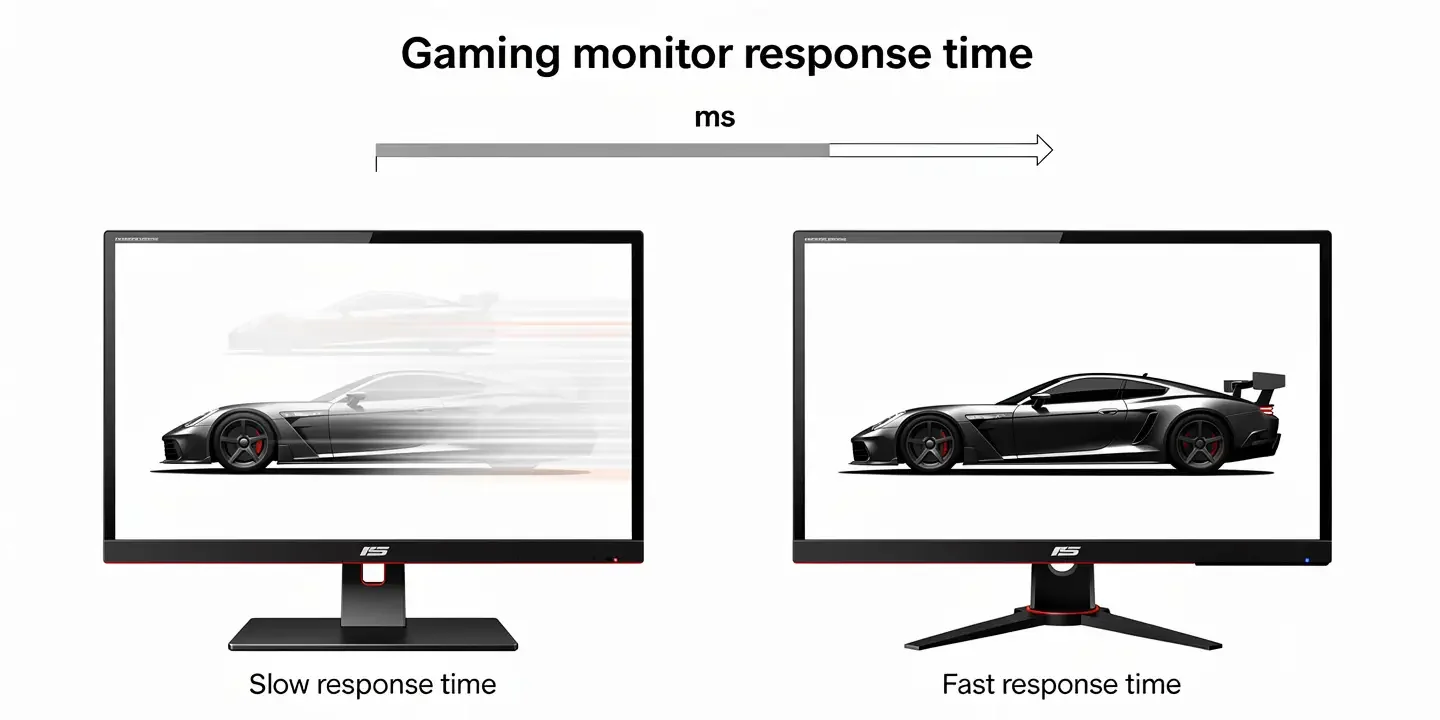
Response time is the amount of time it takes for a single pixel to switch from one color to another, measured in milliseconds. The faster that switch happens, the less chance there is for the old image to linger behind the new one. A slow pixel transition is what causes the blurry trail you sometimes see behind a moving character or a fast camera pan, since the pixel has not fully finished changing before the next frame arrives.
How Pixels Actually Change Color
Inside an LCD panel, color comes from liquid crystals twisting in response to voltage. When a signal tells a pixel to change, voltage is applied and the crystals rotate to let a different amount of light through. The speed of that rotation is response time. A higher voltage moves the crystals faster, which is exactly why manufacturers can push response time down through a setting called overdrive, more on that later. OLED panels skip this mechanical step entirely, since each pixel lights itself and switches almost instantly.
Why The Advertised Number Is Rarely The Real One
A spec sheet usually lists the fastest possible transition a panel can achieve, not a realistic average. Manufacturers cherry pick the quickest color jump out of dozens of possible transitions and print that single figure. In everyday use you are seeing a mix of transitions, some fast, some slower, so the number you experience day to day is almost always higher than what is printed on the box. This is one reason two monitors with the same advertised response time can feel noticeably different in motion.
GtG vs MPRT, What Is The Difference
These two terms show up on nearly every spec sheet, and mixing them up is the easiest way to buy the wrong monitor for your needs.

Gray-to-Gray (GtG) Explained
GtG measures how long a pixel takes to shift from one shade of gray to another. It is the most common figure printed on the box and the one most people mean when they say response time. According to BenQ’s breakdown of the measurement, GtG has become the standard because it reflects the kind of subtle color shifts that happen constantly during actual gameplay, rather than just a dramatic black to white jump.
MPRT (Moving Picture Response Time) Explained
MPRT measures something different, how long a pixel stays visible to your eye while the screen refreshes, not how fast the pixel itself changes. A monitor can advertise “1ms MPRT” through a trick called backlight strobing, where the screen flashes the backlight on and off rapidly to shorten how long each frame stays lit. This can make motion look sharper, but it usually comes with a real drop in brightness and often disables variable refresh rate while it is active.
Which Number Should You Actually Trust
For everyday shopping, GtG gives you a more honest picture of raw pixel speed, while MPRT tells you more about perceived motion clarity. If a listing only shows “1ms” without saying which one it is, assume the more flattering number was chosen for marketing. The safest approach is checking an independent review that measures both.
Why Response Time Matters For Gaming
A slow response time does not just look bad on paper, it changes how a game actually feels to play.

Ghosting And Motion Blur
When a pixel cannot finish its transition before the next frame appears, the old image sticks around just long enough to create a trail. This is ghosting, and it shows up as a faint smear behind moving objects. Motion blur is the softer, broader cousin of ghosting, where fast movement across the screen just looks less sharp overall rather than leaving a distinct trail. Both make it harder to track a target in a fast shooter or follow a car through a tight corner in a racing game. Dark scenes tend to show this more clearly than bright ones, since the eye picks up on trailing shadows faster than it notices trailing highlights.
Response Time vs Refresh Rate
Refresh rate tells you how many times per second the screen draws a new frame, measured in Hz. Response time tells you how fast the pixels can keep up with those new frames. A 240Hz monitor draws a new frame every 4.17 milliseconds, so a panel with an 8ms response time cannot fully transition before the next frame lands, which wastes a chunk of that high refresh rate. For a closer look at how refresh rate itself affects gameplay, see our guide on refresh rate on gaming monitors.
Response Time vs Input Lag, The Other Confusion
Response time and input lag get mixed up constantly, but they measure completely different things. Response time is about how fast a pixel changes color once it has been told to. Input lag is the delay between you pressing a button and that action showing up on screen at all, and it depends far more on the monitor’s processing and scaler than on the panel itself. A monitor can have a fast response time and still feel sluggish if its input lag is high, and the reverse is also true.
How Fast Is Fast Enough, What Science Says
Long before gaming monitors existed, researchers were already studying how quickly humans notice visual change. Back in 1968, IBM researcher Robert Miller found that people perceive any visual reaction to a button press as instant once it happens faster than 100 milliseconds. That number suggested response time barely mattered at all, until later research dug deeper into what the eye can actually detect rather than what feels instant.
A 2014 study by MIT professor Mary Potter found that the human visual cortex can register a change in an image shown for as little as 13 milliseconds. As PCGamesN notes in its own testing, that figure lines up closely with the frame times of high refresh rate monitors and the upper range of slower LCD response times, which means a panel slower than roughly 13ms is technically within a range your eyes can pick up on during fast motion. This is also why the difference between a 4ms and 6ms panel can feel real at 240Hz, even though both numbers sound tiny on paper.
Response Time By Panel Type (TN, IPS, VA, OLED)
The physical technology behind a screen sets a hard ceiling on how fast it can realistically go.
| Panel Type | Typical Response Time | Best Case | Common Weakness |
|---|---|---|---|
| TN | 1ms to 4ms | 0.5ms | Weak colors and narrow viewing angles |
| IPS | 1ms to 4ms | 1ms | Slightly slower than TN in most models |
| VA | 3ms to 8ms | 1ms on the newest panels | Black smearing on dark, fast scenes |
| OLED | Under 0.1ms | 0.03ms | Higher price, risk of burn in |
TN panels were long considered the fastest option and remain popular in budget competitive monitors, though modern Fast IPS panels have closed most of that gap while keeping better colors. For more detail on how TN stacks up today, check our guide on TN panels for gaming. VA panels trade some speed for much deeper contrast, which makes them a strong pick for atmospheric single player games even if fast motion shows a bit more smearing. OLED sidesteps the whole liquid crystal problem since each pixel lights and dims on its own, which is why it posts numbers that LCD technology simply cannot match.
What Is A Good Response Time For Gaming
The honest answer depends entirely on what you play, since a number that is overkill for one genre can be a real limitation for another.

Response Time By Game Genre
| Genre | Recommended Response Time | Why It Matters |
|---|---|---|
| Competitive shooters, esports | 1ms to 2ms | Fast target tracking, split second reactions |
| Racing and fighting games | 1ms to 4ms | Sharp motion during quick direction changes |
| RPG and story driven games | 3ms to 5ms | Contrast and color matter more than raw speed |
| Strategy and turn based games | 5ms to 8ms | Slower pace makes pixel speed far less noticeable |
Is 1ms Really Better Than 4ms
On paper, yes, but in practice the gap is smaller than the numbers suggest, especially once you account for how those figures are measured. A well tuned 4ms IPS panel with good overdrive can feel just as sharp in motion as a poorly tuned 1ms panel that overshoots and creates its own artifacts. The difference becomes meaningful mainly at very high refresh rates, 240Hz and above, where every extra millisecond eats into an already tiny frame window.
Is 5ms Bad For Gaming
Not at all for most players. A 5ms response time is perfectly playable for the vast majority of games, including plenty of competitive titles that do not demand frame perfect reaction time. It becomes a limitation mainly at higher refresh rates paired with genuinely fast paced gameplay, where the slower transition starts to visibly lag behind the frame rate.
Does Screen Size Or Resolution Affect Response Time
Response time itself is a property of the panel, not the resolution, but the two still interact in ways worth knowing. Higher resolution panels have to drive far more pixels at once, and older 4K displays sometimes struggled to keep every pixel transitioning at the same speed across the whole screen. Modern 4K panels have largely closed that gap, but budget models can still show slightly uneven performance at the edges. For more on how resolution choices affect your overall gaming setup, see our guide on 4K resolution for gaming.
1080p vs 1440p vs 4K
1080p panels tend to hit the fastest response times most consistently, which is part of why competitive players still favor the resolution even with weaker overall image quality. 1440p has become the practical middle ground, offering sharper detail while modern panels still reach 1ms to 2ms without much trouble. 4K used to force a real trade off between resolution and speed, but current generation panels handle both well enough that the choice now comes down more to GPU power than response time.
Overdrive Explained, And Why Faster Isn’t Always Better
Overdrive is a setting built into most monitors that pushes extra voltage into the liquid crystals to force them to switch faster than they naturally would. Turned up correctly, it noticeably sharpens motion and cuts down on ghosting. Pushed too far, it creates the opposite problem.
Inverse Ghosting And Overshoot
When overdrive is set too aggressively, a pixel overshoots its target color and has to pull back to correct itself. This creates a bright or dark halo trailing moving objects, an effect called inverse ghosting or corona. It often looks worse than the ghosting it was meant to fix. Most monitors offer a few overdrive levels in their menu, and the middle setting is usually the sweet spot, since the highest setting frequently introduces more overshoot than it removes in blur. If you are unsure where to start, leave overdrive on its default setting and only bump it up one level at a time while watching for halo artifacts around fast moving objects.
How To Actually Test A Monitor’s Response Time
Manufacturer numbers only tell part of the story, so independent testing matters more than the spec sheet. One widely used method comes from the Open Source Response Time Tester, a free tool built around a light sensor that measures real brightness changes on screen rather than trusting what the monitor claims. It runs through dozens of color transitions and produces separate readings for initial response time, how quickly a pixel first starts changing, and perceived response time, which factors in overshoot and undershoot to reflect what your eyes actually see.
This kind of testing is also how reviewers catch monitors that look great on paper but perform worse in practice, since a panel with heavy overshoot at its fastest overdrive setting can end up with a worse perceived response time than the same panel running one setting lower.
Common Mistakes When Judging A Monitor By Its Response Time Spec
A few habits lead buyers toward the wrong monitor almost every time.
- Trusting a single advertised number without checking whether it is GtG or MPRT, since the two are not comparable
- Assuming a 1ms monitor will always look sharper than a 4ms one, without factoring in overdrive tuning or refresh rate
- Ignoring panel type entirely and shopping by response time number alone, which can lead to a fast but washed out TN panel when a Fast IPS panel would serve better
- Pairing a fast response time monitor with a refresh rate too low to take advantage of it, like a 1ms panel running at 60Hz
- Overlooking input lag completely, since a fast panel with poor processing can still feel unresponsive
How To Choose The Right Response Time For Your Setup
Once you know your priorities, matching a response time to your setup gets a lot simpler.
Competitive Gamer
If you play shooters, battle royales, or fighting games where every frame counts, aim for 1ms to 2ms GtG paired with a high refresh rate and a variable sync feature to avoid tearing during intense moments. Our guide on FreeSync for gaming monitors covers how adaptive sync works alongside a fast panel.
Casual And Story-Driven Gamer
For open world titles, RPGs, and anything where atmosphere matters as much as speed, 3ms to 5ms is genuinely fine and lets you prioritize contrast and color instead. This is where a VA or standard IPS panel usually makes more sense than chasing the lowest number on the shelf.
Office And Everyday Use
For spreadsheets, browsing, and video calls, response time barely factors in at all. Anything from 5ms to 10ms will feel completely smooth for that kind of use, so it is worth spending your budget on screen size or color accuracy instead. If you are still weighing panel type, resolution, and response time together for a new purchase, our full guide on how to choose a gaming monitor walks through every spec in order.
Conclusion, Which Response Time Actually Matters For You
Response time is one piece of a much bigger picture, and chasing the lowest number on a spec sheet rarely tells the full story. What actually matters is whether the panel keeps up with your refresh rate and your playstyle, whether the overdrive setting is tuned well, and whether GtG or MPRT is being advertised in the first place. A competitive shooter player and someone working through a long RPG genuinely need different things from the same spec, and neither one is wrong for wanting it. Once you know what GtG, MPRT, and overdrive actually mean, a spec sheet stops being a marketing trick and starts being useful information you can actually shop with.
Before you buy, write down the games you play most, check whether they lean fast paced or slow and atmospheric, and match that against the tables in this guide rather than defaulting to whatever number sounds the most impressive. A monitor bought this way will almost always feel better in practice than one picked purely off a headline spec.
Frequently Asked Questions About Monitor Response Time
Is 1ms response time better than 4ms?
Technically yes, but the real world gap is smaller than the numbers suggest. A well tuned 4ms panel can look just as sharp as a poorly tuned 1ms one, and the difference only becomes clearly noticeable at very high refresh rates like 240Hz and above.
Does response time affect FPS?
No, response time has nothing to do with how many frames per second your FPS in gaming setup can produce. That number depends on your graphics card and CPU. Response time only affects how clearly those frames are displayed once they reach the screen.
Why is my 1ms monitor still blurry?
A few common causes, your refresh rate might be set lower than the monitor supports in your display settings, overdrive could be disabled or set too low, or the game itself might have a motion blur setting turned on. Check your Windows display settings and in game options before assuming the panel is at fault.
Can I change my monitor’s response time?
You cannot change the physical limit of the panel, but almost every gaming monitor lets you adjust the overdrive level in its on screen menu. Moving between normal, fast, and extreme settings changes how aggressively the panel pushes its pixels, which can noticeably affect how sharp motion looks.
Is 0.5ms response time real?
On some high end TN and OLED panels, yes, though it is worth checking whether that figure is GtG or MPRT before trusting it fully. A 0.5ms MPRT number usually means backlight strobing is involved, which comes with its own trade offs like reduced brightness.
Does response time affect input lag?
Not directly. Input lag mostly comes down to the monitor’s internal processing and scaler, while response time is purely about how fast the pixels themselves transition. A monitor can have a very fast response time and still carry noticeable input lag if its processing is slow.
What is a good response time for a 144Hz monitor?
A 144Hz display refreshes every 6.9 milliseconds, so a response time of 4ms or lower keeps pixels comfortably ahead of each new frame. Most modern IPS and TN monitors built for 144Hz land in that range without issue.