Resolution is the first spec most people check when they shop for a display, and it is also the one that gets misunderstood the most. A 4K gaming monitor resolution is 3840 x 2160 pixels, which works out to roughly 8.3 million pixels on the panel at once. That is four times what a standard 1080p screen packs in, and the difference shows up the moment you load a game with detailed textures or a wide draw distance. This guide walks through what 4K actually changes on screen, how it compares to 1440p and 1080p, what hardware you need to run it properly, and how to decide if it fits your setup.
What Does 4K Gaming Monitor Resolution Actually Mean?
The number 3840 x 2160 describes how many pixels sit across the screen horizontally and vertically. Multiply those two figures and you get 8,294,400 individual pixels, which is why the format is often shortened to 4K, since the horizontal count rounds up close to 4,000. The term is also written as Ultra HD or UHD on product boxes and spec sheets, and all three names point to the exact same panel resolution.
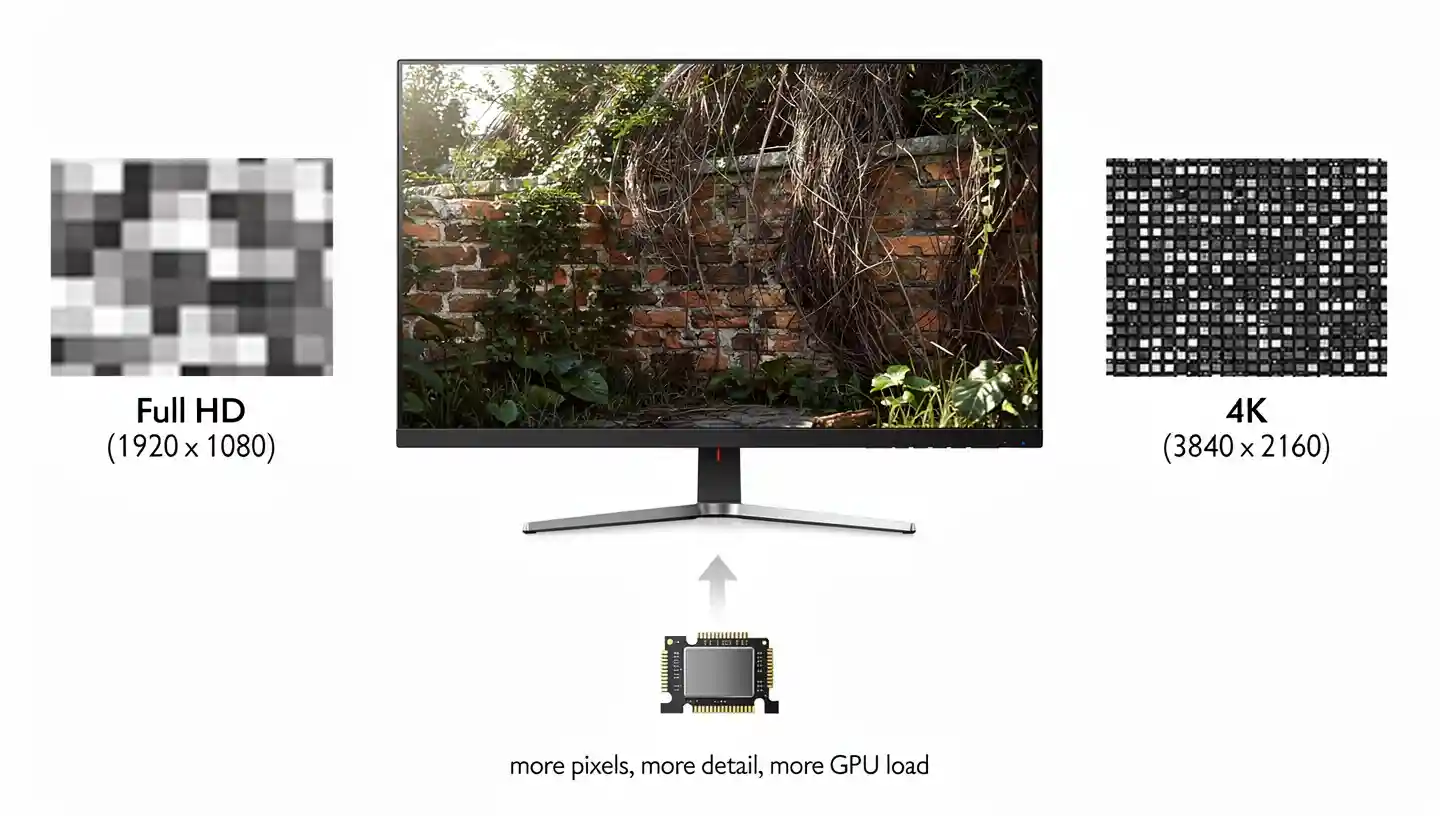
More pixels packed into the same physical screen means each one covers a smaller area, so edges look cleaner, small text stays readable up close, and fine detail in foliage, hair, or brickwork does not blur into a flat texture the way it can at lower resolutions. The tradeoff is that every one of those 8.3 million pixels needs to be redrawn by the graphics card dozens or hundreds of times per second, which is where the real cost of running games at 4K shows up.
4K Gaming Monitor Resolution vs 1440p vs 1080p
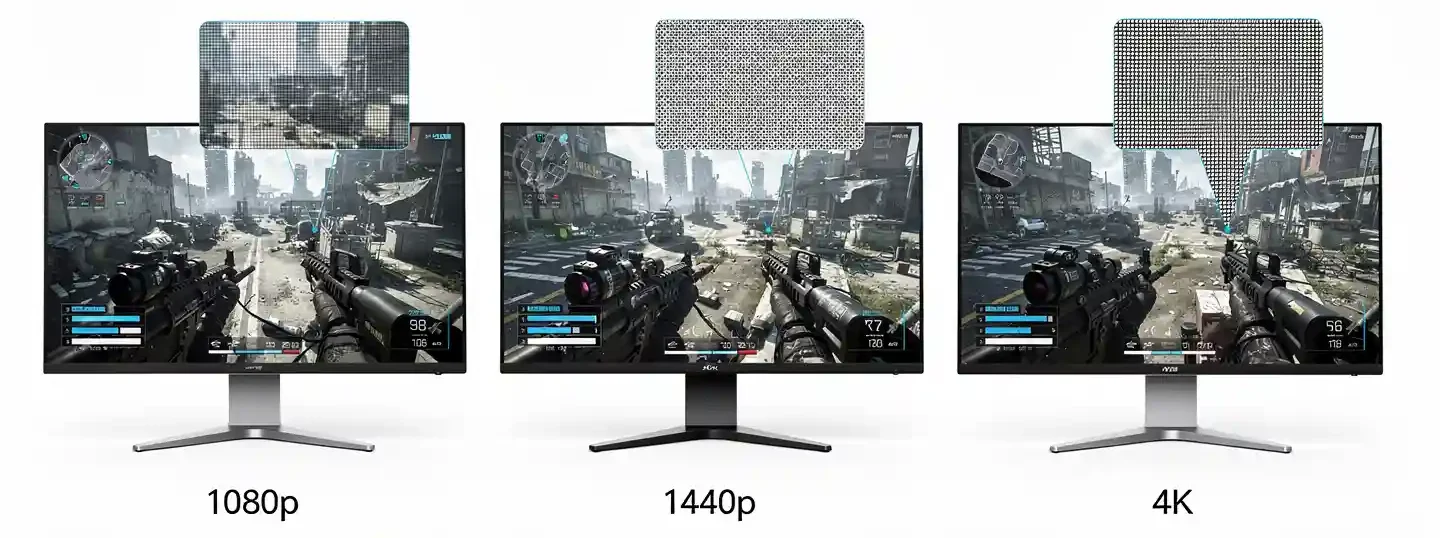
Picking a resolution is really about matching pixel count to your screen size, your graphics card, and the kind of games you play most. Here is how the three mainstream options stack up against each other.
1080p (Full HD)
1080p sits at 1920 x 1080 pixels, about 2.07 million in total. It remains the standard for competitive shooters because even a mid-range graphics card can push well past 240 frames per second at this pixel count, and high refresh rate panels at 360Hz or faster are built almost exclusively around 1080p. Pixel density starts to fall apart on anything larger than a 24 to 27 inch screen, where individual pixels become easier to spot and text edges lose their crispness. You can read more about where Full HD still makes sense in a dedicated breakdown.
1440p (QHD)
2560 x 1440 pixels puts 1440p almost 80 percent ahead of 1080p in raw pixel count, and it has become the resolution most PC gamers settle on in 2026. A 27 inch 1440p panel lands around 109 pixels per inch, sharp enough that text and detail hold up well without asking for flagship graphics hardware. Refresh rates of 165Hz to 240Hz are common at this resolution, which keeps competitive players happy while still giving single player games noticeably more clarity than 1080p. A full comparison against 4K panels is covered in our 2K resolution guide.
4K (UHD)
At 3840 x 2160, 4K delivers the sharpest image of the three, with texture work, distant objects, and fine detail all rendering with noticeably more clarity than 1440p or 1080p. The catch is GPU demand. A card that comfortably holds 144 frames per second at 1080p in a demanding title might only manage 45 to 60 frames per second at native 4K in the same game with identical settings. That is the central tradeoff behind native 4K resolution: the visual upgrade is real, but so is the horsepower it asks for.
Pixel Density and Screen Size Guide for 4K Gaming
Resolution alone does not tell the whole story. What matters for actual sharpness is pixel density, meaning how many pixels are packed per inch of screen, and that number changes with panel size. A 43 inch 4K television has the exact same 3840 x 2160 pixel count as a 27 inch monitor, but the smaller panel looks noticeably sharper because those pixels are packed tighter together.

| Screen Size | Resolution | Pixels Per Inch |
|---|---|---|
| 24-27 inch | 1080p | 82-92 PPI |
| 27 inch | 1440p | 109 PPI |
| 27 inch | 4K | 163 PPI |
| 32 inch | 4K | 138 PPI |
| 43 inch | 4K | 102 PPI |
At typical desk viewing distances of 60 to 80cm, most people stop noticing individual pixels once density climbs past roughly 130 to 140 PPI, which is why 27 to 32 inch panels are the sweet spot for 4K gaming. Go much larger without adding resolution and the sharpness advantage that makes 4K worth the GPU cost starts to disappear. This is also where curved formats come into the picture for immersive single player titles, which we cover separately in our guide on whether curved monitors are good for gaming.
Refresh Rate and 4K Gaming Monitor Resolution
Resolution and refresh rate are two separate specs that fight over the same GPU budget. Early 4K panels were locked to 60Hz, but 2026 monitors commonly reach 120Hz to 144Hz at full 4K, with premium OLED models pushing to 240Hz. Higher refresh rate means the screen redraws more often per second, which translates into smoother motion and less blur when the camera pans quickly or you turn fast in a shooter.

The problem is that hitting a high refresh rate at 4K takes a serious graphics card, since the GPU has to render 8.3 million pixels for every single frame it produces. A 4K 60Hz target is realistic for most upper mid-range cards in demanding games, while sustaining 120Hz or higher at native 4K settings currently needs flagship hardware. Some monitors get around this with dual mode panels that switch between full 4K at a moderate refresh rate and a lower resolution at a much higher one, giving competitive players the option to drop down when frame rate matters more than sharpness.
Adaptive Sync and VRR at 4K Resolution
Screen tearing gets worse at 4K, not better, because the GPU has more pixels to push and frame times swing around more when a demanding scene hits. That is where variable refresh rate technology, usually shortened to VRR, comes in. It lets the monitor’s refresh rate match the graphics card’s output frame by frame instead of sticking to a fixed cycle, which removes tearing and stuttering without forcing a frame rate cap.

NVIDIA cards use G-Sync, AMD cards use FreeSync, and most 4K monitors released in the past two years support both standards through HDMI 2.1 or DisplayPort, so the brand of your graphics card rarely locks you out of a panel anymore. This matters more at 4K than at lower resolutions because frame rates swing harder between a busy scene and an empty hallway when the GPU is already working near its limit, and a stable sync connection keeps that swing from turning into visible tearing on screen.
Ports and Connectivity for 4K Gaming Monitor Resolution
Cabling becomes a real bottleneck at 4K in a way it never was at 1080p. HDMI 2.0 tops out at 4K 60Hz, so anything past that needs HDMI 2.1, which supports 4K at up to 120Hz or 144Hz depending on the panel and cable quality. DisplayPort 1.4 covers most 4K 120Hz to 144Hz monitors already on shelves, while newer DisplayPort 2.1 panels are built for 4K at 240Hz without relying on chroma subsampling to hit the bandwidth. If you are setting up a new panel for the first time, our guide on how to connect a gaming monitor to a PC covers which cable to grab for which refresh rate target.
USB-C with DisplayPort Alt Mode has also become common on 4K monitors aimed at both gaming and productivity, since it carries video, data, and in some cases power delivery over a single cable for laptop users. Before buying, it is worth checking that your graphics card actually outputs the port and bandwidth the monitor needs, since an older card limited to HDMI 2.0 will cap a 4K 144Hz panel at 60Hz regardless of what the monitor itself supports.
What GPU Do You Need for 4K Gaming Monitor Resolution?
Graphics card choice is the single biggest factor in whether 4K gaming actually feels good to play on or turns into a slideshow with the settings maxed out. As a rough guide, a card in the RTX 4080 or RX 7900 XTX class handles most AAA titles at native 4K with high settings around 60 frames per second, while consistent 100Hz-plus performance in the most demanding games currently needs an RTX 5080 or 5090 class card, or the AMD equivalent once it lands.
Frame rate itself, meaning how many complete images your graphics card produces every second, is a separate number from the monitor’s refresh rate ceiling, and it is worth understanding the difference before you shop. Our guide on FPS in gaming breaks down how frame output and refresh rate interact. Pairing a weaker GPU with a 4K 144Hz panel is not necessarily wasted money either, since the extra headroom still helps with input responsiveness and future upgrades, even if you are not hitting the full refresh rate yet.
AI Upscaling and 4K Resolution: DLSS 4 vs FSR 4
AI upscaling has changed the math around 4K gaming monitor resolution more than any other development in the past few years. Instead of rendering every frame at full native 4K, the graphics card renders internally at a lower resolution, often 1440p or 1080p, and then a trained model reconstructs the missing detail to output something close to native 4K quality.
NVIDIA’s DLSS upscaling technology and AMD’s FSR 4 both use this approach, and the result is that mid-range cards can now hit playable frame rates at 4K in games that would otherwise be unplayable at native resolution. Frame generation technology goes a step further by inserting AI-generated frames between rendered ones, multiplying the perceived frame rate beyond what raw rendering alone produces. The tradeoff is a small amount of added input latency, which matters more in fast competitive titles than in slower single player games.
HDR and Panel Type at 4K Resolution
Resolution and HDR work together rather than separately. The extra pixel count of 4K allows for more precise gradients between light and dark areas, which is exactly what HDR needs to look convincing instead of flat or overblown. Check our guide on what HDR actually does for gaming if this is unfamiliar territory. Certification tiers such as DisplayHDR 400, 600, and 1000 tell you how bright and how precise the panel can get, and the VESA DisplayHDR certification standard lays out the exact brightness and contrast requirements behind each tier.
Panel type matters just as much as the resolution number itself. IPS panels remain the safe, widely available choice with strong color accuracy and wide viewing angles, while VA panels trade some color accuracy for deeper native contrast. TN panels are rare at 4K since they cannot match the color output buyers expect at this price range. OLED has become the premium pick for 4K in 2026, delivering near instant pixel response time and true blacks that neither IPS nor VA can fully match, at the cost of a higher price and a small long-term risk of burn-in with static on-screen elements like HUDs.
Is 4K Gaming Monitor Resolution Worth It in 2026?
Whether the jump to 4K resolution is worth it depends heavily on what you play and what hardware sits behind the panel. For competitive shooters where every millisecond of input lag and every extra frame counts, 1440p or even 1080p at a high refresh rate is still the more practical choice, since it is easier to sustain the frame rates that actually matter in ranked play.
For single player, story driven games where you spend time taking in environments rather than reacting to split second gunfights, 4K delivers a genuinely different experience, particularly on a 32 inch or larger panel paired with a GPU that can push settings without leaning entirely on upscaling. If you also do photo editing, video work, or general productivity on the same screen, the extra screen real estate and detail at 4K carries over into those tasks as a bonus that 1440p cannot fully replicate.
How to Choose the Right 4K Gaming Monitor Resolution for Your Setup
There is no single right answer here, only what fits your GPU, your screen size, and the games you actually play. Before locking in a purchase it also helps to read through our full walkthrough on how to choose a gaming monitor, which covers panel type, size, and port compatibility alongside resolution.
Choose 4K if:
- You own a high-end GPU or plan to upgrade to one soon
- You mostly play single player or story driven titles
- Your monitor is 27 inches or larger
- You also do content creation or detail-heavy productivity work
Choose 1440p instead if:
- You want a balance of sharpness and frame rate without a flagship GPU
- You play a mix of competitive and single player games
- Your budget favors the panel and GPU together rather than the panel alone
Choose 1080p instead if:
- Competitive play and maximum refresh rate are your top priority
- Your GPU is entry to mid-range
- Your screen is 24 to 25 inches or smaller
Common Misconceptions About 4K Gaming Monitor Resolution
A lot of buyers assume a 4K gaming monitor automatically means a better gaming experience than 1440p, full stop, but that is not quite how it plays out in practice. A 27 inch 1440p panel running at 240Hz can feel noticeably better in a fast paced shooter than a 27 inch 4K panel capped at 60Hz, even though the 4K screen technically has more pixels. Sharpness and smoothness are different qualities, and which one matters more depends entirely on the game.
Another common assumption is that a bigger GPU automatically fixes any 4K performance problem. It helps, but settings still matter. Dropping shadow quality or ambient occlusion from ultra to high at native 4K often recovers 15 to 20 frames per second with almost no visible difference on screen, which is a far cheaper fix than jumping to a more expensive graphics card. The same goes for assuming HDR always looks better once it is turned on. A monitor without real local dimming zones can actually make HDR content look worse than SDR, with crushed shadows or washed out highlights, so checking the certification tier before assuming HDR will improve the picture is worth the extra minute.
Conclusion
4K gaming monitor resolution delivers a real, visible upgrade in sharpness over 1440p and 1080p, and in 2026 the panels, GPUs, and upscaling tools needed to run it well are more accessible than they have ever been. The decision still comes down to what you play and what sits inside your PC. Competitive players chasing frame rate are usually better served by 1440p or 1080p at a high refresh rate, while anyone who wants the sharpest possible image for single player games, content creation, or a mixed use desktop setup gets genuine value out of moving to 4K, provided the GPU behind it can actually keep up.
Frequently Asked Questions
Is 4K better than 1440p for gaming?
4K delivers a sharper image with more visible detail, but it demands significantly more GPU power to hit the same frame rate as 1440p. For competitive play where frame rate matters most, 1440p is usually the more practical option. For visual fidelity in single player games with a strong GPU behind it, 4K is the better pick.
What GPU do I need for 4K 144Hz gaming?
Sustaining 144Hz at native 4K in demanding titles currently needs a flagship class card such as an RTX 5080 or 5090. Lower tier cards can still hit high frame rates at 4K with the help of upscaling technology like DLSS or FSR, or by targeting 60Hz to 100Hz instead of the full 144Hz ceiling.
Does 1440p content look blurry on a 4K monitor?
Content that is not native 4K can look softer on a 4K screen because the pixels do not divide evenly, unlike 1080p content on a 4K panel which scales cleanly at a 2 to 1 ratio. This mainly affects non-native game rendering or older content rather than games actually running at native 4K resolution.
Is 4K gaming monitor resolution worth it for competitive gaming?
For most competitive titles, no. High refresh rate 1080p or 1440p panels are easier to run at maximum frame rates, and the extra sharpness of 4K matters far less than motion clarity and low input lag in fast paced ranked play. 4K makes more sense for slower, visually focused games.
What is the best screen size for 4K gaming?
27 to 32 inches is the sweet spot, since pixel density stays high enough that individual pixels are not visible at normal desk distances while still giving you a large enough image to appreciate the extra detail. Larger 4K displays, such as 43 inch panels, work better when viewed from further back, like a living room setup rather than a desk.
Do I need G-Sync or FreeSync for a 4K gaming monitor?
You do not strictly need it, but it makes a real difference at 4K because frame rates swing more between demanding and light scenes when the GPU is already working near its limit. Most current 4K monitors support both standards over HDMI 2.1 or DisplayPort, so matching the sync technology to your GPU brand is rarely a limiting factor anymore.
Can a mid-range GPU run 4K gaming monitor resolution?
Yes, with the right expectations. A mid-range card can usually hold 60 frames per second at native 4K in less demanding titles, or higher in competitive games with lighter graphics loads. For newer AAA titles at high settings, leaning on DLSS or FSR upscaling is the practical way to keep frame rates playable without dropping to a lower native resolution.