A TN panel is the oldest type of LCD screen technology still used in gaming monitors today, and it gets its name from twisted nematic, the way the liquid crystals inside it are arranged. If you have ever wondered why some of the fastest gaming monitors on the market are also some of the cheapest, the answer usually comes down to this panel type. TN stands out for pixel response times as low as 0.5ms and refresh rates that push well past 240Hz, which is why competitive players still reach for it years after IPS and OLED took over most other categories. It comes with real tradeoffs though, mostly around color and viewing angles, so before picking a TN panel gaming monitor it helps to know exactly what you are getting and what you are giving up.
In short: TN panels are the fastest and cheapest LCD panel type, built around competitive gaming. Response time can drop as low as 0.5ms, with refresh rates reaching 600Hz or higher on some current models. Color accuracy and viewing angles are the weakest of any panel type on the market, including VA and IPS. Fast TN, Super TN, and Esports-TN are all marketing names for the same core technology underneath.
What Does TN Stand For in a Monitor?
TN stands for twisted nematic, a term that describes how the liquid crystals inside the panel line up and twist when an electrical charge is applied to them. The technology dates back to LCD watches and calculators from the 1970s, long before it ever showed up in a computer display. By the 1990s, manufacturers worked out how to add color filters on top of that same basic design, which is around when twisted nematic panels started appearing in desktop monitors. It became the standard LCD panel type for years mainly because it was the cheapest to manufacture at scale, and that cost advantage carried straight into the early days of LCD gaming monitors.
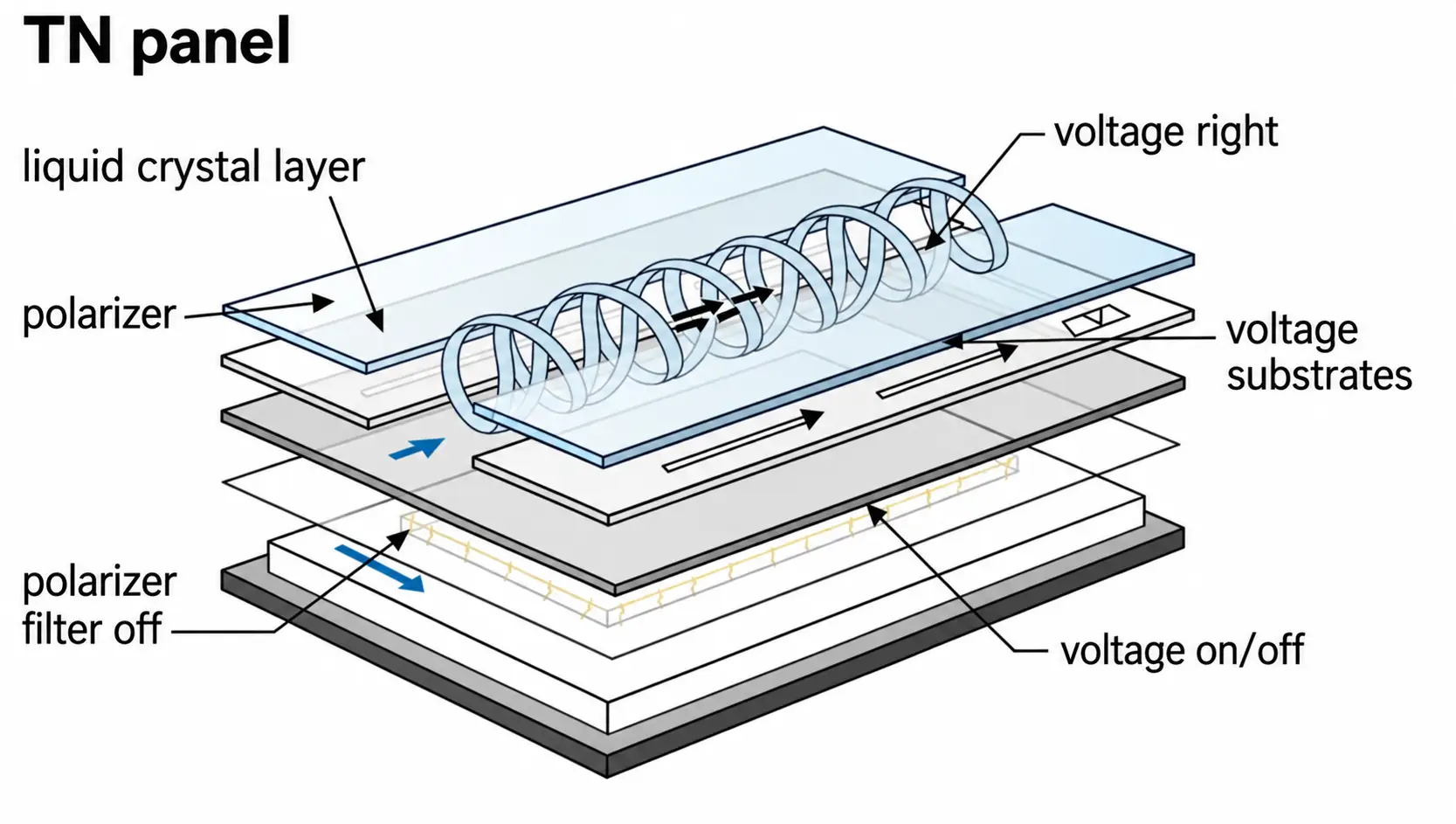
TN panels are still built the same basic way today, just refined with better electronics, faster overdrive circuits, and far higher refresh rates than the original versions from two decades ago. The name itself sounds technical, but in practice it just means a panel that reacts fast and costs less to produce than the alternatives, which is exactly why a TN panel gaming monitor is usually the cheapest option in any given refresh rate bracket. For a closer look at how the twist itself works at a molecular level, Wikipedia has a solid entry on the twisted nematic field effect.
How a TN Panel Works

The Layers Inside a TN Panel
A TN panel is built from several thin layers stacked on top of each other. Light starts at a backlight behind the screen, then passes through a vertical polarizing filter that lines it up in one direction. Next comes a layer of glass with electrodes etched into it, followed by the liquid crystal layer itself, another glass layer with a second set of electrodes, and finally a horizontal polarizing filter that either blocks or allows the light through depending on how the crystals in between are arranged.
Why the Crystals Make Pixels Fast
The liquid crystals sit between the two glass layers in a naturally twisted arrangement, which is where the technology gets its name. When voltage is applied through the electrodes, the crystals untwist by varying amounts depending on the strength of the signal, changing how much light passes through the horizontal filter and reaches your eyes. Because this twisting motion is mechanically simple compared to how other panel types control light, the crystals can shift position faster, which is the core reason TN panels post such quick response times and support such high refresh rates.
TN Panel Specs That Matter on a Gaming Monitor

Response Time
Response time measures how quickly a pixel can shift from one shade of gray to another, usually written as a gray to gray or GtG number in milliseconds. TN panels have historically led every other panel type here, with modern models rated between 0.5ms and 1ms, and some marketing claims pushing that number down to 0.1ms under specific overdrive settings. There is no single industry standard for how this number gets measured, so response time figures from different brands are not always directly comparable, and the real-world result can vary depending on overdrive settings and the specific gray to gray transition being tested.
Refresh Rate
Refresh rate tells you how many times per second the screen redraws the image, and TN panels have long been the technology of choice for pushing this number as high as possible. Mainstream TN gaming monitors commonly sit in the 240Hz to 280Hz range, while dedicated esports models go further still, with some retail panels reaching 540Hz and 600Hz. A handful of monitors advertise numbers above 600Hz through an overclocked mode, which is not the panel’s stock rated speed but an extra setting some manufacturers unlock for players chasing the highest number possible.
Input Lag
Input lag is often confused with response time, but the two are not the same thing. Response time is about how fast the panel itself changes color, while input lag is the delay between an action on your mouse or keyboard and that action actually appearing on screen, which depends heavily on the monitor’s internal processing rather than the panel alone. A TN panel with a fast response time can still have noticeable input lag if the electronics behind it are slow to process the signal, so the two specs need to be looked at separately rather than assumed to move together.
Color and Contrast
This is where a TN panel gives up the most ground. Color gamut coverage typically lands somewhere between 72% and 100% of the sRGB space depending on the specific model, which is a wide range that makes it hard to generalize across every TN monitor on the market. Contrast ratio is usually rated around 1000:1, on the lower end compared to VA panels, which means blacks look closer to dark gray than true black, especially in a bright room.
Bit Depth and Color Banding
Part of why TN color looks flatter than other panels comes down to bit depth. Many TN panels are natively 6-bit rather than true 8-bit, and manufacturers make up the difference through dithering, often labeled FRC, which rapidly alternates between two close shades to simulate colors the panel can’t produce directly. It works well enough for most content, but in smooth gradients, like a sunset sky or a subtle lighting effect in a game, this can show up as visible banding, faint stepped lines instead of a clean transition between shades. True 8-bit TN panels do exist, usually on higher end competitive models, but a 6-bit plus FRC panel remains common at the budget end of the TN lineup.
Viewing Angles
Viewing angles are the most noticeable weak point of any TN panel. Most models are rated around 170 degrees horizontal and 160 degrees vertical, sometimes listed as 160/160, well short of the 178/178 rating that IPS and VA panels typically carry. Move off center, especially looking up or down at the screen, and you will see real color shift along with a washed out look to the image, which is one reason TN monitors are a poor fit for sharing a screen with someone sitting beside you.
Pros and Cons of TN Panels for Gaming
What TN Does Well
The short answer to whether TN panels are good for gaming is yes, specifically for fast, competitive titles where reaction time matters more than visual polish. TN panels lead on response time and refresh rate, they cost noticeably less than IPS or VA panels at the same speed, and their black level performance, while not class leading, tends to hold up reasonably well compared to how weak their color reproduction is.
- Fastest response times available on an LCD panel
- Highest refresh rates, with some models reaching 600Hz
- Lowest price for a given speed tier
- Solid dark scene detail relative to their color weaknesses
Where TN Falls Short
The tradeoffs show up the moment you step outside competitive gaming. Colors look flat and less vivid than IPS or VA, viewing angles are narrow enough that off-center seating is a real problem, and the overall image quality can feel noticeably behind other panel types when you are watching a movie or browsing outside of a match.
- Weakest color accuracy of any common panel type
- Narrow viewing angles with visible color shift off center
- Less vivid, flatter looking colors than IPS or VA
- Not a strong fit for photo or video editing work
TN Panels Outside of Gaming
Gaming is where TN panels get the most attention, but the same speed and price advantage shows up elsewhere too. Budget office monitors often use TN simply because it keeps costs down for tasks like spreadsheets, email, and browsing, where color accuracy and viewing angles rarely matter. TN is also common in lightweight, portable monitor designs, the kind that plug into a laptop over USB-C for a second screen on the go, since the panel is cheap to produce and doesn’t need much power to run. Outside of these budget and portability driven cases though, most general users are better served by an IPS panel, since the color and viewing angle gap becomes far more noticeable once gaming performance is no longer the priority.
Fast TN, Super TN, Esports-TN, and TN Film: What the Labels Mean
Same Panel Type, Different Labels
Walk through any gaming monitor lineup and you will see names like Fast TN, Super TN, Esports-TN, and TN Film scattered across product pages. These are not separate panel technologies with their own standard, they are brand names built on top of the same twisted nematic foundation, refined with tighter manufacturing and faster overdrive tuning.
Fast TN is the term BenQ’s ZOWIE line uses for its competitive gaming panels, Super TN shows up on some of ASUS ROG’s overclocked models, and TN Film is an older label that still turns up in reviews and spec sheets referring to the same basic panel family. None of these names point to a formal industry certification, so two monitors both labeled Fast TN can still perform differently depending on the actual panel supplier and tuning behind them.
Blur Reduction on TN Monitors
Many high refresh rate TN monitors also include a backlight strobing feature designed to cut down on motion blur beyond what raw response time alone can achieve. Brands each use their own name for it, including DyAc and DyAc2 from BenQ, ELMB from ASUS, and ULMB from monitors built around Nvidia’s platform.
These modes work by flashing the backlight rather than leaving it constantly on, which sharpens the appearance of motion at the cost of some brightness, and they usually cannot run at the same time as G-Sync or other adaptive sync features unless the monitor specifically supports switching between them. Some competitive-focused TN monitors, like ASUS’s overclocked Esports-TN models, pair this with a basic HDR certification, though the HDR performance on a TN panel is usually limited given the panel’s lower native contrast.
TN vs IPS vs VA vs OLED for Gaming

| Panel | Response Time | Refresh Rate | Color Accuracy | Best For |
|---|---|---|---|---|
| TN | 0.5-1ms | Highest, up to 600Hz | Weakest | Purely competitive gaming |
| IPS | ~1ms on fast models | High, up to 360Hz | Strong | All-round gaming and general use |
| VA | 2-4ms | Moderate, up to 240Hz | Good, best contrast | Movies and immersive single player |
| OLED | ~0.1ms | Growing fast, up to 500Hz | Excellent | Best overall image quality |
TN vs IPS
The gap between TN and IPS panels has narrowed a lot in recent years. Older IPS panels were noticeably slower than TN, but Fast IPS and Nano IPS variants have closed most of that distance, often landing close enough that the difference is hard to feel during actual gameplay. In exchange, IPS gives you far better color accuracy and viewing angles close to 178 degrees in both directions, which makes it the more well rounded choice for anyone who games and does other things on the same screen. RTINGS has a detailed breakdown comparing the two panel types directly if you want to see how they stack up across more categories.
TN vs VA
VA panels sit closer to TN on price but pull ahead significantly on contrast, producing much deeper blacks thanks to contrast ratios that regularly hit 3000:1 or higher. That strength makes VA a better fit for horror games, atmospheric titles, and movies, though VA panels are slower than TN and prone to smearing in fast, dark scenes, which is exactly the scenario competitive shooters tend to produce constantly.
TN vs OLED
On paper, OLED beats TN in raw response time, with pixel transitions near 0.1ms compared to TN’s 0.5ms to 1ms range, since OLED pixels light up individually instead of relying on liquid crystals to physically move. In practice, some competitive players still argue that a fast TN panel with backlight strobing enabled looks cleaner in motion than OLED without it, since OLED’s sample and hold behavior can introduce its own type of blur even at a high refresh rate. OLED also carries a real cost premium and a risk of burn-in from static elements like a HUD, both of which TN panels are immune to, which is why TN remains common at the budget end of high refresh rate gaming even with faster technology available.
Why Pros Still Use TN Panels
Despite years of predictions that Fast IPS would push TN out of competitive gaming entirely, TN panels remain heavily represented at the top of the esports scene. Usage data collected from professional players across popular FPS titles as of August 2026 shows TN panels making up all five of the most used monitors overall, led by two ZOWIE models that together account for more than a third of all monitors tracked. That pattern holds across CS2, Valorant, Rainbow Six Siege, and Fortnite, where split-second reactions and consistent motion clarity are worth more to a competing player than color accuracy or wide viewing angles.
In CS2, players lean on the fast response time to track close range flicks and read grenade or flash timing without the trailing blur a slower panel can introduce. Valorant’s agent abilities move fast and often rely on precise timing, so a lot of pro players stick with the panel type they trained and competed on rather than switching once they’ve built muscle memory around it.
Models You See Most Often
The names that come up again and again in pro setups and competitive gaming monitor lists include the ZOWIE XL2566K, XL2546K, and XL2586X+, along with ASUS’s ROG Strix XG248QSG and budget-focused options like the KTC 25M1. Most of these share the same basic formula: a 24 to 25 inch 1080p TN panel, a refresh rate between 240Hz and 600Hz, and a price that stays well below comparable IPS or OLED alternatives at the same speed.
Is a TN Panel Gaming Monitor Worth It in 2026?
Whether a TN panel gaming monitor still makes sense depends heavily on what you actually play. Fast IPS panels have closed enough of the speed gap that casual and even semi-competitive players often can’t tell much difference in a blind test, and that has genuinely shrunk TN’s advantage compared to a few years ago. At the same time, data from professional gaming setups shows TN panels still dominating the very top of competitive play, which suggests the remaining gap matters most at the extreme edge of performance rather than for the average player.
Who Should Buy One
A TN panel gaming monitor makes the most sense for players focused almost entirely on fast, competitive titles, especially at 1080p where TN panels are most common and most affordable. If you’re chasing the highest possible refresh rate on a tight budget, or you already know 144Hz to 165Hz feels smooth enough and want to know whether pushing higher is worth chasing, checking whether 120Hz is good enough for gaming first can help set realistic expectations before spending more on a faster panel.
Who Should Skip It
If your time is split between gaming, content, and general use, or you’re gaming at 1440p where fewer TN options exist and Fast IPS panels are just as fast, a TN panel is a harder sell. The narrow viewing angles and flat colors become much more noticeable outside of fast-paced matches, and the price gap between TN and Fast IPS has shrunk enough that the tradeoff is less worth it than it used to be.
How to Tell if a Monitor Has a TN Panel
Manufacturers don’t always advertise the panel type clearly, so it sometimes takes a bit of digging to confirm what you’re actually buying.
- Check the viewing angle spec. A rating of 170/160 or 160/160 almost always means TN, while 178/178 usually points to IPS or VA
- Look at the price relative to the refresh rate. An unusually cheap monitor at a high refresh rate is very likely TN
- Search the exact model number alongside a review site or forum thread, since panel type is often confirmed there even when it’s missing from the retail listing
- Tilt the screen or look at it from below if you already own it. A strong color shift or the image darkening from an angle is a clear TN signature
- Look for the term TN Film in professional reviews, which is an older name still used for the same panel family
Getting the Best Picture From a TN Panel
A few adjustments can meaningfully improve how a TN panel looks day to day. Switching the monitor into its sRGB color mode, if it has one, usually tightens up color accuracy compared to the default vivid preset most monitors ship with. Getting the monitor height and tilt right matters more here than on other panel types, since a TN screen sitting even slightly too high or too low relative to your eyes will show visible color shift. In Windows, confirming the display is actually set to run at its maximum refresh rate is worth double checking, since it sometimes defaults to 60Hz after a driver update. Finally, turning off any in-game motion blur setting lets the panel’s natural speed do the work instead of fighting against an effect the game engine is adding on top.
Common Myths About TN Panels
A few misconceptions about TN panels keep getting repeated even as the technology has improved. The idea that TN colors always look terrible isn’t quite accurate anymore, since sRGB coverage on newer models can reach close to 100% depending on the panel supplier, even if contrast and viewing angles remain weak points.
The claim that OLED has made TN pointless overlooks price and burn-in risk, two factors that keep TN relevant at the budget end of high refresh rate gaming. Another common myth is that TN only shows up on cheap, low quality monitors, when in reality some of the most expensive esports monitors on the market, built around 600Hz panels, are TN through and through. And the assumption that IPS is simply better in every situation doesn’t hold up either, since the real gap between panel types today is smaller than a lot of older articles suggest, and the right choice still comes down to what you actually play.
Frequently Asked Questions
Are TN panels good for gaming?
Yes, particularly for fast, competitive genres like shooters and fighting games where response time and refresh rate matter more than color accuracy or viewing angles.
Are TN panels still worth buying in 2026?
They’re still worth it for players focused on competitive gaming and tight budgets, though Fast IPS panels have closed enough of the speed gap that TN’s advantage is smaller than it used to be for casual play.
Is TN or IPS better for FPS games?
TN still holds a slight edge in raw response time and maximum refresh rate, but Fast IPS panels are close enough now that the difference is hard to notice for most players outside of top level competitive play.
Do pro gamers use TN panels?
Yes, usage data from competitive players in games like CS2 and Valorant shows TN panels still make up the majority of the most used monitors at the professional level.
Are TN panels bad for your eyes?
Not inherently. Eye strain comes down to brightness, flicker, and blue light settings more than panel type, and TN panels perform similarly to other panel types in that regard.
Can you edit photos or video on a TN monitor?
It’s not recommended for serious color work, since TN panels have narrower color gamut coverage and less accurate color reproduction than IPS or VA panels, which can make edited colors look different on other screens.
What is the difference between TN and Fast TN?
Fast TN is a marketing name, not a separate technology. It refers to a twisted nematic panel with tighter manufacturing and faster overdrive tuning, most commonly used by BenQ’s ZOWIE lineup for competitive gaming monitors.
How can I tell if my monitor has a TN panel?
Check the viewing angle specification first, since a rating of 170/160 or 160/160 almost always indicates TN, and confirm with a review site if the panel type isn’t clearly listed by the manufacturer.
Final Thoughts
A TN panel gaming monitor is still one of the fastest, cheapest ways to get into high refresh rate gaming, and it remains a serious choice for players who care about competitive performance above everything else. The tradeoffs in color and viewing angles are real, but for the specific job TN panels were built for, fast, responsive competitive play, they continue to hold their own even against newer panel technology.