If you have shopped for a new screen in the last few years, you have probably run into the letters IPS more than once. It shows up on budget monitors, premium gaming displays and everything in between, and for good reason. IPS has quietly become the default panel choice for a huge chunk of the gaming monitor market, replacing TN in places where TN used to be the only sensible pick.
This guide breaks down what an IPS gaming monitor actually is, why it works so well for play, where it still falls short, and how it stacks up against TN, VA and OLED panels. By the end you will know exactly what to look for before you buy one, and you will understand why the old advice that gamers should avoid IPS no longer holds up the way it used to.
What Is an IPS Panel?
IPS stands for in-plane switching, a type of LCD panel technology built to fix the weak points of older TN screens. Instead of letting liquid crystals twist in a fixed, narrow pattern, an IPS panel arranges those crystals so they rotate in the same plane as the glass substrate. That single design choice is what gives IPS panels their trademark strong colors and wide viewing angles.
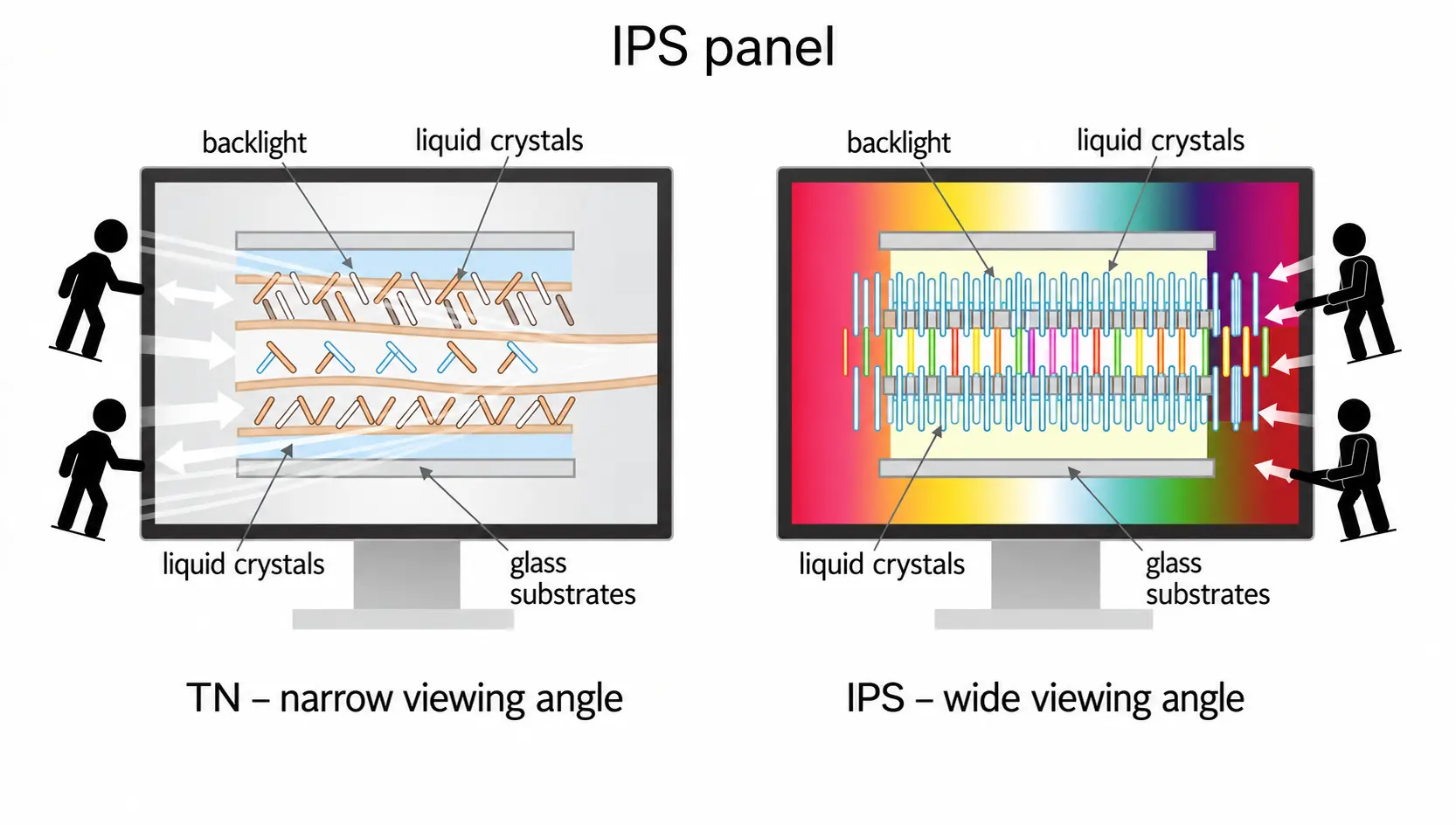
How IPS Technology Works
Every LCD monitor works the same basic way. A backlight shines through layers of polarized filters and liquid crystals, and those crystals twist when voltage is applied to let more or less light pass through. On a TN panel, the crystals sit in a way that only looks accurate when you view the screen dead on. On an IPS panel, the crystals rotate horizontally, within the plane of the glass, so the picture stays consistent even when you are sitting off to the side. That is the whole trick behind why IPS looks so good from almost any angle.
IPS Panel Variations
Not every IPS panel is built the same way under the hood. Over the years the technology has gone through several revisions, each one aimed at fixing a weakness of the last. S-IPS improved on the original design’s slow response, H-IPS pushed contrast a bit further, and e-IPS brought costs down for mainstream monitors. More recent versions like AH-IPS and PLS, which stands for Plane to Line Switching, tightened up brightness and thinness even more. You rarely need to memorize these labels as a shopper, since manufacturers do not always advertise which generation a panel uses, but it explains why two monitors both marketed as IPS can still perform noticeably differently in reviews.
IPS vs IPS-Level Panels
You will sometimes see a monitor advertised as IPS-level instead of plain IPS. That label usually means the panel was not made by LG Display, one of the biggest producers of true IPS glass, so the manufacturer avoids using the IPS name directly for licensing reasons. In most cases the picture quality is close enough that you will not notice a real difference, though panel lottery still plays a part from unit to unit. IPS-level panel technology is explained in more detail if you want the full background on it, including why certain manufacturers avoid the IPS label even when the underlying glass performs almost identically.
Is IPS Good for Gaming?
Yes, a modern IPS gaming monitor is a solid choice for the vast majority of players. A decade ago IPS had a reputation as the slow, non-gamer panel, stuck with high response times and noticeable input lag. That reputation is outdated now. Manufacturers pushed hard on faster pixel response and better overdrive settings, and today you can find IPS gaming monitors with 1ms response times and refresh rates well past 240Hz, matching what TN used to offer almost exclusively.

The tradeoff is smaller than most people expect. You give up a small amount of raw speed compared to the fastest TN panels, and you accept a lower contrast ratio compared to VA, but in exchange you get colors and viewing angles that neither of those panel types can really match. For casual and even competitive gamers who care about how a game looks as much as how fast it reacts, that trade is usually worth it.
Manufacturers know this too, which is why so many mainstream gaming monitor lineups have quietly shifted almost entirely to IPS over the last few product cycles. Where a brand once split its range between a cheap TN model and an expensive IPS model aimed at creative professionals, most of that middle ground now belongs to IPS alone. TN survives mainly at the very bottom of the price range and at the very top of the refresh rate charts, while VA holds on with shoppers who care most about contrast.
Nothing swings the decision more than the games you actually play. Story driven titles, open world games, and anything with detailed environments tend to look noticeably better on IPS because of the color work. Twitch shooters where you are staring at a crosshair for hours are the one category where the older TN advantage still shows up occasionally, though the gap keeps shrinking every year.
It also helps to think about how you use the monitor outside of gaming. If the same screen doubles as a work display, handles photo editing, or gets used for streaming and content creation, IPS earns its keep even faster because those tasks depend heavily on accurate color and consistent brightness across the whole panel.
IPS Gaming Monitor Advantages
An IPS panel brings a handful of clear strengths to the table, and these are the reasons so many gaming monitor lineups now default to IPS instead of TN or VA.
Color Accuracy and Color Gamut
Color is where IPS wins hands down. A typical IPS panel covers close to full sRGB, and many gaming models now stretch into 90 percent or higher DCI-P3 coverage, which makes a real difference in games with rich, colorful worlds. That accuracy is also why IPS remains the standard pick for photo editing and design work, since the colors on screen stay close to what the content creator actually intended.
Wide Viewing Angles
This is the other headline feature. Most IPS panels hold 178 degrees of viewing angle on both the horizontal and vertical axis, meaning the picture barely shifts even if you are sitting well off center. That matters more than people assume, especially if you play with someone next to you on the couch, stream your gameplay on a second screen, or just like to lean back while gaming. TN and even VA panels wash out noticeably at steep angles, while a good IPS panel barely blinks.
Improved Response Time
Response time used to be the weak link for IPS, and it is still the one area where TN keeps a slight edge. Older IPS panels averaged 8ms or more, but current gaming models routinely hit 4ms, and higher end panels with strong overdrive tuning reach 1ms GtG. For a deeper breakdown of what these numbers actually mean for your gameplay, our guide on response time covers how to read the spec sheet properly. In practical terms, the gap between a fast IPS panel and a fast TN panel has shrunk to the point where most players will not notice it during normal play.
Lower Input Lag
Input lag and response time often get mixed up, but they are not the same thing. Input lag measures the delay between your action and the moment it shows up on screen, and modern IPS gaming monitors have made huge strides here too. A well built IPS gaming monitor now sits comfortably under 10ms of input lag, which is fast enough that even fairly quick, reaction heavy games feel responsive.
IPS Gaming Monitor Drawbacks
No panel type is perfect, and IPS has a short list of weaknesses worth knowing before you buy.
Lower Contrast Ratio
IPS panels typically sit around a 1000:1 static contrast ratio, which is noticeably lower than what VA panels manage. In practice this means blacks look more like a dark gray than a true black, especially in a dim room. If you spend a lot of time in horror games or dark, atmospheric titles, this is the one spec where IPS falls behind.
IPS Glow
Nearly every IPS panel shows some amount of what is called IPS glow, a soft white or yellowish haze that appears in the corners of the screen when you are viewing dark content from an angle. It is a normal side effect of how the panel handles backlight, not a manufacturing fault, though it does become more noticeable on larger screens viewed up close.
Motion Blur Compared to TN
Even with better overdrive settings, IPS still tends to show slightly more motion blur than the fastest TN panels during very quick camera movements. Most gamers will not pick up on this difference outside of side by side comparisons, but it is worth knowing if you are chasing the absolute lowest latency for a competitive title.
IPS Glow vs Backlight Bleed
These two issues get confused constantly, but they are caused by completely different things and behave differently on screen. Knowing which one you are looking at can save you from returning a perfectly healthy monitor.
How to Tell Them Apart
IPS glow changes as you move your head or shift your seating position. It shows up as a soft, diffuse haze, usually strongest in the corners, and it fades or moves depending on the angle you are viewing from. Backlight bleed, on the other hand, stays completely fixed in one spot no matter how you move. It tends to look like sharper streaks or blotches of light rather than a soft glow, and it comes from uneven pressure or assembly issues inside the panel rather than the way IPS handles light. Independent testing labs such as RTINGS run dedicated black uniformity tests to separate the two, and their method is a good one to copy at home: load a full black image in a dark room, then move your head side to side while watching the corners.
Is It Normal or a Defect
A small amount of IPS glow is expected and not a reason to return a monitor. It is simply part of how the panel technology works. Backlight bleed is more of a gray area. A faint patch that only shows up on a pure black screen in a dark room is usually within normal tolerance, but a bright streak that is obvious during regular dark scenes in games or movies is worth raising with the seller, especially if the monitor is still under warranty.
IPS vs TN vs VA vs OLED for Gaming
Panel choice always comes down to what you value most.

Here is how the four main options compare across the categories that matter for gaming.
| Panel Type | Color Accuracy | Viewing Angles | Response Time | Contrast |
|---|---|---|---|---|
| TN | Weak | Narrow | Fastest | Average |
| IPS | Excellent | Widest | Fast | Average |
| VA | Good | Good | Average | Best (LCD) |
| OLED | Excellent | Widest | Fastest | Best overall |
IPS vs TN Panels
A TN panel still wins on raw response time and price, which is why budget and ultra high refresh rate esports monitors sometimes still use TN. But the color washout and narrow viewing angles on TN are hard to ignore once you have used a good IPS screen. Unless you are chasing the absolute fastest possible panel for a competitive shooter on a tight budget, IPS is the more balanced pick.
IPS vs VA Panels
A VA panel takes the opposite tradeoff from TN. You get much deeper blacks and higher contrast, which looks fantastic in dark, moody games, but VA panels are more prone to smearing during fast motion because the pixels take longer to transition between shades. IPS handles fast motion more cleanly, while VA handles dark scenes better. Which one wins depends entirely on what you play most.
IPS vs OLED Panels
OLED is the newest challenger and it genuinely beats IPS on most technical specs, including near instant response time, true per pixel blacks and no glow whatsoever. The catch is price and the small but real risk of burn-in with static images like taskbars or HUD elements. IPS remains the safer, more affordable option for anyone who is not ready to pay the OLED premium or worried about long term image retention.
How Much Does an IPS Gaming Monitor Cost
Price is where IPS sits right in the middle of the pack, and that middle position is a big part of why it has become the default choice for so many buyers. Entry level TN monitors remain the cheapest option on the shelf, but the gap has closed a lot as IPS manufacturing has matured. A basic 1080p 144Hz IPS gaming monitor now costs only slightly more than an equivalent TN model, and once you move up to 1440p or higher refresh rates the price difference between IPS and TN becomes almost irrelevant.
VA panels usually land close to IPS in price at the same specs, with the exact number depending more on brand and extra features than panel type alone. OLED still commands a clear premium, often two to three times the cost of a comparable IPS panel, which is the main reason IPS continues to dominate the mid range and even a lot of the high end of the market.
Is IPS Good for Competitive and Esports Gaming?
This is the question that gets debated the most, and the honest answer is that it depends on the game and how serious you are about competing.
IPS for FPS and Fast Paced Games
For most first person shooters and fast paced titles, a modern high refresh IPS panel is perfectly capable. Once you get into 240Hz or 360Hz territory with a properly tuned overdrive setting, the response time gap between IPS and TN becomes small enough that the average player will not feel it in a match. If you want a closer look at how frame rate itself factors into competitive play, our guide on FPS walks through why higher numbers matter and where the returns start to shrink.
When TN or OLED Still Makes More Sense
If you are playing at the very top level of competitive gaming, where every fraction of a millisecond genuinely counts, the fastest TN panels or the newest OLED gaming monitors still hold a slight edge in raw pixel response. For everyone else, including the huge majority of ranked and casual competitive players, a well built IPS gaming monitor will not be the reason you lose a match.
What to Look for in an IPS Gaming Monitor
Not all IPS panels are built the same, so it helps to know which specs actually matter before you spend your money. If you want a broader rundown that covers panel type alongside every other spec, our full guide on choosing a gaming monitor is a good place to start.

Refresh Rate
Refresh rate decides how many times per second the image updates, and it has a direct effect on how smooth motion feels. Most IPS gaming monitors now start around 144Hz, with higher tier models pushing 240Hz or beyond. Our refresh rate guide explains how to match this number to the kind of games you actually play.
Response Time and Overdrive
Look for a stated gray to gray response time, and if possible read independent reviews rather than trusting the number printed on the box alone. Overdrive settings can push a panel faster, but pushed too far they introduce overshoot and inverse ghosting, so the best monitors usually offer a middle overdrive setting rather than the most aggressive one.
Resolution and Screen Size
IPS panels are available at every resolution from Full HD up to 4K, and the right choice depends on your graphics card as much as your monitor budget. A higher resolution panel needs more GPU power to hit high frame rates, so it is worth checking our 4K resolution guide before committing to a bigger, sharper screen than your hardware can comfortably drive.
Adaptive Sync
Almost every current IPS gaming monitor supports some form of variable refresh rate, whether that is G-Sync or the AMD equivalent. This keeps your frame rate and refresh rate in sync to cut down on screen tearing, and it is one of the easier specs to check since most manufacturers list it clearly on the product page.
Does IPS Have Burn-In Risk?
One advantage that often gets overlooked is that a standard IPS panel does not carry the burn-in risk that OLED panels do. Because IPS relies on a traditional LED backlight rather than individually lit pixels, leaving a static image like a game HUD or a desktop taskbar on screen for long periods will not permanently mark the panel the way it can on OLED. Independent testing of IPS panel burn-in risk confirms this as one of the clearer practical benefits of sticking with IPS if you also use your monitor for long productivity sessions alongside gaming, since a desktop left open for hours will not leave any permanent trace on the panel.
Who Should Buy an IPS Gaming Monitor
An IPS gaming monitor makes the most sense if you play a wide mix of game genres rather than sticking to one competitive shooter, if you also use the same screen for browsing, streaming, photo work or general productivity, or if you simply want a picture that looks good from more than one seating position. It is also the safer pick if you are worried about burn-in but still want faster motion handling than a VA panel offers. It makes less sense if your entire gaming life revolves around ranked competitive play at the highest level, where every last fraction of a millisecond in response time genuinely changes outcomes, or if deep, rich blacks in dark atmospheric games matter more to you than fast motion clarity.
Final Verdict: Should You Buy an IPS Gaming Monitor?
For the large majority of gamers, an IPS gaming monitor is the smartest all around choice available right now. You get color and viewing angles that TN cannot match, motion handling that beats VA in fast paced games, and a price that still sits well below OLED. The only gamers who should look elsewhere are those chasing the absolute fastest response time for top level esports, or anyone who wants the deepest possible blacks for dark, cinematic games. Everyone else will be well served by a good IPS panel.
Before you check out, take a moment to think about how the monitor fits into the rest of your setup. Refresh rate, resolution and adaptive sync all work together with panel type to decide how a game actually feels once you sit down and play, so it rarely makes sense to judge a monitor on panel technology alone. A well matched combination of a solid IPS panel with the right refresh rate for your graphics card will beat a monitor chosen for a single standout spec almost every time.
The panel technology debate also keeps shifting as prices drop and manufacturing improves, so specs that felt like a compromise two or three years ago are often standard today. Checking recent, independently tested numbers rather than relying on old assumptions about IPS being slow will save you from overpaying for speed you do not actually need.
Frequently Asked Questions
Is IPS better than TN for gaming?
For most players, yes. IPS gives up a small amount of raw response time but makes up for it with far better color accuracy and viewing angles. TN only pulls ahead for players chasing the absolute lowest input lag in top tier competitive play.
What is a good response time for an IPS gaming monitor?
Anything between 1ms and 4ms GtG is considered strong for current IPS panels. Pair that with a refresh rate of at least 144Hz for the smoothest overall experience.
Does every IPS monitor have glow?
Almost all IPS panels show some level of glow in dark scenes viewed from an angle. It varies in intensity between units and brands, but a small amount is completely normal and not a sign of a faulty panel.
Can IPS keep up with 240Hz or 360Hz gaming?
Yes, modern high end IPS panels are available at both 240Hz and 360Hz, with response times fast enough to take full advantage of those refresh rates in most games.
Is IPS or VA better for dark room gaming?
VA generally looks better in a dark room thanks to its higher contrast ratio and deeper blacks. IPS still holds an advantage in fast paced scenes where VA can show smearing.