Resolution is one of the first specs you see on any gaming monitor listing, right next to price and screen size. A full hd gaming monitor is still one of the most common choices on the market, even with 1440p and 4K panels getting cheaper every year. Below we break down what Full HD and 1080p actually mean, how this resolution stacks up against higher standards, and who should still be buying one.
What Does Full HD (1080p) Mean?
Full HD refers to a resolution of 1920 x 1080 pixels, which works out to a little over two million individual pixels on screen. Each pixel is a single point of light that carries color information, and the total count directly affects how sharp and detailed the image looks.
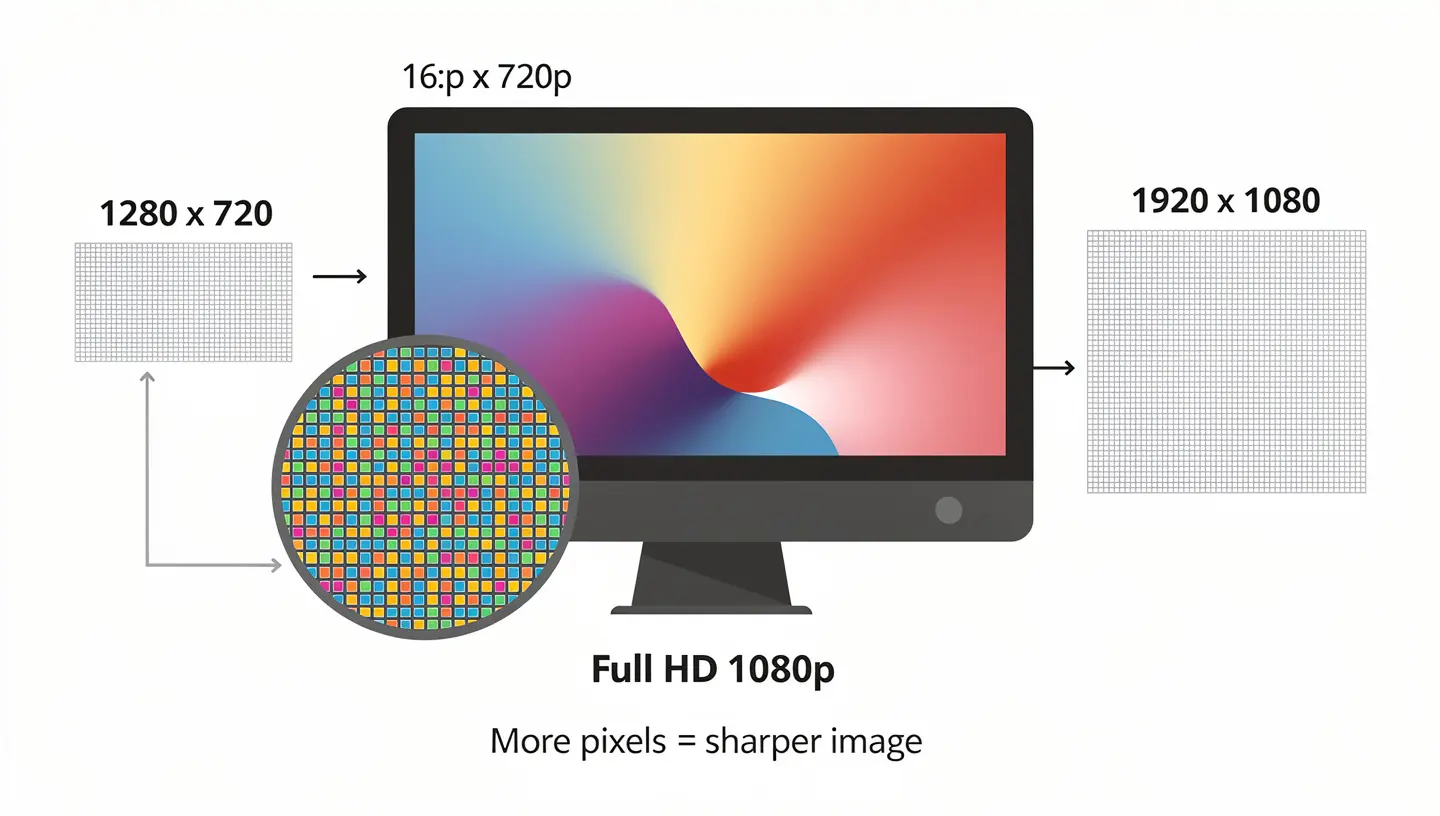
The number 1080 refers to the vertical pixel count, while the letter “p” stands for progressive scan, meaning the display draws a full frame at once instead of splitting it into two passes. This is why 1080p looks noticeably cleaner than the older interlaced format, 1080i, which can show combing artifacts during fast motion. Almost no modern monitor uses interlaced scanning anymore, so 1080p and Full HD are treated as the same thing.
Before Full HD became the standard, 720p was the most common resolution on budget displays, at 1280 x 720 pixels. The jump to 1080p nearly doubled the pixel count and gave a real boost in sharpness, which is why Full HD held onto the title of the default resolution for so long. Today it sits at the entry point of the resolution ladder, but the basic rule still applies: more pixels mean a sharper picture and a heavier load on the graphics card.
Full HD panels almost always use a 16:9 aspect ratio, the same shape used by televisions, streaming platforms, and most video content. That consistency is part of why Full HD stuck around as the baseline resolution for monitors, laptops, and mid-range TVs for over a decade.
1080p vs 1440p vs 4K: Which Gaming Monitor Resolution Should You Choose
Once you decide you want a gaming monitor, the real decision usually comes down to resolution rather than whether to buy one at all. There are three resolutions that dominate the market right now, and each one makes sense depending on your budget, screen size, and graphics card.

1080p (Full HD): The Competitive Gaming Standard
Full HD remains the most widely used resolution among budget and mid-range gaming setups. Because there are fewer pixels to render, even a modest graphics card can push a high frame rate at this resolution. That matters a lot in competitive shooters and esports titles, where reaction speed counts for more than raw image sharpness, and it is also why 1080p monitors tend to be the cheapest option on the shelf.
1440p (QHD): The Sweet Spot
At 2560 x 1440 pixels, QHD gives you a noticeably sharper image than 1080p while staying well short of the GPU demands of 4K. It is a popular pick for players who already own a solid graphics card and want more visual detail without paying for a 4K panel and the hardware needed to drive it. You can read more about this resolution in our guide to 2K resolution, which covers how it compares to both Full HD and 4K in practice.
This resolution is especially appealing for gamers who already have a capable graphics card and want to get more out of it without jumping straight to the priciest tier of monitors. Pairing a 27 inch screen with QHD is now considered one of the more balanced setups on the market, since it delivers a clearly sharper image than Full HD while still allowing a solid frame rate in most modern titles.
4K UHD (3840×2160): Maximum Visual Fidelity
4K packs four times as many pixels as Full HD, which produces an extremely sharp and detailed image, especially on screens 27 inches and larger. That sharpness comes at a cost though, since a graphics card needs to work much harder to keep frame rates high at this resolution, often requiring one of the newest cards on the market. For a full breakdown, see our guide on 4K resolution, including when it actually makes sense for gaming rather than just watching movies.
There is also 8K, but it remains mostly limited to TVs and professional work, since even flagship hardware struggles to run modern games at that pixel count without heavy compromises to frame rate.
| Resolution | Pixel Count | Recommended GPU Tier | Ideal Screen Size |
|---|---|---|---|
| 1080p (Full HD) | 1920 x 1080 | Entry to mid-range | 24 to 27 inches |
| 1440p (QHD) | 2560 x 1440 | Mid to high-range | 27 to 32 inches |
| 4K (UHD) | 3840 x 2160 | High-end to flagship | 32 inches and larger |
Beyond 4K: 5K and Ultrawide Monitors
For specialized creative work and productivity, some monitors go past 4K entirely. 5K panels, at 5120 x 2880 pixels, are mostly aimed at content creation and professional editing rather than gaming, since the rendering demands at that pixel count go beyond what most consumer graphics cards can sustain at a playable frame rate.

Ultrawide monitors take a different approach. Instead of adding more vertical resolution, formats like 3440 x 1440 and 5120 x 1440 stretch the image horizontally, giving you more screen real estate without pushing GPU demand as high as a full 4K panel would. These are popular for immersive single-player games and for anyone who splits their screen between a game and other windows, though they are a step outside the core 1080p versus 1440p versus 4K comparison most gaming monitor shoppers are making.
Why Full HD Gaming Monitors Are Still Popular
Even with all the talk about moving to higher resolutions, a full hd gaming monitor still has real advantages that keep it relevant. The biggest one is the balance between performance and price. Fewer pixels mean less strain on the graphics card, so even a mid-range build can hit a high and stable frame rate without needing an expensive upgrade.
This matters most in competitive shooters and other fast-paced titles, where serious and professional players often choose a lower resolution on purpose to squeeze out the highest possible frame rate and the lowest input lag. It is not unusual to see top esports competitors using 1080p monitors with extremely high refresh rates rather than switching to a sharper but slower setup.
AI upscaling has also changed the picture in recent years. Technologies like DLSS and FSR let games render internally at a lower resolution, such as 1080p, and reconstruct a sharper image through machine learning, which stretches the usefulness of a Full HD panel even further and can make the frame rate advantage even bigger.
On top of that, Full HD monitors are available in an enormous range of options, from entry-level models to high-end gaming displays loaded with extra features, so there is a fitting choice no matter what budget you are working with.
Refresh Rate on Full HD Gaming Monitors
Refresh rate, measured in hertz (Hz), tells you how many times per second a monitor redraws the image. Standard displays run at 60 Hz, while gaming monitors now commonly offer 144 Hz, 240 Hz, and even 360 Hz. A higher refresh rate produces smoother motion and less blur during fast action, which is especially noticeable in games with a lot of camera movement.
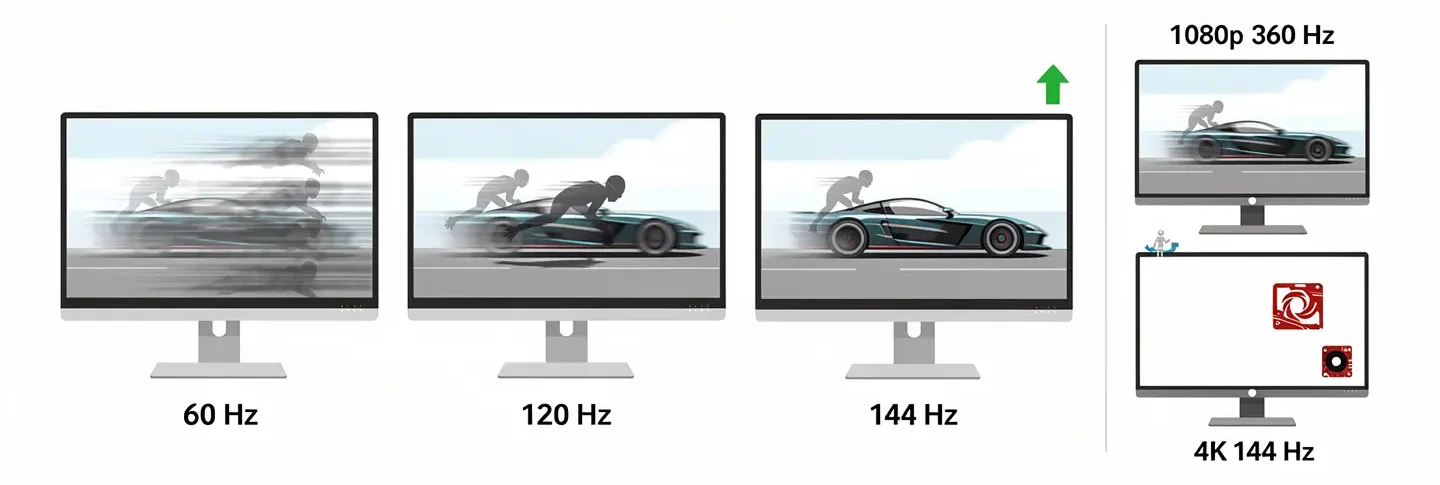
Because rendering fewer pixels takes less processing power, Full HD monitors can hit much higher refresh rates than monitors running at 1440p or 4K. That is why 360 Hz and higher options exist mainly at 1080p, while the same numbers on a 4K panel are still rare and require serious hardware to actually use. For more detail on how this spec affects gameplay, check our guide to refresh rate, which explains the practical difference between the common tiers.
This naturally raises the question of how much refresh rate is actually enough. For most players and genres, jumping from 60 Hz to 120 Hz or 144 Hz is a huge, easy to notice improvement, while the gap between 144 Hz and 240 Hz becomes harder to spot for the average person, even though it still matters at a competitive level. Plenty of casual and story-driven gamers never feel the need to go past 120 Hz, since the smoothness at that point already feels like a massive step up from a standard 60 Hz screen, and pushing further mostly benefits players chasing every possible edge in fast, twitch-based games. If you are on the fence about whether you even need that much, our guide on is 120Hz good for gaming walks through when that number is already more than enough.
A higher refresh rate is only useful if the game and graphics card can actually produce enough frames per second to match it. A 240 Hz monitor paired with a card that can only output 100 frames per second in a given title is not getting anywhere near its full value.
Response Time and Adaptive Sync
Response Time Explained
Response time measures how quickly a pixel can change color, and it is measured in milliseconds. The lower the number, the less motion blur you see during fast scenes, like quick camera turns or sprinting through an environment. Gaming monitors typically list response times between 1 and 5 milliseconds, while ordinary office monitors are usually much slower and not built with fast motion in mind. Our full guide to response time covers how manufacturers measure this spec and why the numbers on the box are not always directly comparable between brands.

A low response time on its own does not guarantee a great gaming experience, since panel type and refresh rate both play a big role in how the image actually looks in motion. Still, for fast and demanding games, a quick response time is close to essential if you want a clear, readable picture at all times.
G-Sync and FreeSync on 1080p Monitors
Fast-paced games often cause a visual issue known as screen tearing, where part of the image does not line up with the rest because the graphics card and monitor are not synced on frame count. This gets worse when the frame rate jumps around a lot during gameplay, since the monitor simply cannot keep pace with the changes. Technologies like FreeSync and G-Sync solve this by matching the monitor’s refresh rate to whatever frame rate the graphics card is producing at that exact moment. The result is a smooth image with no tearing or stutter, even during demanding scenes. Read more in our guide on FreeSync, and Nvidia G-Sync offers a similar solution on compatible monitors.

Without one of these technologies, even a monitor with a great refresh rate and fast response time can feel choppy and inconsistent, especially in open-world games where the frame rate tends to swing based on how much is happening on screen.
Best Screen Size for a Full HD Gaming Monitor
Screen size and resolution are closely linked. Full HD looks its best on screens between 24 and 27 inches, where pixel density stays high enough that the image still looks sharp and clean. On smaller 24 inch screens, this resolution is especially popular with competitive players since it lets you sit closer to the monitor without losing detail, and it keeps the whole scene inside your field of view, which matters a lot in first-person shooters.
Once you stretch that same resolution across a 32 inch panel or larger, pixel density drops and the image can start to look soft, particularly with text and fine in-game details. That is why bigger screens usually call for a jump to 1440p or 4K, so the pixel count keeps pace with the larger surface area.
Screen shape matters too. Alongside flat panels, curved monitors have grown more popular for the sense of immersion they add, and some players find they reduce eye strain during long sessions. If that sounds interesting, our guide on whether curved monitors are good for gaming covers when curvature actually adds something and when it does not make much difference.
Panel Types for Full HD Gaming Monitors: TN vs VA vs IPS
Resolution is not the only thing that shapes image quality. The type of panel inside the monitor plays a big role too, and there are three main types on the market, each with its own trade-offs.

TN panels are the cheapest option and offer the fastest response times, which is why they were the go-to choice for competitive gamers for years. The downside is weaker viewing angles and less vivid color compared to other panel types, so the image can look washed out if you are not sitting dead center.
VA panels stand out for their strong contrast and deep black levels, though they usually come with a slightly slower response time than TN panels. They are a solid pick if you care about rich, dark scenes, such as in horror games or titles with a lot of shadow detail.
IPS panels offer the best colors and the widest viewing angles, and modern IPS response times have closed much of the gap with TN panels. That combination has made IPS the default choice for most gaming monitors today, regardless of price point or resolution. Our full breakdown is available in the guide to IPS panels, which covers the advantages over older panel technology in more detail.
- TN panel – fastest response time, lowest price, weaker viewing angles
- VA panel – best contrast, moderate response time
- IPS panel – best colors and viewing angles, now competitive response times
HDR and Extra Features on Full HD Monitors
HDR improves the contrast and color range a monitor can show, making bright areas brighter and dark areas deeper and more detailed. On Full HD gaming monitors, HDR support is usually fairly basic, since panels in this price range rarely include the hardware needed for the kind of contrast that a stronger HDR standard demands.
Outside of HDR, it is worth checking brightness, measured in nits, along with features like blue light reduction and flicker-free backlighting, which make long gaming sessions easier on your eyes. None of these are essential for image quality on their own, but they do add up to a more comfortable experience during extended play.
Pros and Cons of a Full HD Gaming Monitor
Before making a final call, it helps to weigh both sides of this resolution so you know whether it actually fits your setup and how you play.
On the plus side, Full HD monitors are affordable, easy on the graphics card, capable of very high frame rates, and available with high refresh rates at prices that would be much higher at 1440p or 4K. They are also a great match for an older or budget system, letting you keep gaming comfortably without spending money on a full hardware upgrade. The sheer number of models on the market keeps competition high among manufacturers, which tends to push prices down and features up.
On the downside, the main tradeoff is reduced sharpness compared to 1440p or 4K, which becomes noticeable on screens larger than 27 inches. Some gamers see this resolution as outdated, though in practice it still delivers a perfectly good experience, particularly in competitive titles where speed matters more than fine detail. If you also plan to use the monitor for photo or video work, the extra pixels at higher resolutions give a real, visible advantage that Full HD cannot match.
Common Full HD Misconceptions
A higher refresh rate makes the resolution higher
This is not true. Refresh rate and resolution are separate specs. A 1920 x 1080 monitor is still 1080p whether it runs at 60 Hz or 360 Hz. Bumping up the hertz number improves motion smoothness, not pixel count.
Any monitor labeled “HD” is Full HD
Not always. Plain “HD” can refer to 720p as well as 1080p. If the listing does not clearly state 1920 x 1080 or 1080p, do not assume it is Full HD.
All 1080p monitors look the same
Two Full HD monitors can look very different from each other. Panel type, brightness, contrast, color accuracy, and response time all vary between models, so resolution alone does not tell you much about overall image quality.
A 1080p monitor can display native 4K content
It cannot. A 1080p panel can accept and downscale a 4K signal, but the screen is still limited to its own 1920 x 1080 pixel grid, so you never actually see the extra detail that native 4K would show.
Who Should Buy a Full HD Gaming Monitor
A full hd gaming monitor makes the most sense for budget-conscious gamers who want strong performance without spending extra on a high-end graphics card. It is also a smart pick for competitive and esports players who care more about frame rate and low latency than maximum sharpness, since this resolution lets them fully use a monitor with a very high refresh rate.
This resolution also works well for anyone playing mostly older or less demanding games, where a higher resolution would not add much to the experience but would still put extra strain on the hardware and cut into frame rate. For players building their first gaming setup, going with Full HD frees up budget to put toward a stronger graphics card or processor instead, which usually pays off more than a sharper monitor would.
In short, if your build is on the modest side or you play games where speed beats detail, a Full HD monitor is still a completely reasonable choice.
What to Check Before Buying a Full HD Gaming Monitor
Once you have settled on the resolution, it is worth running through a few checks so you are not disappointed after the purchase. Start by confirming which ports your monitor and PC support, since that determines whether you can actually use the full refresh rate and resolution the panel offers. HDMI and DisplayPort are the most common connections today, while older VGA and DVI ports can limit how high a refresh rate you are able to run.
- Check the panel type and whether it fits your play style
- Pick a refresh rate that matches what your graphics card can realistically deliver
- Pay attention to response time, especially for fast and competitive games
- Confirm whether the monitor supports FreeSync or G-Sync
- Match the screen size to the space you actually have on your desk
- Check available ports and compatibility with your PC or console
- Consider extras like an adjustable stand or VESA mount compatibility
A full walkthrough of the entire buying process, including the questions worth asking yourself before you spend any money, is covered in our guide on how to choose a gaming monitor, which pulls together everything discussed in this article into one place.
After picking a model, it is worth comparing a few retailers and watching for sales, since prices on Full HD gaming monitors shift fairly often throughout the year. Also check the warranty and support policy, since a monitor is something you will use daily for years, and the manufacturer’s reliability matters just as much as the spec sheet. For a broader look at how 1080p stacks up against other resolutions heading into this year, Newegg’s gaming monitor resolution guide is a solid reference point alongside everything covered here.
How to Connect a Full HD Gaming Monitor to Your PC
Even the right monitor will not perform well if it is not connected the right way. HDMI is the most common connection and works fine for 1080p at most refresh rates, but older HDMI versions can cap out before reaching 240 Hz or higher, so it is worth checking which HDMI version both your monitor and graphics card support. DisplayPort is generally the safer choice for pushing the highest refresh rates a Full HD panel can offer, since it has more bandwidth headroom than older HDMI standards.
Once everything is physically connected, you will usually need to set the resolution and refresh rate manually in your graphics driver or display settings, since some setups default to a lower refresh rate until you tell them otherwise. A full walkthrough of this process, including how to troubleshoot a blank screen or a refresh rate that will not stick, is available in our guide on how to connect a gaming monitor to a PC.
Quick Decision Guide
- Choose 1080p if: competitive gaming at the highest possible frame rate is your priority, or your graphics card is entry-level to mid-range
- Choose 1440p if: you want a clear step up in sharpness without the GPU demands of 4K, especially on a 27 to 32 inch screen
- Choose 4K if: visual detail matters more than raw frame rate, you own a high-end graphics card, and your monitor is 32 inches or larger
Frequently Asked Questions
Is 1080p the same as Full HD?
Yes, they refer to the exact same resolution. Full HD is the consumer-friendly name, while 1080p is the technical term for 1920 x 1080 pixels displayed using progressive scan.
Is 1080p good enough for gaming?
For most budget and mid-range setups, yes. It is easier to run than 1440p or 4K, and 1080p monitors are widely available with very high refresh rates, which makes this resolution a strong pick for competitive and esports titles.
Is 1080p better than 1440p for competitive gaming?
For pure frame rate, 1080p usually wins, since fewer pixels mean the graphics card can push higher and more consistent numbers. If sharpness matters more to you than the last few frames per second, 1440p is the better all-around choice.
What screen size is best for a 1080p gaming monitor?
A screen between 24 and 27 inches is considered the sweet spot, since pixel density stays high enough for a sharp image at that size without needing to bump up resolution.
Does a full hd gaming monitor support high refresh rates like 240Hz?
Yes, and it does so more easily than higher resolutions. Because Full HD requires less processing power, monitors at this resolution can reach 240 Hz, 360 Hz, or higher at prices far below what similar refresh rates cost at 1440p or 4K.
Is a Full HD monitor worth it with a powerful graphics card?
It can be, especially for players chasing the highest possible frame rates in competitive titles. A strong graphics card paired with Full HD can push well past 240 frames per second in many esports games, which is exactly the kind of performance serious competitive players look for.
Which panel type should I pick for a Full HD gaming monitor?
For pure competitive play, TN panels still make sense because of their speed, but IPS panels now offer nearly the same response times with much better color and viewing angles, making them the better overall pick for most people.