“8K resolution” gets thrown around a lot in monitor ads, but most buyers still don’t know what it actually changes on screen. In simple terms, an 8K gaming monitor displays 7680 x 4320 pixels, which works out to roughly 33 million pixels in total. That is four times the pixel count of a 4K screen and sixteen times more than standard 1080p. On paper, that sounds like the obvious upgrade for anyone building a serious gaming setup. In practice, the picture is a bit more complicated, because resolution alone does not decide how good a gaming monitor feels to actually play on. This guide breaks down what 8K resolution really means, how it affects games specifically, what hardware you need to run it, and whether it makes sense for your setup right now or if you are better off putting that budget somewhere else.
What Is 8K Resolution, Exactly?
Resolution describes the number of pixels that make up the image on your screen, expressed as width by height. An 8K display has a resolution of 7680 x 4320 pixels, meaning there are 7680 pixels running across the screen and 4320 pixels running down it. Multiply those two numbers together and you get roughly 33.2 million individual pixels building every frame you see.
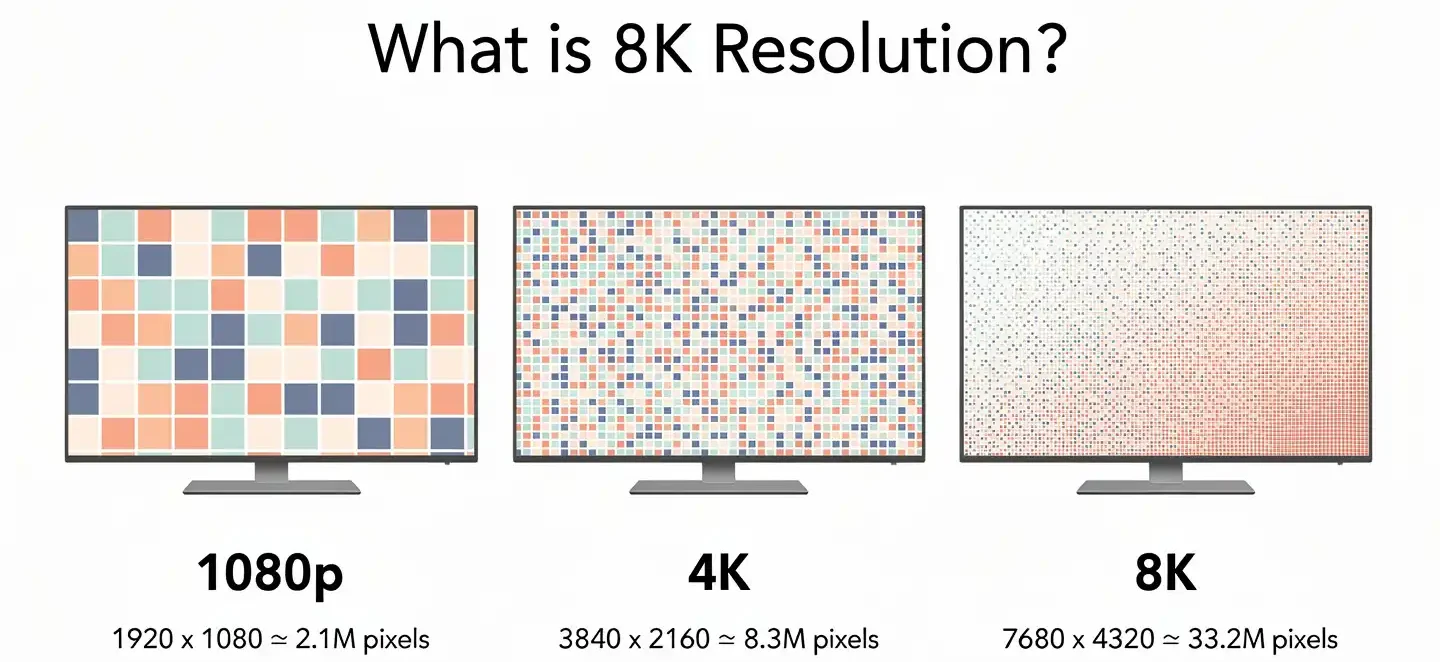
That is a large jump compared to 1080p, which uses about 2.1 million pixels, and 4K, which uses about 8.3 million. More pixels packed into the same screen size means each pixel is smaller and harder to spot individually, which is part of what gives high resolution displays their sharper look.
Why Is It Called 8K?
The “8K” name comes from the horizontal pixel count, which sits close to 8,000 pixels across. This naming pattern is not new. 4K got its name the same way, since 3840 pixels rounds up close enough to 4,000. 8K resolution actually comes in two versions. Standard 8K UHD, the version used in monitors and TVs, keeps the familiar 16:9 aspect ratio at 7680 x 4320. The other version, 8K DCI, is used in digital cinema projection and runs slightly wider at 8192 x 4320 (see 8K DCI resolution for the technical distinction). Almost everything sold to consumers, including every 8K gaming monitor on the market, uses the UHD version.
8K Resolution in Numbers
Numbers make the jump from 4K to 8K easier to picture. Here is how the common resolutions stack up against each other.

| Resolution | Pixel dimensions | Total pixels | Common name |
|---|---|---|---|
| 1080p | 1920 x 1080 | about 2.1 million | Full HD |
| 1440p | 2560 x 1440 | about 3.7 million | 2K / QHD |
| 2160p | 3840 x 2160 | about 8.3 million | 4K UHD |
| 4320p | 7680 x 4320 | about 33.2 million | 8K UHD |
Going from 1080p to 4K resolution already quadruples the pixel count, and going from 4K to 8K quadruples it again on top of that. That compounding effect is why 8K files, game textures and video frames end up so much heavier than 4K content, both to store and to render. A single 8K screenshot can be four times the file size of the same shot taken at 4K. The same math applies to your graphics card. Every frame your GPU renders at 8K contains four times more pixel data than the same frame at 4K, which is the main reason 8K gaming demands so much more raw processing power than most people expect.
8K vs 4K vs 1080p: What Actually Changes on Screen
More pixels do not automatically mean a better gaming experience. What resolution mainly changes is detail and sharpness, not motion smoothness, input response or color performance. A jump from 1080p to 4K is easy to notice on a normal desk, because text sharpens up, jagged edges disappear and small details in the distance become readable. The jump from 4K to 8K is far more subtle for most viewing distances and screen sizes, since the human eye simply cannot resolve that much extra detail once you are sitting more than two or three feet away from a 27 to 32 inch panel.

Sitting closer, or moving up to a much larger screen, is really the only way most people notice the difference between 4K and 8K in daily use. If you regularly zoom into photos, inspect video frames one by one, or work with dense visual files, the extra pixels start to earn their keep. If your main use case is competitive gaming, the story looks different, and a 1440p or 4K panel with a much higher refresh rate will usually feel better than 8K running at a low refresh rate.
How 8K Resolution Works on a Gaming Monitor
Whether 8K resolution looks sharp on your desk depends heavily on pixel density, not just the raw pixel count. Pixel density is usually measured in pixels per inch, or PPI, and it tells you how tightly packed those millions of pixels actually are on a given screen size. An 8K panel at 27 inches packs an extremely high PPI, well beyond what most people can perceive at typical desk viewing distances.
Put that same 8K resolution on a 65 inch television and the PPI drops considerably, even though the pixel count stays identical, because the same number of pixels is now spread across a much larger surface. This is exactly why an 8K TV viewed from across a living room can look similar to a 4K set from the same distance, while an 8K monitor viewed up close at a desk shows a genuinely sharper image.
Viewing Distance: Can You Actually See the Difference?
Viewing distance decides more about perceived sharpness than most buyers realize. At a typical desk distance of around 20 to 28 inches, a well made 27 to 32 inch 4K monitor already looks crisp enough that most people struggle to pick out individual pixels, a pattern backed up by independent research into pixels per degree of vision.
Pushing past that to 8K mainly helps once you sit closer than about 24 inches from a large panel, or once the screen itself grows past 40 inches, since both situations put more pixels within your direct line of sight. For a typical gaming desk setup, where the monitor sits an arm’s length away, the practical benefit of 8K resolution shrinks quite a bit compared to what the spec sheet promises. This does not mean 8K is pointless. It means the sharpness gain is tied closely to how you actually sit and what size screen you are running, not to the resolution number by itself.
Key Features of an 8K Gaming Monitor
Resolution is only one spec among several that decide whether an 8K gaming monitor actually performs well during real gameplay. Refresh rate, response time, panel type, HDR support and the ports on the back of the monitor all affect how a game looks and feels just as much as pixel count does. Before buying into 8K, it helps to understand each of these pieces separately, since a monitor that nails resolution but falls short elsewhere can end up feeling worse to play on than a sharp 4K screen with stronger fundamentals.
Refresh Rate and Response Time
Refresh rate measures how many times per second your monitor draws a new image, and it plays a much bigger role in how smooth a game feels than resolution does. Most 8K gaming monitors on the market today top out around 60Hz, largely because pushing that many pixels at higher refresh rate numbers requires bandwidth and processing power that current hardware struggles to deliver reliably. Compare that to a 4K gaming monitor running at 144Hz or higher, and the difference in motion clarity during fast paced games becomes obvious almost immediately, even though the 4K screen has fewer total pixels.
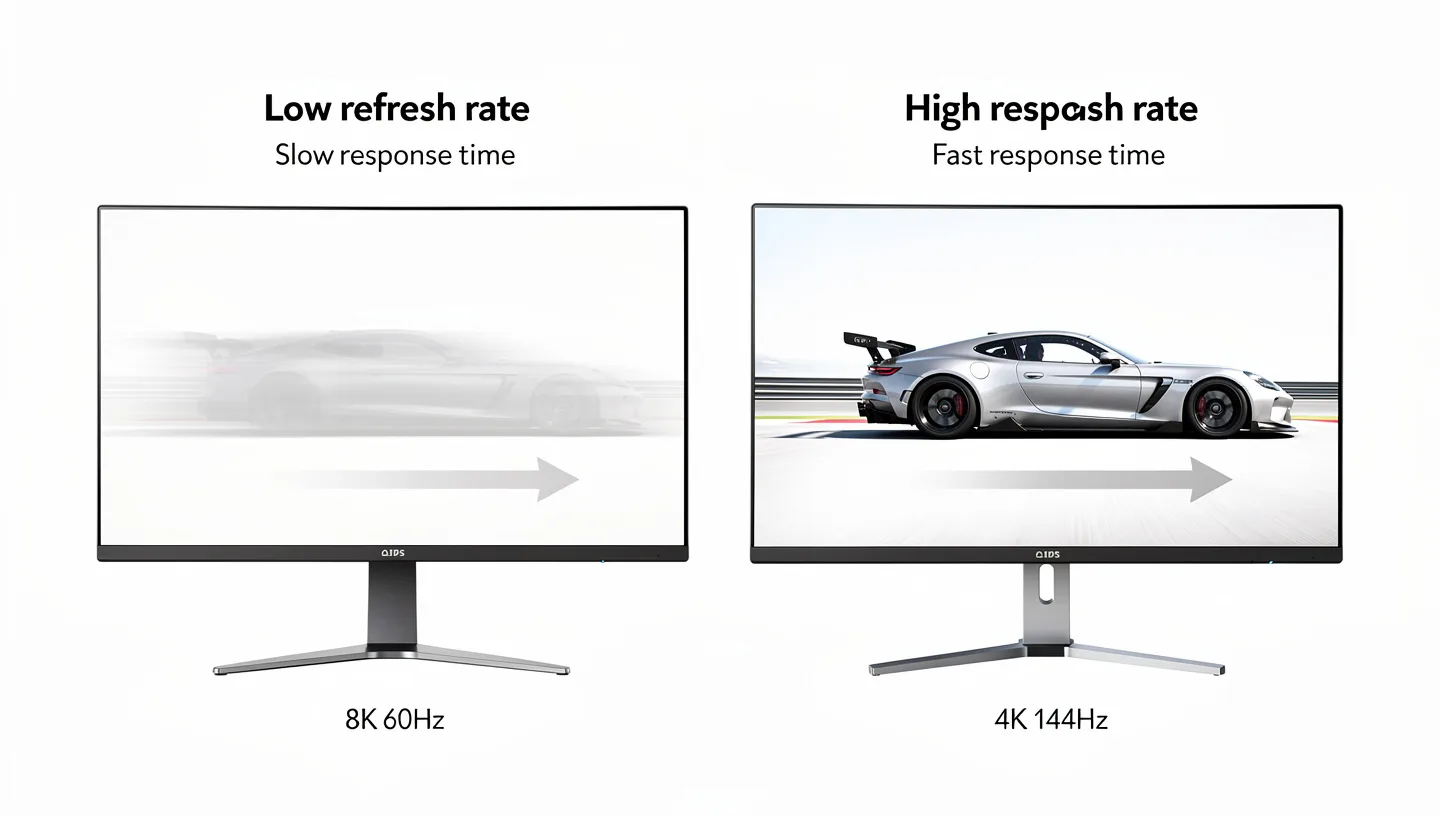
For competitive shooters, racing games and anything involving quick camera movement, that gap in refresh rate usually matters more than the extra sharpness 8K provides. Response time is the other half of this picture. It measures how quickly a pixel can shift from one color to another, and a slow response time can cause trailing or ghosting behind fast moving objects no matter how high the resolution is set. A monitor with a sharp 8K panel and a sluggish response time will still look smeared during fast action, which is why refresh rate and response time deserve just as much attention as resolution when shopping for a gaming monitor.
HDR Support
High dynamic range, or HDR, controls how well a monitor handles the gap between the brightest highlights and the darkest shadows in a scene. On an 8K panel, strong HDR support tends to matter more for how impressive a game looks than the extra pixel count does, since it affects contrast, color range and how believable lighting appears on screen.
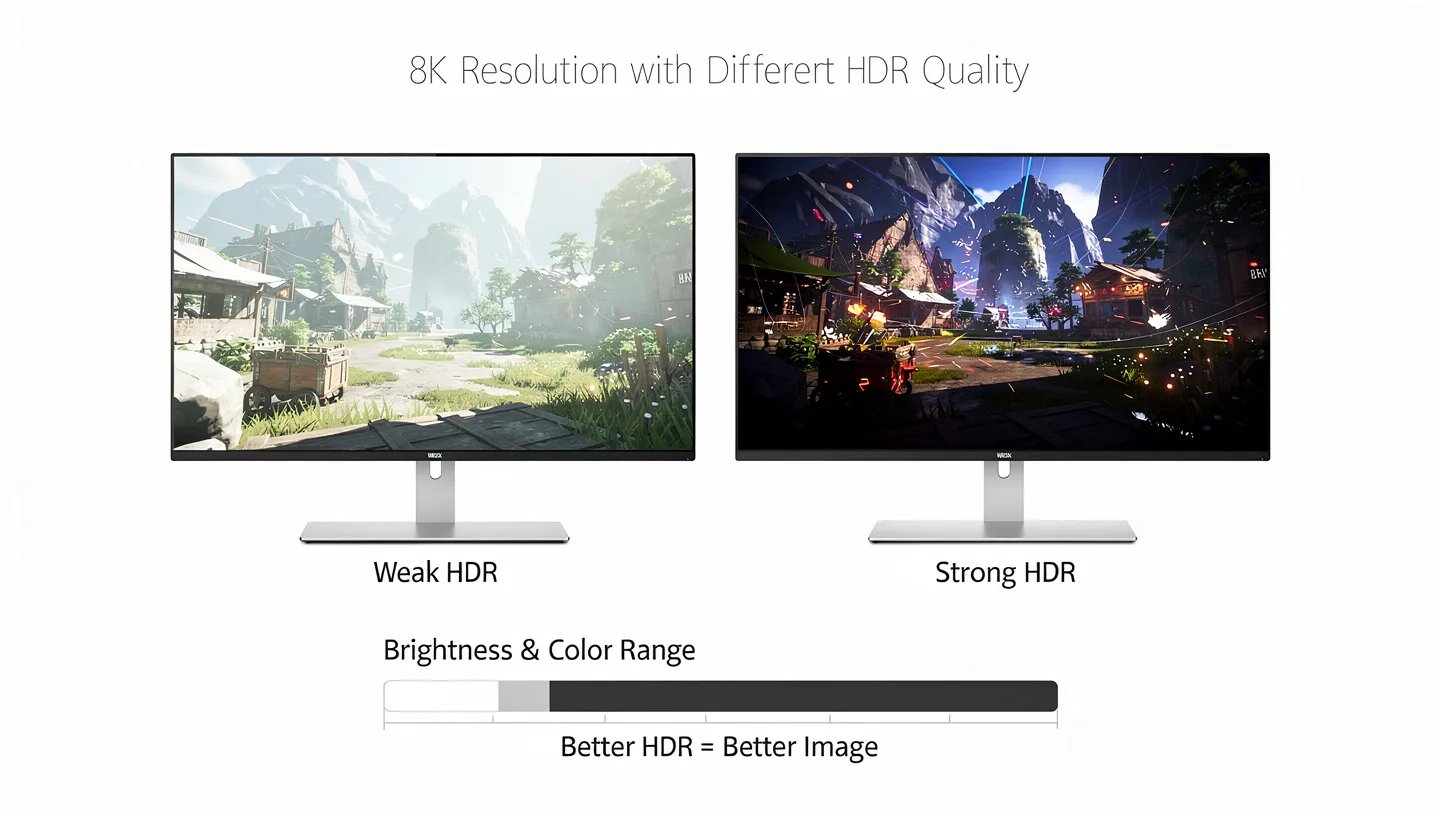
A monitor can have every pixel of 8K resolution and still look flat if its HDR implementation is weak, with low peak brightness or a narrow color gamut hiding behind the marketing label. When comparing 8K monitors, checking the actual brightness rating and supported HDR format tells you far more about real world image quality than the resolution number printed on the box.
Panel Type
Panel type decides how a monitor handles viewing angles, contrast and color consistency, regardless of resolution. Most 8K gaming monitors currently ship with IPS panels, since IPS technology tends to offer more consistent color and wider viewing angles, which suits both gaming and the creative work that many 8K buyers also use these screens for.
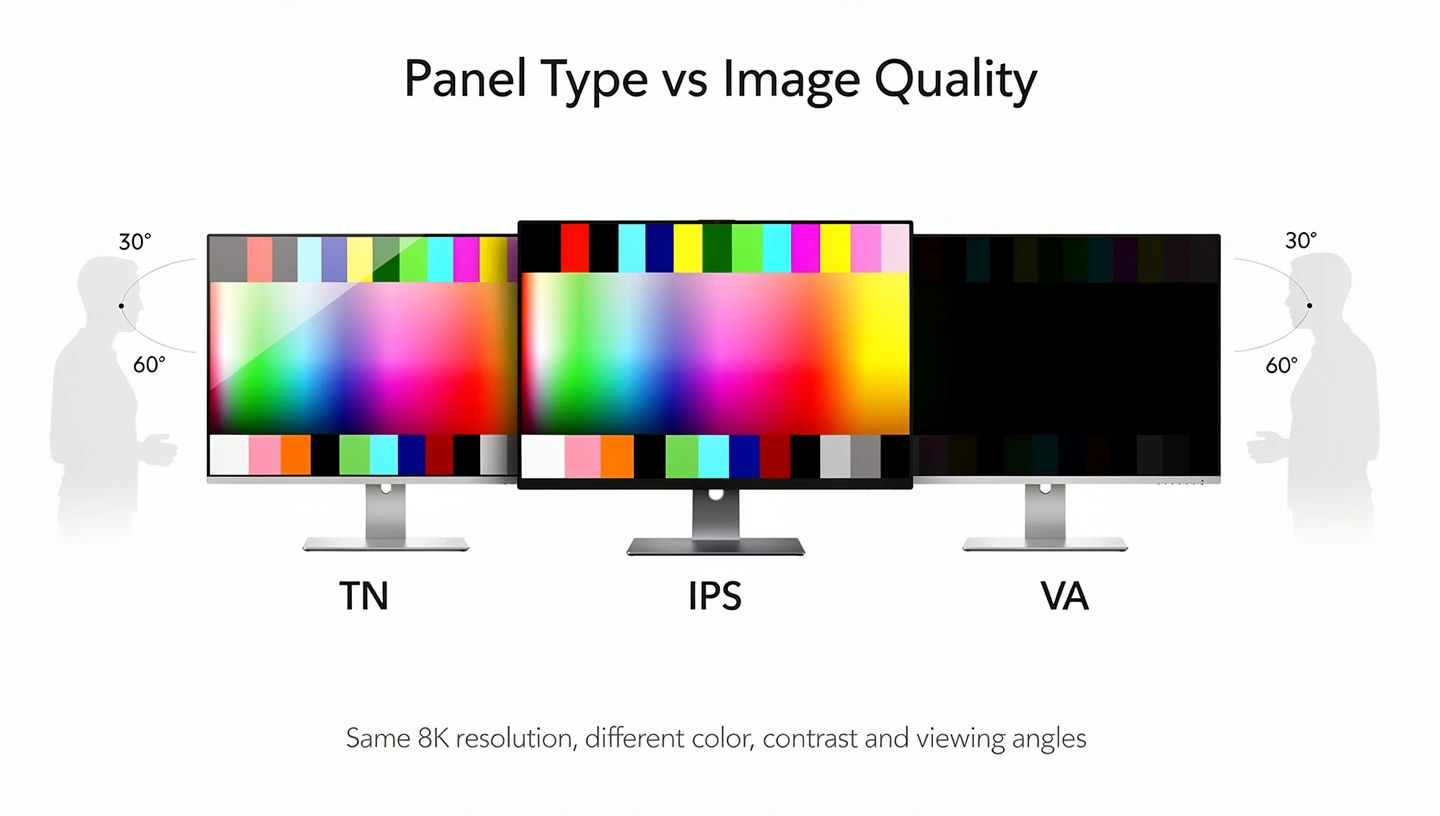
Other panel types trade some of that color consistency for deeper contrast or faster pixel response, so the right choice still depends on what you play and how you sit relative to the screen. A sharp 8K resolution paired with a weak panel type will still show washed out colors or shifting contrast at certain angles, so panel quality is worth checking separately from the resolution spec.
Connectivity and Ports
Running 8K resolution at a usable refresh rate needs serious bandwidth, which is why connectivity matters more here than on a typical 1080p or 1440p monitor. HDMI 2.1 and DisplayPort 1.4 or 2.1 are currently the only common standards that can carry an 8K signal at 60Hz, and even then some setups rely on chroma subsampling or compression to fit the signal through the cable.
Older HDMI or DisplayPort versions simply cannot carry a full 8K signal, so checking both your monitor’s inputs and your graphics card’s outputs before buying is worth the extra five minutes. Some 8K monitors also include USB-C ports capable of carrying video, data and power at once, which can simplify a laptop based setup considerably.
What Setup and Hardware Do You Need for 8K Gaming?
Buying an 8K gaming monitor is really only step one. Actually gaming at that resolution, rather than just using the extra pixels for desktop work, needs a hardware setup built specifically around the load that 8K places on your graphics card. Skipping this step is the single biggest reason people end up disappointed after spending a lot of money on an 8K panel, since the screen itself is never the bottleneck.
Best GPU for 8K Gaming
The graphics card carries almost all the weight in an 8K setup. Right now, only the very top tier of consumer GPUs, cards like the NVIDIA GeForce RTX 4090 or the AMD Radeon RX 7900 XTX, have enough raw power to render modern games at native 8K resolution while holding a playable frame rate. Even these cards usually need help from upscaling technology to hit a stable 60 frames per second in demanding titles, rather than rendering every pixel natively. Anything below that GPU tier tends to struggle badly at 8K, dropping well under 30 frames per second in newer games with detailed lighting and effects.
This is very different from 4K gaming, where a much wider range of graphics cards can hold solid frame rates without leaning on upscaling as heavily. If your current GPU already struggles to hold 60 frames per second at 4K, moving up to 8K resolution will not solve that problem, since it multiplies the exact same workload that is already causing the slowdown.
CPU, RAM and Storage
While the GPU does the heaviest lifting, the rest of your system still needs to keep up. A strong CPU, generally something in the current Ryzen 9 or Core i9 class, helps prevent bottlenecks in games that lean on the processor for physics, AI behavior or streaming decompression at high resolutions.
Most 8K gaming builds benefit from at least 32GB of RAM, since large textures and frame buffers at this resolution use noticeably more memory than the same game running at 4K. Storage matters too, particularly if you plan on recording or streaming 8K gameplay, since footage at this resolution produces much larger files and needs faster read and write speeds to avoid dropped frames during capture. A fast NVMe SSD is close to a requirement rather than a nice extra once you start working with 8K video files regularly.
DLSS and Upscaling: Making 8K Gaming Playable
Native 8K rendering is brutal on even the strongest graphics cards, which is exactly why upscaling technology has become the main way 8K gaming actually works today. Instead of rendering every single one of those 33 million pixels from scratch, upscaling tools render the game at a lower internal resolution, often 1440p or 4K, and then use trained models to reconstruct a sharp 8K image from that smaller starting point. NVIDIA’s DLSS is the best known example, and its newer versions have gotten noticeably better at filling in detail without the blurring or ghosting that plagued earlier upscaling attempts.
AMD offers a similar approach with its own upscaling technology, and both continue to improve with each generation. In practical terms, this means a graphics card that could never hold 60 frames per second at native 8K might comfortably hit that target once upscaling from a lower internal resolution is switched on. The tradeoff is that upscaled 8K is not quite identical to native 8K, since fine detail is being reconstructed rather than rendered directly, though the gap has narrowed a lot compared to early upscaling attempts. For most people considering an 8K gaming monitor today, upscaling is not a workaround, it is the realistic way 8K gaming happens at all.
Is 8K Gaming Worth It? Benefits vs Drawbacks
Whether an 8K gaming monitor is worth the money depends on what you actually do with it, not just how it looks on a spec sheet. The list below covers the main points on both sides.
Benefits of an 8K Gaming Monitor
- Extremely high pixel density for close viewing distances or very large screens
- Sharper fine detail in high resolution textures, distant objects and cinematic scenes
- More usable desktop space for multitasking alongside gaming
- Strong pairing with creative work such as photo editing, video review or design
- Future proofing as more games and streaming platforms add native 8K support over time
Drawbacks and Considerations
- Very few games support native 8K without relying on upscaling
- Requires a top tier GPU just to hold a playable frame rate
- Most 8K monitors are capped around 60Hz, which limits motion smoothness
- Higher price for both the monitor and the rest of the system
- Limited 8K video and streaming content available right now
8K vs 4K for Gaming: Which Actually Wins?
For the vast majority of gamers, a 4K monitor running at a high refresh rate beats an 8K monitor running at 60Hz. Motion clarity and responsiveness are far easier to notice during actual play than the extra sharpness 8K provides, especially in fast paced or competitive games. A 4K panel at 144Hz feels noticeably smoother than an 8K panel at 60Hz, and 120Hz is generally considered the point where motion starts to feel genuinely fluid rather than merely acceptable. Slower, story driven single player games are the one category where 8K makes a stronger case, since detail and atmosphere matter more than split second reaction times in those genres.
Even there, the same budget often buys a 4K OLED or mini LED monitor with better contrast and color, which many players end up preferring over the extra pixels of 8K. The honest answer is that 8K gaming monitors currently reward a narrow slice of buyers, mostly people combining gaming with professional visual work, rather than gamers looking purely for the smoothest possible competitive experience.
Other Things to Know Before Buying an 8K Gaming Monitor
A few practical questions come up again and again once someone starts actually shopping for an 8K gaming monitor, rather than just reading about the resolution in theory. These cover games, consoles, price and how 8K stacks up against other monitor formats you might be considering instead.
Which Games Actually Support 8K Resolution?
Native 8K support is still limited, but it is not zero. Titles built on flexible engines, such as Fortnite, Apex Legends, Overwatch 2, World of Warcraft and Call of Duty: Warzone, can be set to run at 8K resolution on the right hardware, since their menus allow custom resolution settings well beyond 4K. Many other modern games technically accept an 8K resolution setting as well, but that does not always mean the game was built with 8K textures or assets in mind. In several cases the game is simply rendering more pixels of the same detail level, rather than showing genuinely sharper textures. Before assuming a game “supports” 8K, it is worth checking patch notes, official system requirements or community benchmarks, since resolution support and real visual improvement at that resolution are not always the same thing.
Can You Game in 8K on PS5 or Xbox Series X?
Both consoles list 8K output as a supported feature through HDMI 2.1, but that is mostly a hardware claim about the port, not a promise about actual games. As of now, no console game renders natively at 8K, and the practical result of connecting a PS5 or Xbox Series X to an 8K monitor is usually upscaled 4K content rather than a true 8K image. The console handles the signal fine, but the internal rendering horsepower simply is not built for native 8K gameplay yet. If your main platform is a console rather than a gaming PC, an 8K monitor mostly buys you a very sharp upscaled 4K picture today, with the option to take fuller advantage of 8K later if a future console generation supports it natively.
How Much Does an 8K Gaming Monitor Cost?
Price is one of the biggest practical barriers to 8K adoption right now. Most 8K monitors currently sell somewhere between $2,000 and $5,000 depending on size, panel quality and HDR performance, compared to a high refresh rate 4K gaming monitor that often costs a few hundred dollars. That price gap grows further once you add the cost of a GPU capable of driving 8K, since cards like the RTX 4090 sit at the very top of the market. For the same total budget, many gamers can build a 4K high refresh setup with a stronger GPU, faster storage and better peripherals, which is why cost alone pushes a lot of buyers toward 4K rather than 8K.
8K vs Ultrawide and Dual Monitor Setups
Resolution is not the only way to get a bigger, more immersive gaming setup, and an 8K monitor is not automatically the best choice for that goal. An ultrawide monitor trades extra vertical pixels for a much wider field of view, which many racing and simulation games use directly, while a dual monitor setup spreads chat, streaming tools or a strategy map across a second screen without touching your main game window at all. Both options tend to cost far less than an 8K panel and place a lighter load on your GPU, since neither one multiplies pixel count the way native 8K does. If the goal behind buying an 8K monitor is really about a bigger, more immersive view rather than pixel density specifically, an ultrawide or dual monitor setup is worth comparing before committing to 8K.
Screen Size and Desk Space for 8K
Screen size and desk space affect whether 8K resolution is worth it just as much as your GPU does. Most 8K monitors start around 32 inches, since the extra pixel density becomes easier to notice once the panel grows past that size, and some options run considerably larger. A bigger screen also needs more viewing distance to use comfortably, which means a small desk or a tight room can work against the exact size range where 8K makes the most visual sense. Before buying, it is worth measuring your actual desk depth and typical seating distance, since a monitor that is technically excellent on paper can still feel oversized or overwhelming in a cramped setup.
8K Gaming Monitor Buying Checklist
Before spending the extra money that 8K resolution demands, it helps to run through a short checklist covering both the monitor and the rest of your system. If you want a broader walkthrough that covers panel types, sizes and connections for any resolution, our guide to choosing a gaming monitor covers the fundamentals in more detail.
- Confirm your GPU can realistically hold at least 60fps at 8K, with or without upscaling
- Check that your cables and ports support HDMI 2.1 or DisplayPort 1.4/2.1
- Measure your typical viewing distance and screen size before assuming you need 8K
- Compare pricing against a high refresh rate 4K monitor doing the same job
- Verify how many of the games you actually play support 8K or scale well to it
- Budget for the rest of your system, not just the monitor itself
Frequently Asked Questions
What is the resolution of an 8K gaming monitor?
An 8K gaming monitor typically runs at 7680 x 4320 pixels, which adds up to roughly 33 million pixels on screen. That is four times the pixel count of a 4K monitor and sixteen times more than a standard 1080p display.
Does 8K gaming require a powerful GPU?
Yes, and by a large margin. Rendering games at native 8K resolution currently needs a top tier graphics card such as an RTX 4090 or RX 7900 XTX, and even those usually rely on upscaling technology to hold a stable frame rate in demanding titles.
Is 8K better than 4K for gaming?
Not necessarily. 8K offers sharper detail, but most 8K monitors are limited to around 60Hz, while 4K monitors commonly reach 144Hz or higher. For most gamers, that extra refresh rate on a 4K screen makes a bigger difference to how a game feels than the additional pixels of 8K.
What internet speed do I need to stream 8K content?
Streaming 8K video generally needs a stable connection of at least 50Mbps, and often more depending on the platform and compression used. Slower connections will either buffer frequently or automatically drop down to a lower resolution to keep playback smooth.
Can current GPUs handle 8K resolution for tasks besides gaming?
Yes. Many modern GPUs handle 8K resolution comfortably for tasks like video editing, 3D rendering and general desktop use, since those workloads are far less demanding than rendering a full game scene 60 times per second at that resolution.
How does 8K resolution affect virtual reality?
Higher resolution reduces the visible gap between individual pixels in VR headsets, which is one of the more noticeable uses for 8K outside of traditional monitors. Since VR screens sit so close to your eyes, extra pixel density has a bigger practical impact here than it does on a desktop monitor viewed from an arm’s length away.
What screen size works best with an 8K gaming monitor?
Most 8K monitors fall in the 32 inch and larger range, since bigger screens make the extra pixel density easier to notice at normal viewing distances. Smaller 8K panels exist, but the benefit over 4K becomes harder to see once the screen drops much below 27 inches.
Does HDR make a real difference on an 8K monitor?
It can, provided the monitor has strong brightness and a wide color gamut to back up the HDR label. A high resolution panel with a weak HDR implementation will still look flatter than a well calibrated 4K screen with proper HDR support.