Yes, 120Hz is good for gaming. It shows twice as many frames per second as a 60Hz display, which means smoother motion, less blur on fast moving objects, and a display that feels more responsive to your inputs. For most players moving up from 60Hz, the jump to 120Hz is the biggest single upgrade they will notice, bigger than moving from 120Hz to 144Hz or higher. Whether it is worth it for you depends on what you play, what hardware you have, and whether you are gaming on a monitor, a TV, or a console.
Below we break down exactly what refresh rate does, how 120Hz performs on monitors, TVs, and consoles, who actually benefits from it, and what else you should check before you buy.
What Is Refresh Rate and How 120Hz Works
Refresh rate is how many times per second a display redraws the image on screen, measured in Hertz (Hz). A 60Hz screen redraws the picture 60 times every second. A 120Hz screen redraws it 120 times every second, twice as often. Think of it like a flipbook: the more pages you flip through in a second, the smoother the motion looks. A monitor or TV cannot show more than its refresh rate allows, no matter how fast your graphics card is.
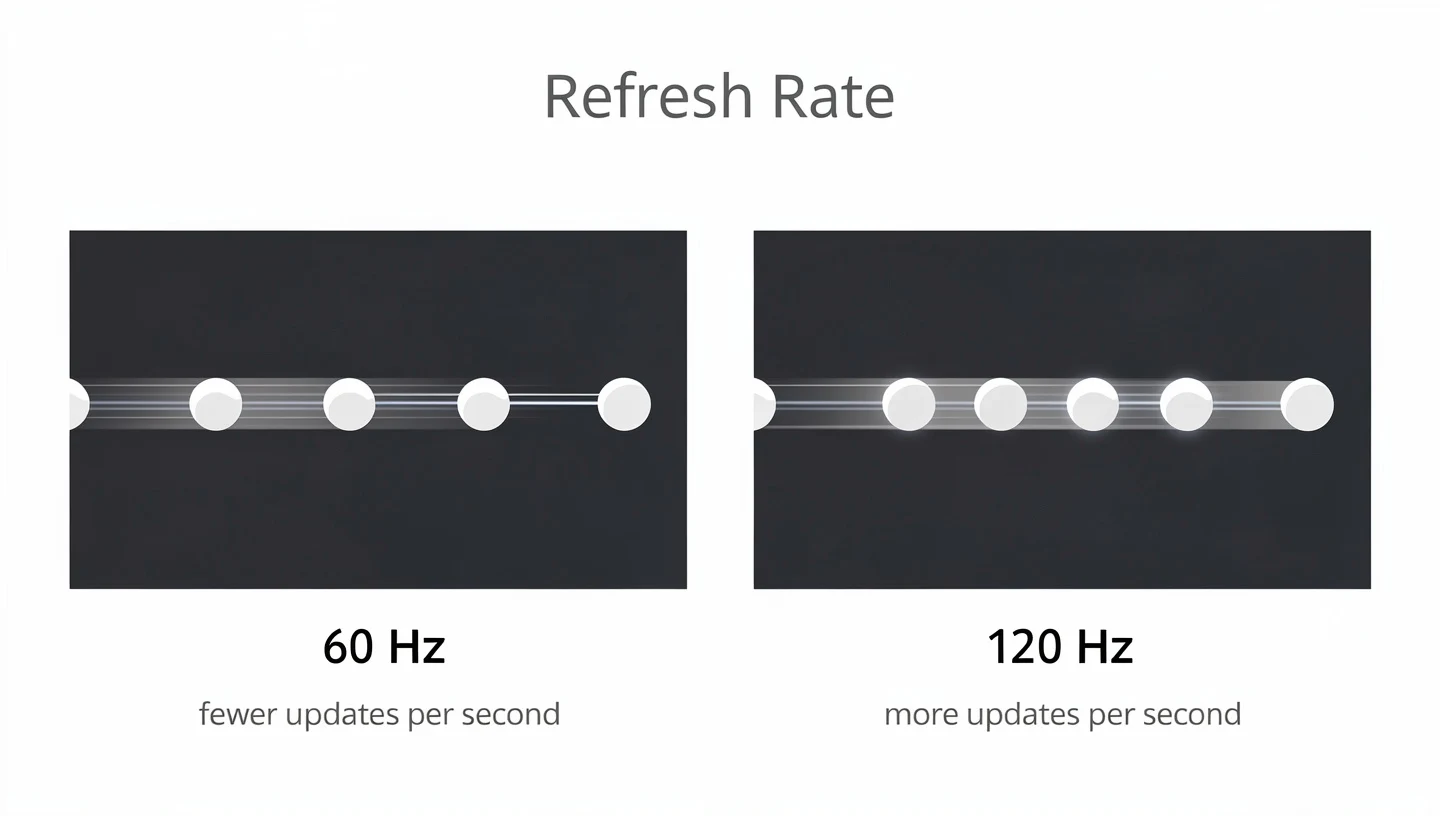
This matters for gaming because games are constantly moving images, and how often the screen updates directly affects how fluid that movement looks. A camera pan that stutters on 60Hz can look completely smooth at 120Hz, and fast moving objects like bullets, cars, or player models hold their shape better instead of smearing.
60Hz vs 120Hz vs 144Hz Explained
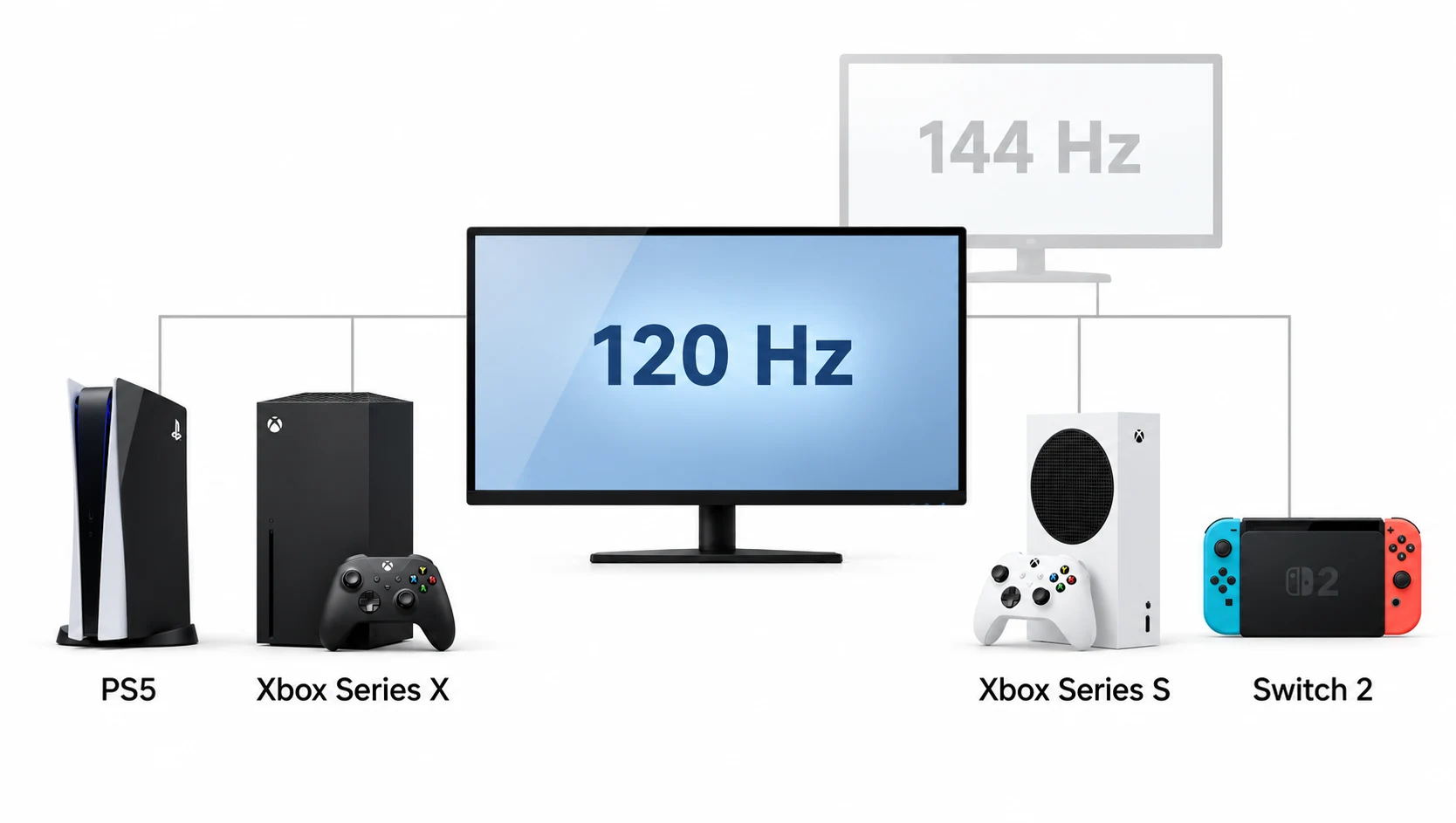
A 60Hz display is the long standing standard for TVs, laptops, and budget monitors. It is fine for office work, movies, and slower paced single player games, but in fast games the motion can look choppy compared to higher refresh rates. 120Hz doubles that, and it is now the maximum refresh rate supported by the PS5, Xbox Series X and S, and the Nintendo Switch 2, which is why it has become the console gaming standard. 144Hz goes a step further and is common on PC gaming monitors, offering a small additional gain over 120Hz that most people find harder to notice than the initial 60Hz to 120Hz jump.
| Refresh Rate | Typical Use | Noticeable Gain Over 60Hz |
|---|---|---|
| 60Hz | Office work, movies, casual single player games | Baseline |
| 120Hz | Consoles, mid range PC gaming, smart TVs | Large |
| 144Hz | Competitive PC gaming monitors | Moderate |
| 240Hz and above | High end esports monitors | Small for most players |
Refresh Rate vs Frame Rate, What Is the Difference
Refresh rate and frame rate are related but not the same thing. Refresh rate is a property of the display. Frame rate, measured in FPS (frames per second), is how many new frames your graphics card or console can actually produce each second. A 120Hz screen only looks like a 120Hz screen if your hardware is also pushing close to 120 FPS. If your frame rate is stuck at 70 or 80, you are still seeing smoother motion than on a 60Hz screen, but you are not getting the full benefit the panel is capable of.
Is 120Hz Good for Gaming on a Monitor
On a PC, a 120Hz gaming monitor is a clear step up from 60Hz for almost anyone who plays regularly. Mouse movement feels tighter, scrolling and window dragging look cleaner, and in game aiming becomes easier because targets do not smear across the screen the way they do at 60Hz. This is especially true in fast paced shooters and racing titles, where every extra frame gives you slightly more information before you have to react.

It is not only about competitive titles either. Story driven and open world games also look noticeably better at 120Hz, since camera pans, cutscenes, and general movement all pick up a level of fluidity that is hard to go back from once you get used to it.
What You Notice Going From 60Hz to 120Hz
The most obvious change is reduced motion blur. At 60Hz, the gaps between frames are wide enough that fast movement can look smeared or ghosted. At 120Hz those gaps shrink, so moving objects stay sharper and easier to track. Camera turns feel less jerky, and games generally feel more connected to your controller or mouse, since there is less delay between an action and seeing the result on screen.
Input Lag and Response Time at 120Hz
Refresh rate is not the only thing that affects how responsive a monitor feels. Input lag, the delay between your action and it appearing on screen, is also tied to how quickly the panel itself can change pixels from one color to another. That is measured as response time, usually in milliseconds. A 120Hz panel with a slow response time can still show ghosting on fast moving objects, so refresh rate and response time need to be considered together, not separately, when you are picking a monitor for competitive play.
Is 120Hz Good for Gaming on a TV
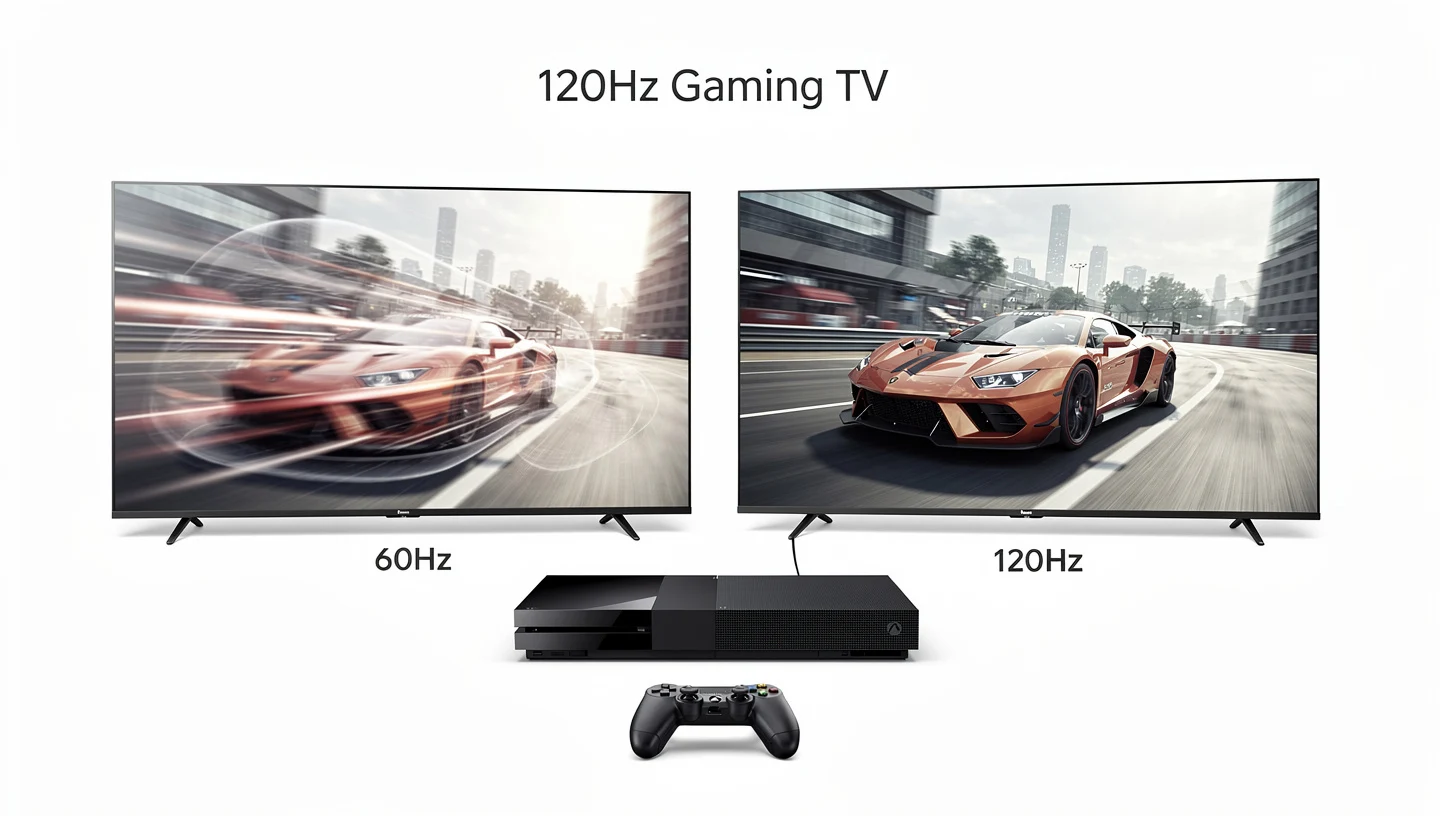
Smart TVs have caught up to monitors in the last few years, and many mid range and high end models now support 120Hz, largely because of console gaming. A 120Hz TV lets you take full advantage of the PS5 and Xbox Series X or S when a game supports higher frame rates, which is becoming more common in newer releases. The improvement over a standard 60Hz TV is the same in principle as on a monitor: smoother motion, sharper fast action, and a more responsive feel overall.
HDMI 2.1, VRR and ALLM Explained
A 120Hz panel on its own is not enough for console gaming. You also need an HDMI 2.1 port to carry the bandwidth required for 120Hz at higher resolutions, along with support for variable refresh rate (VRR), which matches the display’s refresh rate to the console’s output in real time to prevent screen tearing. Auto Low Latency Mode (ALLM) is the third piece, since it automatically switches the TV into its lowest lag setting the moment a game launches, without you needing to dig through menus. The official HDMI 2.1 specification covering these features is maintained by the HDMI Forum.
Without HDMI 2.1, VRR, and ALLM working together, a “120Hz” TV on paper might still fall short of what console gaming actually needs, so it is worth checking all three specs, not just the headline refresh rate number, before buying.
Does 120Hz Make a Difference on a TV
Yes, particularly in fast paced genres like shooters and racing games, where a 120Hz TV with VRR and ALLM enabled will feel noticeably smoother and more responsive than a standard 60Hz set. For slower, cinematic single player games the difference is smaller, though many players still prefer the extra fluidity once they have experienced it.
120Hz for Consoles: PS5, Xbox Series X and S, and Switch 2
120Hz is currently the ceiling for console gaming. The PS5, Xbox Series X and S, and the Nintendo Switch 2 all support up to 120Hz output, which is why matching your TV or monitor to that number makes sense for console players rather than chasing 144Hz or higher, which consoles cannot use anyway.
How to Enable 120Hz on PS5 and Xbox
On PS5, you enable it under Settings, then Screen and Video, then Video Output, where you turn on 120Hz Output and set it to Automatic. You then need to switch on Performance Mode under Saved Data and Game/App Settings for supported titles. On Xbox Series X or S, go to Settings, then General, then TV & Display Options, and select 120Hz under Refresh Rate. Both consoles will only apply 120Hz automatically in games that actually support it.
Which Games Actually Support 120fps
Not every game takes advantage of 120Hz, since developers have to build support for it. Fast paced multiplayer titles such as competitive shooters and racing games are the most common to offer a 120fps mode, often by lowering resolution or dropping some visual effects to hit the higher frame rate. Story focused, graphically heavy titles are more likely to stick to a 60fps mode, or even 30fps with better visuals, since hitting 120fps consistently on console hardware is demanding.
- Competitive shooters and battle royale titles are the most likely to offer a 120fps performance mode
- Racing games often support 120fps to keep fast moving cars looking sharp
- Large open world and story driven games are less consistent, and many still cap at 60fps or 30fps
Who Benefits Most From 120Hz
Not everyone gets the same value out of a 120Hz upgrade. It depends heavily on the type of games you play and how much you care about reaction time versus visual detail.
Competitive and FPS Players
This is where 120Hz matters most. In shooters, battle royale games, and fast paced multiplayer titles, being able to track enemies clearly and react a fraction of a second sooner can be the difference between winning and losing an engagement. Clearer motion at 120Hz makes it easier to spot movement at the edge of the screen and follow targets without the smearing that 60Hz introduces.
Casual and Single Player Gamers
You do not need to be a competitive player to enjoy 120Hz. Casual gamers who play a mix of genres will still notice smoother scrolling, cleaner camera movement, and a generally more pleasant feel across everything they do on the screen, not just games. It is a quality of life upgrade as much as a performance one.
Racing and Sports Games
Racing games benefit heavily from higher refresh rates because cars and tracks move quickly across the screen. At 120Hz, judging distances and reacting to sudden turns or crashes becomes easier, and the overall sense of speed feels more convincing than it does at 60Hz.
Does 120Hz Help With Anything Besides Gaming
A 120Hz display is not only a gaming feature. Once it is running, everything on the screen benefits from the higher refresh rate, not just games. Scrolling through a web page or a long document looks noticeably cleaner, since text and images move without the small stutter you get at 60Hz. Dragging windows around the desktop feels tighter, and the cursor itself tracks your mouse movement with less of a delay between the two.
Video playback can also look smoother at 120Hz, particularly with fast moving footage such as sports or action scenes, although most streamed video is still capped at 24, 30, or 60 frames per second, so the display is not always the limiting factor there. For anyone who splits time between work, browsing, and gaming on the same screen, a 120Hz panel improves the overall feel of the machine, not just the time spent in games.
120Hz vs 144Hz: Is the Upgrade Worth It
Once you understand what 120Hz offers, the natural next question is whether to go further and get 144Hz instead. The honest answer is that most players struggle to tell the difference between the two side by side. The jump from 60Hz to 120Hz is dramatic because you are doubling the frames shown per second. The jump from 120Hz to 144Hz is a smaller percentage increase, and many people report it is barely noticeable outside of controlled testing, particularly in fast paced shooters where both refresh rates already feel very smooth.
Where 144Hz makes more sense is if you already have the graphics hardware to hit those frame rates consistently and the budget difference between a 120Hz and 144Hz monitor is small. If you are gaming on console, this comparison does not really apply, since none of the major consoles output above 120Hz anyway. If you are shopping for your first high refresh rate monitor, our guide to choosing a gaming monitor walks through how to balance refresh rate against resolution, panel type, and price.
It is also worth knowing that plain 120Hz monitors are less common on store shelves than 144Hz ones, since most manufacturers jumped straight from 60Hz to 144Hz as their entry level gaming option once panel costs came down. This means a dedicated 120Hz PC monitor can sometimes cost about the same as a 144Hz model, or even more if stock is limited, so it is worth comparing prices before assuming 120Hz will always be the cheaper choice. On TVs the situation is reversed, since 120Hz is the more common spec and 144Hz TVs are rare outside of a handful of gaming focused models.
Is 120Hz Better Than 4K
Refresh rate and resolution solve different problems, so comparing 120Hz to 4K is really a question of what you value more, smoothness or sharpness. Neither one replaces the other, and the right balance depends on the type of games you play and how strong your hardware is. A higher resolution like 4K gives you more detail and a crisper image, while 120Hz gives you smoother motion and quicker perceived responsiveness. Ideally you want both, but hardware limits often force a choice, especially on console, where hitting 4K and 120fps at the same time is demanding even on the newest hardware.
For competitive multiplayer games, most players get more practical benefit from prioritizing refresh rate over resolution, since smooth, responsive motion helps more in a fast paced firefight than extra visual detail does. For slower, visually rich single player games, leaning toward resolution can be the better trade off.
Do You Need a Powerful PC or Console for 120Hz
A 120Hz display is only as good as the hardware feeding it. If your graphics card can only produce 60 frames per second in a given game, your 120Hz monitor will still display those 60 frames, but it will not manufacture extra ones out of nothing. To actually see the benefit of 120Hz, your system needs to consistently render close to 120 frames per second in the games you play.
Can Your Graphics Card Hit 120 FPS
Modern mid range graphics cards can hit 120 FPS in many competitive titles at 1080p or 1440p, especially in games that are not graphically demanding. Heavier, more visually detailed games may require a stronger GPU to hold that frame rate consistently, particularly at higher resolutions. Before buying a 120Hz monitor, it is worth checking benchmarks for your specific graphics card in the games you actually play, rather than assuming any modern GPU can hit 120 FPS everywhere.
Settings to Reach 120 FPS
If your system is close but not quite hitting 120 FPS, a few adjustments usually help. Lowering the graphics preset from Ultra to High or Medium, reducing shadow quality, turning off ray tracing, or dropping to a lower resolution can all free up enough performance to hold a steady 120 frames per second. The goal is consistency, since a frame rate that jumps around defeats some of the benefit of a high refresh rate display.
120Hz Laptops and Phones
120Hz is not limited to monitors and TVs anymore. Plenty of gaming laptops now ship with 120Hz screens as standard, giving portable setups the same smoother motion and quicker feel as a desktop monitor, as long as the laptop’s graphics card can keep up. Phones have followed the same trend, with many flagship models now offering 120Hz displays, sometimes called ProMotion or similar branding depending on the manufacturer. Once you have used a 120Hz phone or laptop for scrolling and gaming, going back to 60Hz tends to feel noticeably slower.
What Else to Check Besides Refresh Rate
Refresh rate is important, but it is only one part of what makes a display good for gaming. A few other specs are worth checking before you commit to a purchase.
Panel Type: TN, IPS, VA and OLED
The panel technology affects color accuracy, viewing angles, and response time. IPS panels generally offer the best color accuracy and wide viewing angles, and modern versions can now hit fast response times as well, making them a popular all around choice for a 120Hz gaming display. TN panels tend to be the cheapest and fastest but have weaker color and narrower viewing angles, while VA panels sit in between, offering strong contrast at the cost of slightly slower response times.
FreeSync and G-Sync
Adaptive sync technology matches your display’s refresh rate to your graphics card’s frame rate in real time, which removes screen tearing and reduces stuttering. This matters even more on a high refresh rate display, since fluctuating frame rates are more noticeable at 120Hz than at 60Hz. AMD FreeSync is an open standard built into most AMD graphics cards, and many Nvidia cards now support it too under the label G-Sync Compatible, which has made it the more common option across budget and mid range 120Hz monitors.

Because it does not rely on extra hardware inside the panel, FreeSync also tends to keep the price of a monitor lower than the alternative. It also works across a wide range of resolutions and refresh rates, so pairing it with a 120Hz panel rarely causes any compatibility issues on AMD hardware, and setup is usually as simple as turning it on in the monitor’s own menu.
Nvidia G-Sync historically used a dedicated hardware module inside the monitor to control the sync process, which gave it a reputation as the more consistent, polished implementation, though it also added to the retail price of any display carrying it. That price gap has narrowed a lot in recent years as more monitors adopt the cheaper G-Sync Compatible certification instead of the full hardware module. For most people shopping for a 120Hz monitor, the choice between the two comes down to which graphics card brand you already own, since both now deliver a smooth, tear free result at 120Hz.
What Monitor Size Works Best for 120Hz
Screen size affects how much you get out of a 120Hz panel too. A smaller 24 inch monitor is a common pick for competitive players, since it is easier to see the whole screen at once without moving your eyes far, and it is usually cheaper to drive at high frame rates than a larger panel. Bigger 27 inch and above monitors give a more immersive view for single player and story driven games, but they demand more from your graphics card to hold 120 FPS, especially at higher resolutions. Curved panels have also become common at 120Hz, and our guide on whether curved monitors are good for gaming covers how that shape affects the experience beyond refresh rate alone.
Is 120Hz Worth It: Final Verdict
For almost anyone upgrading from a 60Hz display, 120Hz is worth it. It is the single biggest jump in perceived smoothness you can make, bigger than moving from 120Hz to 144Hz or beyond, and it is now the standard refresh rate supported by every major console. Competitive and fast paced game players get the clearest advantage, but casual and single player gamers will also notice a real improvement in how fluid everything feels.
The main thing to check before buying is whether your hardware, whether that is a PC, laptop, or console, can actually produce enough frames to take advantage of the higher refresh rate. Pair a 120Hz display with reasonable response times and adaptive sync support, and you get a setup that holds up well across most genres without the cost of chasing the very highest refresh rates on the market.
Frequently Asked Questions
Is 120Hz enough for competitive gaming?
Yes, 120Hz is enough for the vast majority of competitive players, particularly on console, where it is the maximum supported refresh rate anyway. On PC, some professional and highly competitive players prefer 144Hz or higher, but the gap between 120Hz and those higher numbers is much smaller than the gap between 60Hz and 120Hz.
Is 60Hz still fine for gaming?
60Hz still works well for slower paced single player games, turn based titles, and casual play where reaction time is not critical. For fast paced shooters or competitive multiplayer, most players notice a clear improvement moving up to 120Hz.
Does 120Hz reduce eye strain?
Many players report that smoother motion at 120Hz is easier on the eyes during long sessions, since the brain does not have to work as hard interpreting choppy or blurred movement. This varies from person to person and is not guaranteed for everyone.
What cable do I need for 120Hz?
For 120Hz at 1080p or 1440p, a DisplayPort 1.2 or HDMI 2.0 cable is usually enough. For 120Hz at 4K resolution, you need HDMI 2.1 or DisplayPort 1.4 to carry the extra bandwidth. If you are connecting a monitor to a PC for the first time, our guide to connecting a gaming monitor to a PC covers cable choice and setup in more detail.
Is 120Hz worth it on a budget?
Yes, 120Hz monitors and TVs have become far more affordable over the last few years and are no longer a premium feature reserved for expensive displays. It is usually a better use of a limited budget than chasing 240Hz or higher, since the upgrade from 60Hz to 120Hz gives you the largest noticeable improvement for the price.
Can you tell the difference between 120Hz and 144Hz?
Most players find it difficult to notice a clear difference between 120Hz and 144Hz in normal play, since the percentage increase is much smaller than the jump from 60Hz to 120Hz. The difference is easier to spot in side by side testing or in very fast, low latency competitive shooters than in everyday gaming.