If you have shopped for a gaming monitor in the last few years, you have probably seen numbers like 144Hz, 165Hz, or 240Hz plastered across the box. That number is the refresh rate, and it is one of the specs that actually changes how a game feels to play, not just how it looks on a spec sheet. This guide breaks down what refresh rate really means, how it differs from frame rate, what number you actually need, and how the rest of your setup needs to line up to get the benefit.
What Is Refresh Rate?
Refresh rate is how many times per second your monitor draws a new image on screen. It is measured in Hertz, written as Hz, and it comes from the monitor itself rather than your graphics card or processor. A monitor with a refresh rate of 60Hz redraws the picture 60 times every second, while a 144Hz monitor does it 144 times in that same second.
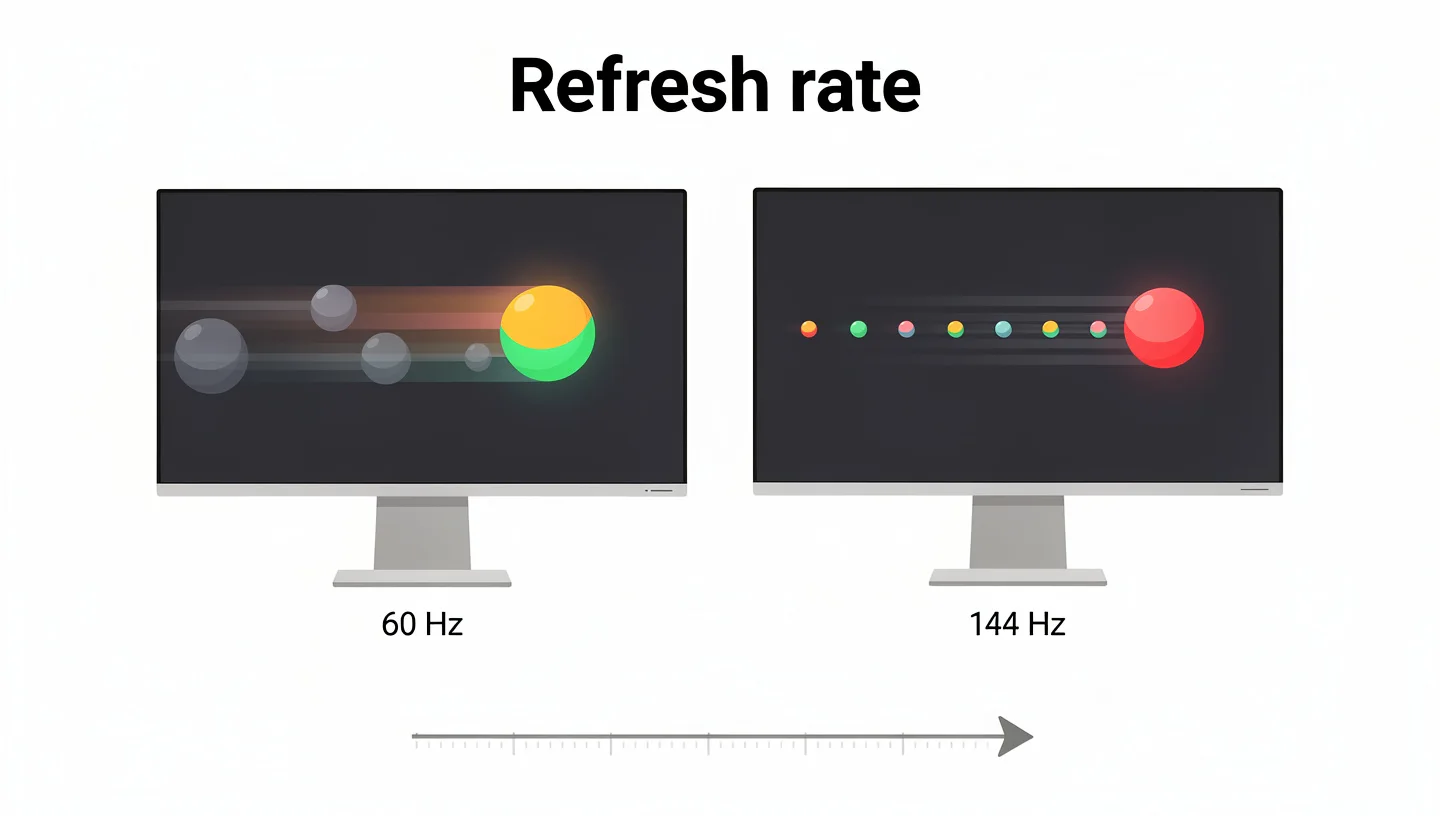
Think of it like a flipbook. The more pages you flip through per second, the smoother the motion looks. A monitor works the same way, just at speeds far too fast for your eye to notice as individual frames. What you do notice is the difference in how fluid everything feels, from moving your mouse cursor to tracking a moving target in a game.
How Is Refresh Rate Measured? (Understanding Hz)
The Hz number tells you exactly how many screen updates happen every second, and it applies whether you are gaming, browsing, or just sitting on your desktop. Common refresh rates you will run into while shopping include 60Hz, 75Hz, 120Hz, 144Hz, 165Hz, 240Hz, and 360Hz, with a handful of newer panels pushing past that. For most of computing history, 60Hz was treated as the standard, and it is still what you will find on budget monitors and most laptop screens.
The jump in numbers is not just marketing. A 144Hz monitor is genuinely refreshing the screen more than twice as often as a 60Hz panel, which is exactly why the difference in how motion looks between the two is so noticeable the first time you see it side by side.
Panel type plays a role here too. For a long time, TN panels were the only technology cheap and fast enough to reach very high refresh rates, which is why older competitive gaming monitors leaned so heavily on them despite weaker color and viewing angles. Newer OLED panels have closed that gap in a different way, pairing high refresh rates with pixel response times fast enough that motion clarity now rivals or beats older TN options.
Refresh Rate vs Frame Rate (FPS): What Is the Difference?
People mix these two up constantly, so it is worth being precise. Refresh rate is produced by the monitor. Frame rate, measured in frames per second, is produced by your graphics card and processor working together to render the game. One is a property of your display, the other is a property of your hardware and the game running on it.
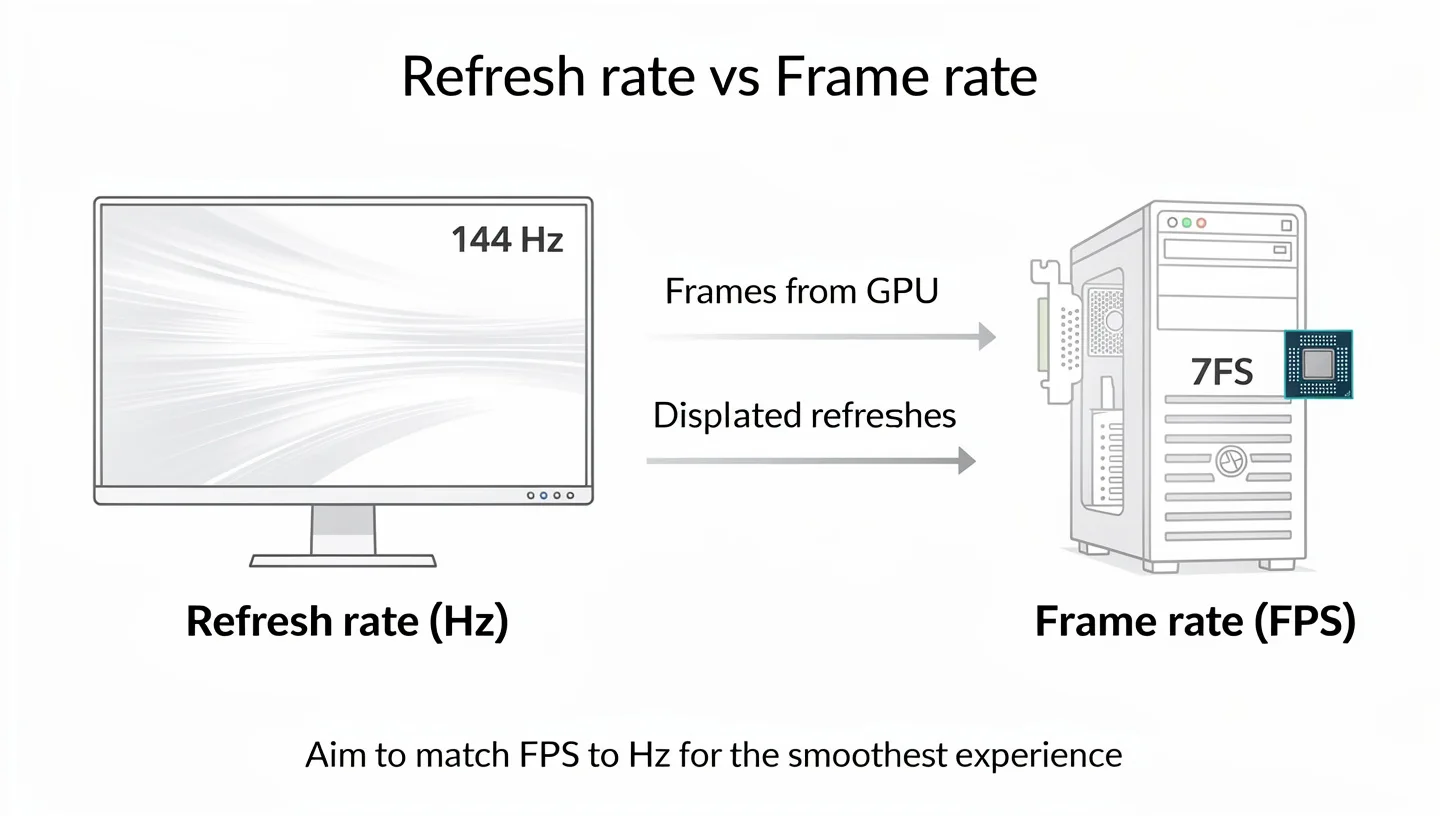
The two need to work together to give you the experience you are actually paying for. If your monitor supports 144Hz but your graphics card can only push out 75 frames per second in a demanding game, you are only getting 75 of those 144 possible refreshes doing anything useful. On the other hand, if your PC is producing more frames than your monitor can display, those extra frames go to waste and can cause visual glitches unless you have some form of sync technology turned on. The general rule is simple: try to get your frame rate as close to your refresh rate as possible for the smoothest result.
Why Refresh Rate Matters for Gaming
A higher refresh rate does more than just sound impressive on a spec sheet. It changes several things about how a game actually feels under your hands, and each of these adds up during a real session.
Smoother Motion and Reduced Motion Blur
The most obvious change with a higher refresh rate is how much smoother motion looks. On a 60Hz screen, fast moving objects can appear to smear or blur slightly as they cross the screen, since there is more time between each redraw for the object to move a noticeable distance. A higher refresh rate shrinks that gap, so fast moving characters, bullets, or vehicles stay sharper and easier to track with your eyes.
Faster Response and Reduced Input Lag
Refresh rate also affects how quickly your actions show up on screen. A faster refresh rate means less time passes between when you move your mouse or press a button and when the screen actually reflects that change, which lowers overall input lag in the full chain from your hand to the display. This matters most in games where split second timing decides whether you land a shot or dodge one.
Less Screen Tearing and Ghosting
A higher refresh rate also reduces how often you run into screen tearing, which is when the monitor displays parts of two different frames at once because the frame rate and refresh rate fell out of sync. Ghosting, where a faint trail follows a moving object across the screen, is a separate issue tied more to how fast individual pixels can change color, but a higher refresh rate combined with a fast panel keeps both problems to a minimum.
What Refresh Rate Do You Need for Gaming?
There is no single correct number here, since it depends heavily on what you play and how seriously you play it. If you are still weighing up your options beyond just this one spec, our guide to choosing a gaming monitor covers the full picture of what to look for.
Casual Gaming: 60Hz to 100Hz
If you mostly play slower paced single player games, strategy titles, or story driven experiences, a monitor in the 60Hz to 100Hz range is genuinely fine. These types of games rarely demand split second reactions, so the smoother motion of a higher refresh rate is a nice extra rather than something you will miss without it.
Most Gamers: 120Hz to 165Hz
For the majority of people who play a mix of genres, including some faster paced online games, a monitor somewhere between 120Hz and 165Hz hits the sweet spot between price and noticeable benefit. It is worth checking whether that 120Hz range actually suits your kind of gaming, since the jump from 60Hz to this range is where most people feel the biggest difference.
Competitive and Esports Gaming: 240Hz and Beyond
Players who take fast paced shooters or competitive online games seriously often look toward 240Hz and higher. At this level, every extra frame matters for tracking fast movement and reacting a fraction of a second sooner than an opponent. The catch is that you need a graphics card capable of consistently producing that many frames per second, or the extra Hz on the box goes unused.
60Hz vs 144Hz vs 240Hz: What Is the Real Difference?
Numbers on a box only tell you so much, so it helps to know what actually changes as you move up the ladder. Going from 60Hz to 144Hz is the single biggest jump most people will ever notice on a monitor, since it more than doubles how often the screen updates. Motion goes from occasionally choppy to consistently smooth, cursor movement feels tighter, and fast moving targets in games become much easier to follow.
The jump from 144Hz to 240Hz is real but noticeably smaller in everyday terms. Most casual and even many competitive players struggle to tell 144Hz and 240Hz apart in a blind test, while almost everyone can spot the difference between 60Hz and 144Hz immediately. Where 240Hz earns its keep is in high level competitive play, where shaving off a few extra milliseconds of latency genuinely does add up over hundreds of matches.
Refresh Rate for Non-Gaming Use (Work and Creative Tasks)
Refresh rate is not just a gaming spec. Everyday tasks like scrolling through documents or dragging windows around feel noticeably smoother above 60Hz, which is part of why even office focused monitors have started creeping up to 75Hz and 100Hz as a new baseline. Creative professionals working in video editing or motion graphics often benefit from 120Hz or higher as well, since smoother playback while scrubbing through footage makes fine editing decisions easier to judge.
One trade off worth knowing about is that very high refresh rates and very high resolutions can be difficult to combine without a powerful graphics card. If you are deciding between a sharper picture and a faster refresh rate, it is worth reading up on 2K resolution requirements, since a heavy resolution paired with a weak GPU can end up capping your real world frame rate well below what your monitor is capable of.
Variable Refresh Rate: G-Sync, FreeSync and VRR Explained
Variable refresh rate technology, often shortened to VRR, solves the mismatch problem between your graphics card’s output and your monitor’s fixed refresh rate. Instead of your monitor refreshing at one constant speed regardless of what your GPU is producing, VRR lets the monitor’s refresh rate adjust on the fly to match your frame rate in real time, which eliminates screen tearing without the added input lag that older sync methods sometimes introduced.
G-Sync is Nvidia’s version of this technology, while FreeSync is AMD’s equivalent, and most modern monitors support at least one of them, with many supporting both. You can find Nvidia’s official list of G-Sync compatible monitors if you want to check whether a specific model works with your graphics card before buying.
Refresh Rate on Console Gaming (PS5, Xbox, Switch 2)
Console gaming has its own ceiling to be aware of. As of now, the PS5, Xbox Series X and S, and Switch 2 all top out at 120Hz, which is far below what many PC monitors can reach. That means a monitor advertising 240Hz or 360Hz offers no extra benefit when connected to a console, since the console itself cannot push a signal past 120 frames per second regardless of the display’s ceiling.
Support for VRR also differs between consoles, and not every game takes advantage of a 120Hz mode even when the console supports it. Independent testing from RTINGS on the best monitors for 120Hz gaming is a useful reference if you are buying primarily for console use rather than PC gaming, since the priorities shift slightly compared to a pure PC setup.
What Cable Do You Need for a High Refresh Rate Monitor?
A high refresh rate monitor is only as good as the cable feeding it a signal. Older HDMI and DisplayPort versions simply do not have the bandwidth to carry a high resolution image at a high refresh rate, which means the wrong cable can silently cap your monitor well below its advertised number without any obvious warning. Generally speaking, DisplayPort has offered stronger support for high refresh rates at higher resolutions for longer, while newer HDMI versions have closed much of that gap. If you are setting up a new monitor and want to make sure you are getting the full refresh rate you paid for, our guide on how to connect a gaming monitor to a PC walks through which port to use and what to check for.
How to Check and Change Your Monitor’s Refresh Rate
Plenty of monitors default to 60Hz right out of the box even when they support much more, so it is worth checking this yourself after setting one up. On Windows, right click your desktop, open Display Settings, then go to Advanced Display Settings to see and change the current refresh rate.
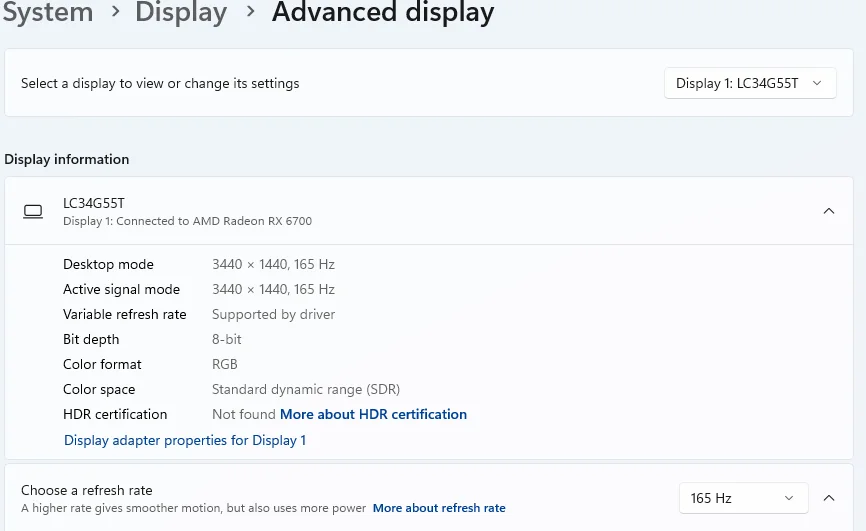
On a Mac, open System Settings, select Displays, and look for the refresh rate option in the dropdown menu. It is also worth opening your graphics card’s own control panel, whether that is the Nvidia or AMD software, since some monitors need the refresh rate confirmed there as well before the higher setting actually sticks. For a full walkthrough covering cables, resolution, and other settings you will want to get right from the start, take a look at our guide on setting up a gaming monitor.
Frequently Asked Questions
What does Hz mean on a gaming monitor?
Hz stands for Hertz, and it tells you how many times per second the monitor refreshes the image on screen. A 144Hz monitor redraws the picture 144 times every second.
Is 144Hz better than 60Hz for gaming?
Yes, for almost any type of gaming, 144Hz provides noticeably smoother motion and better responsiveness than 60Hz. The difference is one of the most immediately obvious upgrades you can make to a gaming setup.
Does refresh rate affect FPS?
Not directly. Your frame rate is produced by your graphics card and processor, while refresh rate is a property of the monitor. However, your monitor’s refresh rate does cap how many of those frames you can actually see displayed at once.
What refresh rate do I need for console gaming?
A 120Hz monitor covers everything current consoles can output, since the PS5, Xbox Series X and S, and Switch 2 all max out at 120Hz. Anything higher than that will not add extra benefit on a console.
Is 240Hz worth it over 144Hz?
For most players the jump from 144Hz to 240Hz is subtle compared to the leap from 60Hz to 144Hz. It mainly matters for competitive players who can consistently hit high frame rates and want every possible edge in fast paced games.
Does a higher refresh rate reduce eye strain?
It can. Lower refresh rates are more likely to produce a subtle flicker that some people notice over long sessions, which contributes to tired or strained eyes. A higher refresh rate reduces that flicker and generally makes long sessions more comfortable, though eye strain also depends on brightness, distance from the screen, and how often you take breaks.
Final Thoughts: Choosing the Right Refresh Rate
Refresh rate is one of the few monitor specs where the difference is genuinely easy to feel rather than something you have to squint at a spec sheet to appreciate. For casual play, 60Hz to 100Hz will treat you fine. For most gamers, somewhere between 120Hz and 165Hz is the sweet spot worth paying for. For competitive players chasing every possible edge, 240Hz and beyond is where the ceiling currently sits, as long as the rest of your setup can actually keep up with it.